How Our AI Assistant Works: Function Calling, Plans You Approve, and One Map of the Whole App
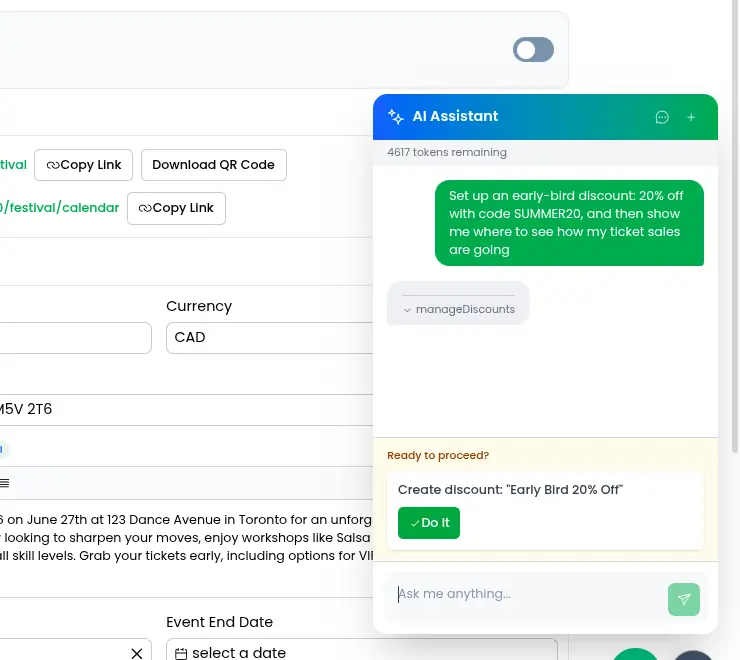
Every event platform now claims to have "AI". Most of that is a chat box that answers questions about the help docs. Ours is different in one specific way: it is an AI assistant for event organizers that can actually do the work. Ask the assistant in the corner of the Eventist dashboard to add an early-bird ticket, move Saturday's headliner to the main stage, or give a volunteer the scanner role, and it does it, then walks you to the page and points at what it changed.
This post is a high-level look at how AI event software works when it is built to act rather than just chat. No source code, but enough of the real mechanism that you understand why it behaves the way it does, and why we trust it around live ticket sales.
Key takeaways
- The assistant is a function calling AI: the model does not run anything itself, it fills in a form and our code runs it.
- Every tool it can use is declared once, with a machine-readable definition, a runtime validator, a risk level, a review flag, and a recipe for undoing it.
- Reads run immediately. Writes are shown to you first, and bigger requests arrive as a numbered plan with one "Do It" button.
- Undo is recorded as a before-image of the rows it will touch, captured before anything runs, so it never has to guess an inverse.
- Navigation is just another tool, and it reads from the same catalog as the sidebar search, so the assistant ends every task by ringing the exact button on the real page.
What "function calling" actually means
A language model on its own can only produce text. It cannot query a database, charge a card, or edit your schedule. Function calling is the pattern that bridges that gap, and it is simpler than it sounds.
We hand the model a list of tools, each described in a structured way: a name, a one-line description of what it does, and a schema of the arguments it takes. When you type "add a $40 early-bird ticket that ends on Friday", the model does not try to do that. It replies with a structured request: call the ticket tool, with action "create", name "Early Bird", price 40, sales end Friday. Our server receives that request, checks it, runs the real code, and hands the result back to the model so it can write the next sentence or decide it needs another tool.
So the model is choosing which form to fill in and what to write on it. Our code decides whether the form is valid and does the actual work. That division is the whole reason the approach is safe enough to point at a production event: the model never has direct access to anything. It only ever asks.
How a tool is declared in Eventist
Every tool the assistant can use is a single object with the same five parts, defined once in one place:
- A definition the model reads: the name, a description, and the argument schema in the format the model expects.
- A runtime validator our server runs: the same argument shape, enforced for real before any code executes. If the model sends a price as a string or forgets a required field, the call is rejected with a precise error the model can read and fix, rather than becoming a half-created ticket.
- A risk level and a review flag. Read-only tools (get the schedule, pull the sales report, find an attendee) run instantly. Anything that writes is marked for review, and the assistant has to show it to you before it runs.
- An undo recipe for tools where undo is possible. More on that below.
- The execute function, which is ordinary application code that receives the validated input and a context: who is asking, which event they are in, and which events they are allowed to manage.
The assistant currently has around four dozen of these. They lean toward "fat" tools with an action field, so one ticket tool covers create, update, delete, and reorder, rather than four separate tools. Fewer, richer tools are easier for the model to choose between and cheaper to describe on every message.
The tools are also not all offered at once. The server looks at what kind of event you are running and hands the model the matching slice: a general ticketed event gets ticketing, checkout, and discount tools; a festival adds stages, activities, and the schedule builder; a competition adds divisions and scorecards on top of that. A studio owner is never offered a scorecard tool, so the model cannot pick it by mistake, and we do not pay to describe it.
The loop: ask, check, run, continue
A single request often takes several rounds. "Set up early-bird pricing and tell me how sales are going" is a write followed by a read, and the model cannot know the sales numbers until the first step returns.
Our loop is deliberately split into small steps that the browser drives:
1. The model is sent your message, recent history, and a compact block of facts about the current event (name, dates, timezone, payment status, ticket and discount counts, registrations, revenue so far) so it rarely needs a tool just to orient itself.
2. It replies with text plus zero or more tool calls. The browser sorts those into "run now" and "needs your approval".
3. Approved and low-risk calls are validated and executed one at a time, and each result is sent back to the model.
4. The model writes its next turn, which may include more tool calls. The loop repeats up to a fixed depth, after which it is told to wrap up in plain text.
Keeping each step a separate request is a boring choice that pays off constantly. Nothing runs in the dark for minutes; you watch each tool complete; and the request that asked for your approval can sit there for an hour while you check something else, because there is no long-lived process waiting on it.
We also route by difficulty. A quick question like "how many tickets have sold?" goes to a smaller, faster model with only the read-only tools attached. A request that will create or change several things goes to the larger model with the full slice. The heuristic is simple keyword scoring, and it cuts the cost of the common case without touching the hard one.
Plan first, then one button
The tool-by-tool review works for a single change. It falls apart for "set up my whole competition weekend", where the assistant would need to create a dozen divisions, several rooms, and a schedule, and asking you to approve each of thirty calls one at a time is worse than doing it by hand.
So there is one special tool whose arguments are other tool calls. When a request will touch roughly three or more things, the model is told to call it alone: a list of steps, each with the tool, its arguments, and a one-line summary, plus a list of anything it decided to skip and why. Every step is validated before you ever see the plan, so a plan cannot contain a step that would fail on its own.
You get a numbered list and a single "Do It" button. If a step is wrong, you reply in the chat and the plan is revised. When you approve, the steps run in order and each one reports back. That is the difference between an assistant that asks permission and one that asks for a signature. It is also the mechanism behind the schedule builds that let dance competitions cut scheduling from 40 hours to 2.
Undo without guessing
Most AI features cannot undo what they did, because they would have to ask the model to work out the reverse operation, and the model can be wrong twice.
We do not ask the model. Before a reviewed tool runs, our code records a before-image of the exact rows it is about to change: this row will be updated from these values, this row will be deleted, these rows will be inserted. After execution, we fill in the ids of anything that was just created. Undo is then a mechanical replay of that record, scoped to your event, with no model in the loop and no inverse to invent.
Some things cannot be undone, and we say so rather than pretend. An email that has been sent or a card that has been charged has no before-image worth restoring, so those tools simply do not carry an undo recipe, and the assistant tells you the action is permanent before you approve it.
One more guard worth mentioning. There is data the model must never invent, like a staff member's email address. Those tools only accept a value that literally appears in what you typed. If the model "remembers" an address you never gave it, the call is rejected.
Where the universal nav comes in
This is the part we are proudest of, and it is what makes the assistant feel like part of the software rather than a chat window bolted onto it.
Eventist has a single navigation catalog: a flat list of every place a user can be sent, each with a stable key, a label, a description, the phrases people actually type when they mean that page, the permissions and event types it applies to, and optionally a named action such as "open the ticket modal on its Payments tab" and a target to highlight once you arrive. We wrote about it in Search That Understands What You Mean, because the sidebar search bar is built on it.
The AI assistant is built on the same catalog, in two ways.
First, navigation is a tool. There is a "navigate user" function alongside the ticket and schedule tools. Its main argument is a destination key from the catalog. The list of valid keys and their descriptions in the model's prompt is generated straight from that catalog, one line per destination, so the assistant can reach every page in the app, the list is never out of date, and we spend the fewest possible tokens describing it.
Second, the tool enforces the same rules the sidebar does. When the model asks to navigate somewhere, the server builds your actual access, your role's permissions, your event type, whether it has a competition, and resolves the key against the catalog with those constraints. A destination you cannot reach is reported back as unavailable, and a made-up key is rejected with the list of real ones, so the model self-corrects instead of dropping you on a page that does not exist.
Then the browser takes over, and it runs exactly the code path a search result would. It navigates to the path, opens the tab, fires the named deep-link action if there is one and waits for the page to be ready, and finally draws a pulsing ring around the element, inside the modal if the action opened one, with a short note about what it does.
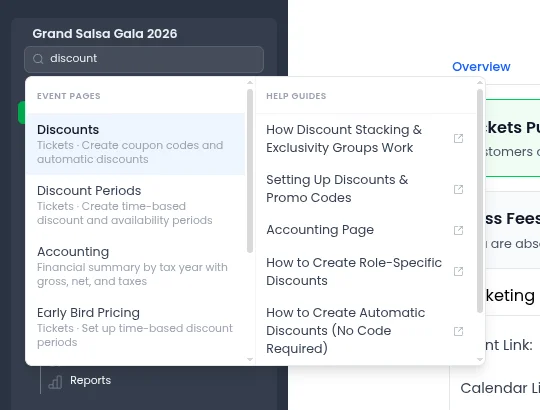
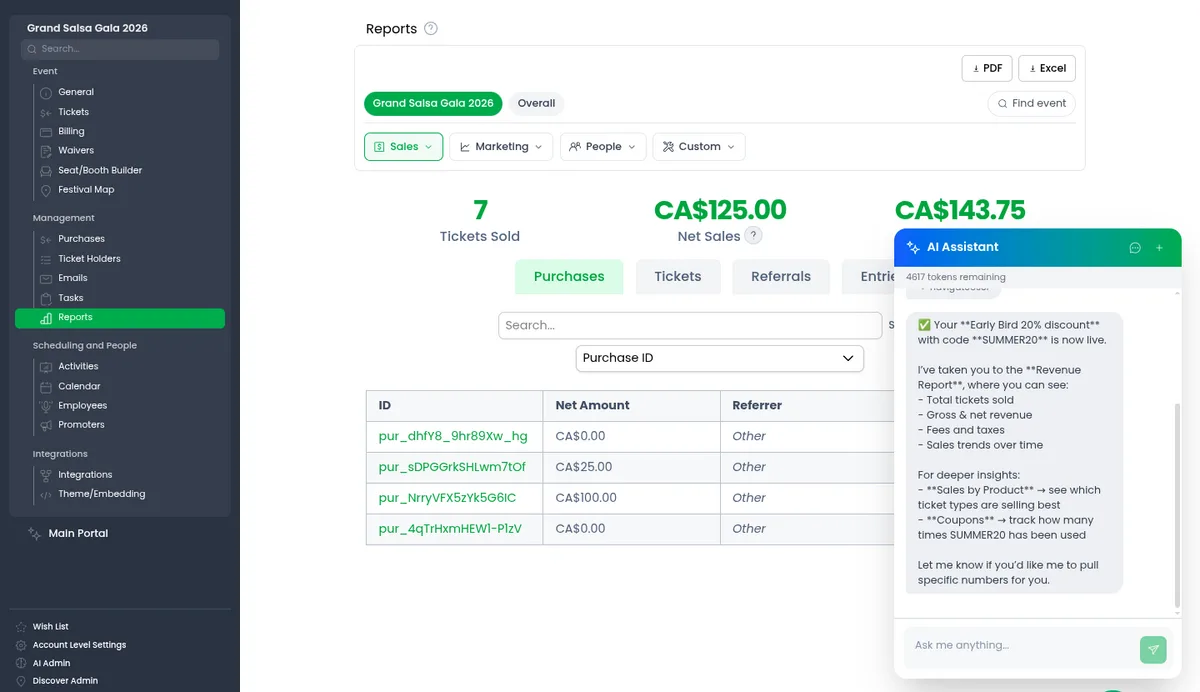
The assistant does this at the end of nearly every task. It just created the discount; now you are looking at the discount, with the field it filled in glowing. The confirmation is the real page, not a sentence claiming success. And the note under the highlight changes with intent: after the assistant acted, it reads "this is where you can do it yourself next time", so the assistant is teaching you the app as it goes.
Guided help works the same way. When you ask how to do something the assistant cannot do for you, connecting your payment processor for example, it returns a step list where each step carries a destination key. It walks you to step one, waits for you to finish, and moves to step two. The steps are ordinary catalog entries, so the help can never point at a button that has moved. For the how-to questions that do not need the assistant at all, there is also a help video on every page.
What we deliberately did not build
- No vector search. Tool selection and navigation are driven by curated descriptions and keyword lists, not embeddings. It is cheaper, it is deterministic, and when it is wrong you can fix it by editing one line.
- No autonomous writes. The assistant never changes your event without a visible approval, no matter how confident it is.
- No hidden long-running agent. Every step is a request you can see finish. The one exception is poster generation, which takes minutes, so it runs as a background job you can check on.
- No separate confirmation screens. Navigation and highlighting already existed for search, so the assistant reuses them instead of rendering a summary of what it thinks it did.
The pattern underneath all of it is the same one behind the search bar, and the same thinking as our approach to making complex software easy to understand: put the knowledge of where everything lives, and what every action requires, into one catalog and one set of tool definitions, and let every front door read from it. An AI assistant for event organizers should not be a separate product. Ours is another way to ask the same software to do the same things.
Frequently Asked Questions
What is function calling in an AI assistant?
In a function calling AI assistant, the language model is given a list of tools with structured argument schemas, and instead of performing actions itself it returns a structured request to call one. The application validates the request, runs the real code, and returns the result to the model. The model chooses and fills in the form; the software does the work.
Can the Eventist AI assistant change my event without asking?
No. Read-only tools such as reports and lookups run immediately. Any tool that writes is flagged for review and shown to you before it runs, which is the rule any AI assistant for event organizers should follow when it sits next to live ticket sales. Larger requests arrive as a numbered plan with a single approval button.
How does undo work?
Before a reviewed tool runs, the server records a before-image of the exact rows it will change. Undo replays that record mechanically, with no model involved. Actions with real-world side effects, like sending an email or charging a card, are marked as permanent and cannot be undone.
How does the assistant know where every page is?
It uses the same navigation catalog as the sidebar search. The list of destinations in its prompt is generated from that catalog, and the navigate tool resolves the chosen key against your real permissions and event type before the browser navigates, opens the right tab or modal, and highlights the element.
Which AI model does Eventist use?
The assistant uses large language models from OpenAI for chat and tool use, with a smaller model for simple questions and a larger one for multi-step requests, plus a separate vision model to read documents and images you attach. The specific models change as better ones ship; the tool definitions and safety rules do not.
If you would rather see it than read about it, take a look around or book a call and we will have the assistant set up an event with you.
Tags
Ready to simplify your events?
Join hundreds of organizers, studios, and festival directors who trust Eventist to run their events.