Making Complex Software Easy to Understand
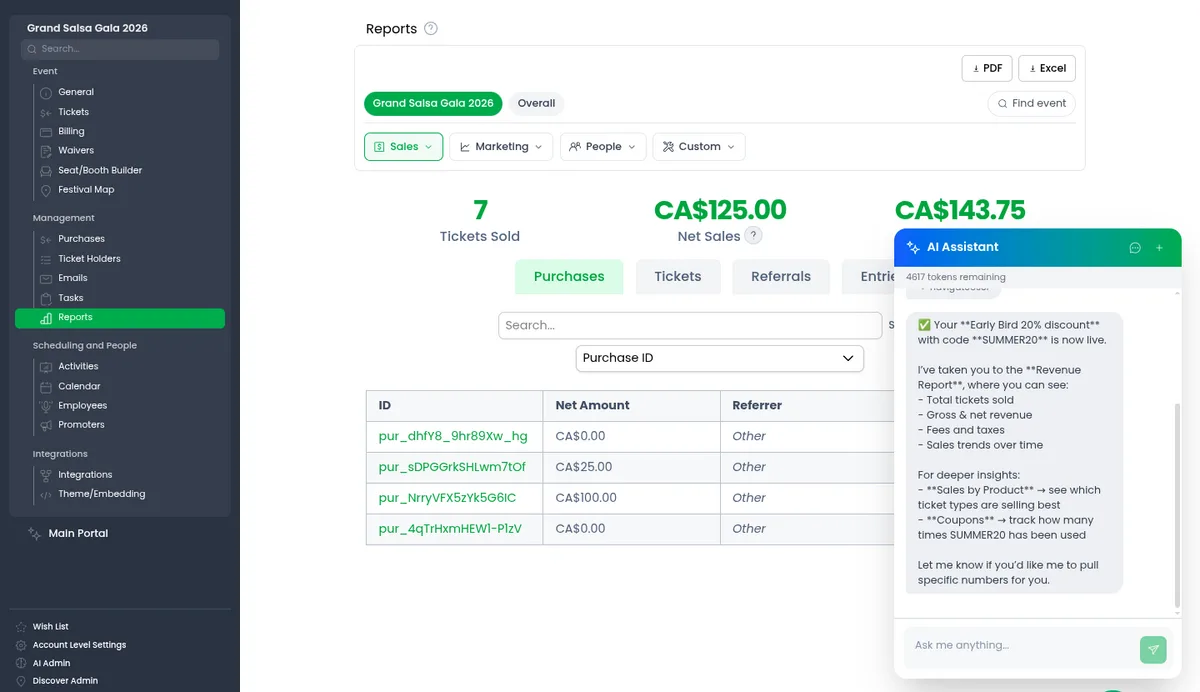
Most event software assumes you will sit through a training session, memorize where everything lives, and call support when you forget. We think that assumption is a failure of event management software design, not of you. You are running a dance competition, a festival, a studio. Easy to use event software should meet you where you are, in the middle of a busy week, and get you to the answer in seconds.
That belief shapes everything we build. Here are four features in Eventist that show what it looks like in practice.
Key takeaways
- The menu search bar understands plain English, takes you to the right page, scrolls to the spot, and highlights the exact button.
- The AI assistant reads information freely, but shows any change to your event as a plan and waits for you to press "Do It".
- Every page has a floating video walkthrough of that specific page, and it keeps playing while you work underneath it.
- The Wish List lets organizers request features, vote privately, report bugs, and watch the public roadmap.
- The principle behind all four: the software should carry the knowledge, so you don't have to.
Search that walks you to the exact button
Every dashboard has a lot of pages, and every page has a lot of buttons. Instead of making you learn the layout, we put a search bar at the top of the menu that understands plain English. Type "discount" (or even "who bought" or "how do I get paid") and it shows two things side by side: the pages and buttons that do it, and the help guides that explain it.
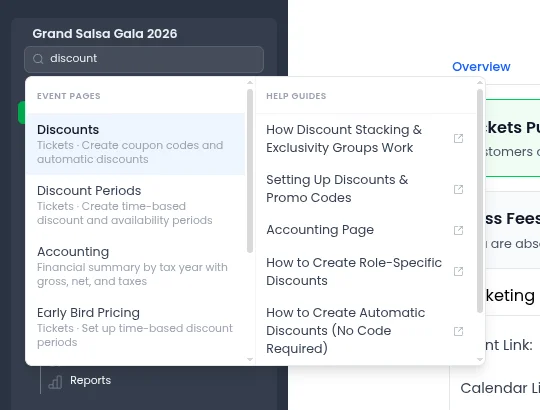
Here is the part we're most proud of: when you pick a result, Eventist doesn't just open a page and leave you to scan it. It takes you there, scrolls to the right spot, and puts a glowing highlight around the exact button you were looking for, with a short note about what it does. Search, teleport, spotlight.
A few quiet event management software design decisions make this work:
- It speaks your language, not ours. Every entry is tagged with the real phrases people use ("coupon codes", "sell tickets at the door", "put the storefront on my website") so you don't need to guess what we called the feature.
- It knows your event. A studio owner sees studio pages, a competition director sees divisions and scorecards, and nobody sees pages their role can't access.
- Help lives next to actions. Guides open in a separate tab, so reading the instructions never costs you the page you were on.
We wrote a whole post on the one index behind the search bar and the assistant.
An assistant that does the work, with your approval
Search gets you to the button. Sometimes you would rather skip the button entirely. The AI event assistant in the corner of the dashboard can set up tickets and discounts, build schedules, look up an attendee's registration, pull sales numbers, and take you anywhere in the app, all from one plain-English request.
The design question we obsessed over wasn't what the assistant could do. It was what it should do without asking. Our answer: nothing that changes your event. Anything that only reads information (a sales report, an attendee lookup) just happens. Anything that creates or changes something is shown to you as a plan first, and it waits for you to press "Do It".
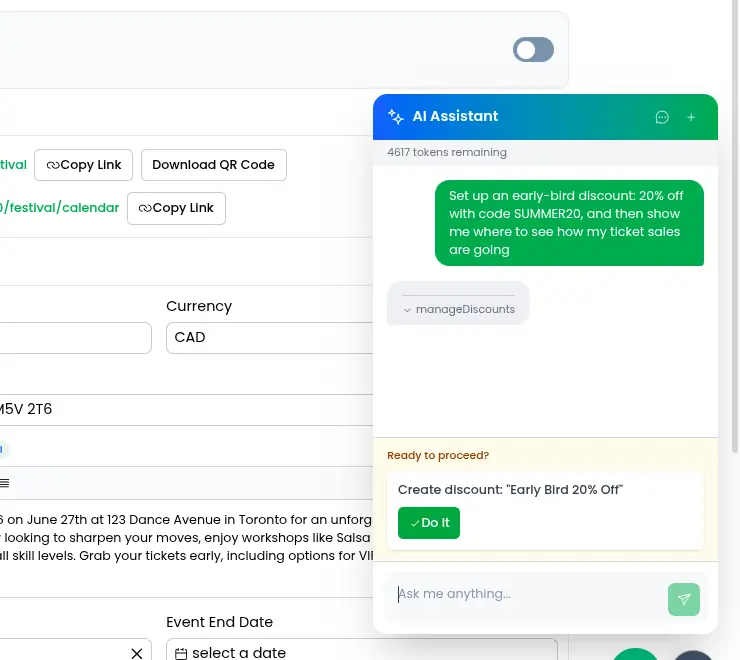
The assistant also chains steps together like a person would. In the example above, one request ("set up an early-bird discount, then show me how ticket sales are going") became: create the discount (after approval), then navigate to the revenue report, then explain what's on the screen. And when it takes you somewhere, it highlights where you could do the same thing yourself next time. We want the assistant to teach you the software, not replace your understanding of it. How our AI assistant works goes into the function calling and the plan-approval step.
One more honest design choice: some things the assistant deliberately won't do, like deleting things. For those, it walks you to the button and lets you press it. A little friction in the right places is a feature.
A how-to video on every page
Written guides are great when you're searching for something specific. But when you land on a page for the first time, what you usually want is for someone to just show you around. So every page in Eventist has a floating play button that opens a short video walkthrough of that exact page, not a generic tour, the page you are looking at right now.
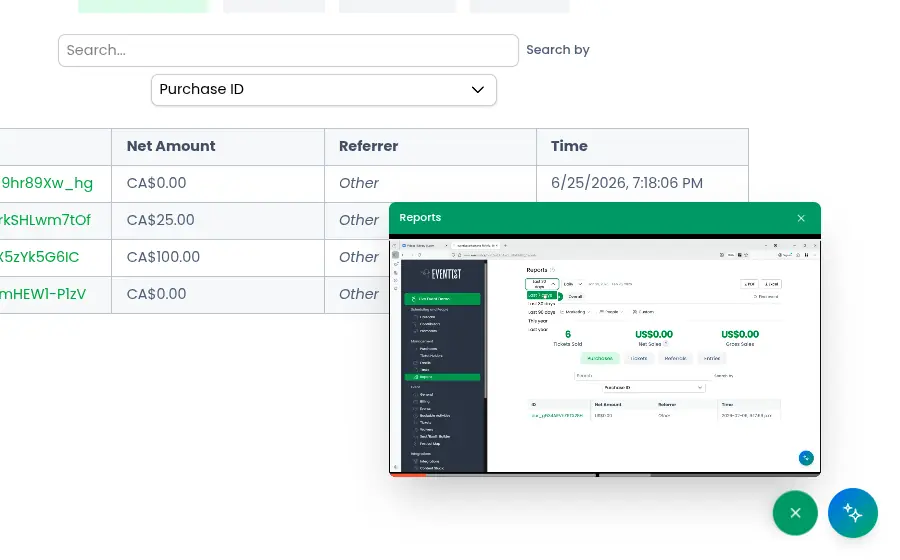
The video plays in a small window that you can drag anywhere and resize, and it keeps playing while you click around underneath it. That detail matters: the whole point is to follow along, pause, try it yourself, and un-pause, without ever leaving the page. We explain why help floats in its own post.
A wish list where users steer the roadmap
The first three features are about helping you use what exists. The fourth is about deciding what should exist. Every Eventist organizer has a Wish List page where you can request features, vote on other people's requests, and report bugs, and see our actual development roadmap, with requested features scheduled onto real dates.
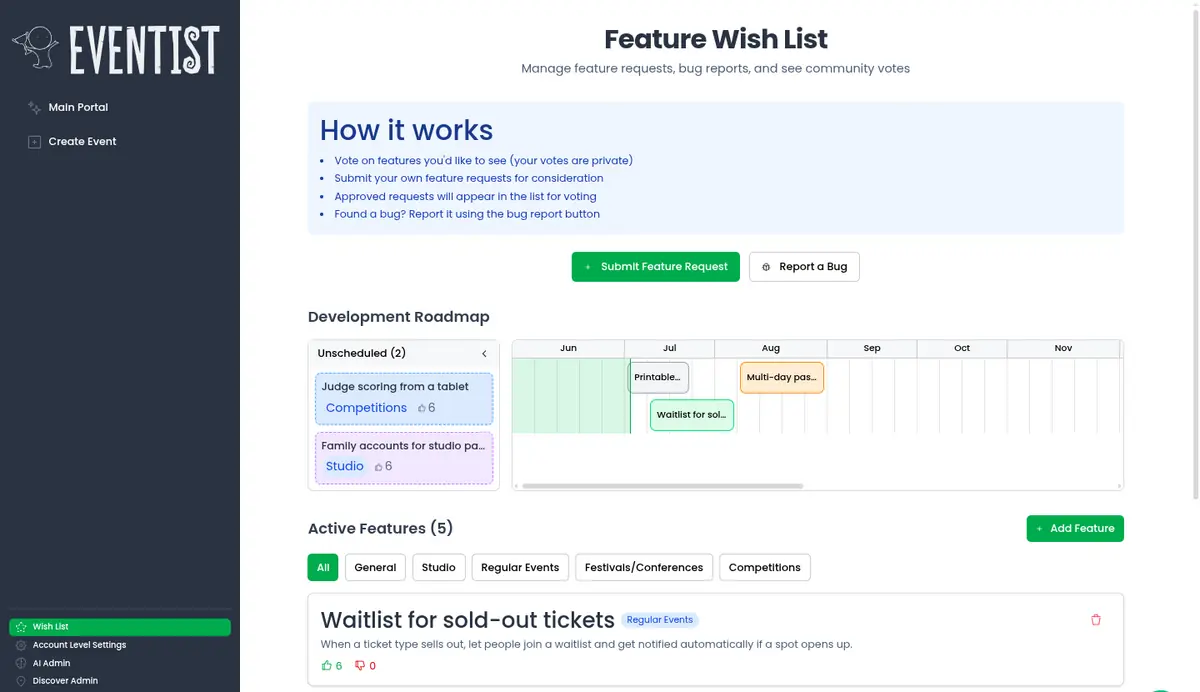
Two deliberate choices here:
- Votes are private. You can see what's been requested, but not the running tally. People vote for what they actually need instead of piling onto whatever is already winning.
- The roadmap is public. When we schedule a requested feature, it appears on the timeline for everyone. If you asked for it, you can watch it move from idea to planned to shipped.
A surprising amount of Eventist started life as a wish list entry. It is the cheapest, most honest research tool we have ever built, and we took a closer look at the Wish List separately.
The thread that ties it together
If there is one principle behind our event management software design, it's this: the software should carry the knowledge, so you don't have to. Search remembers where every button lives. The assistant knows the steps and shows them to you. The videos explain each page in place. And the wish list makes sure that what we build next comes from the people actually running events.
Frequently Asked Questions
Do I need training to use Eventist?
No. The search bar at the top of the menu understands plain English, so you can type "discount" or "how do I get paid" and be taken to the right page with the button highlighted. Every page also has a video walkthrough of that page.
What can the AI assistant do without asking me?
Only things that read information, like pulling a sales report or looking up an attendee's registration. Anything that creates or changes something is shown to you as a plan first and waits for your approval.
Are there things the AI assistant will not do?
Yes. It will not delete things. For those actions it walks you to the button and lets you press it yourself.
Can I see how many votes a Wish List request has?
No. Votes are private, so you can see what has been requested but not the running tally. That keeps people voting for what they need instead of piling onto whatever is already winning.
Is the Eventist roadmap public?
Yes. When a requested feature is scheduled, it appears on the roadmap timeline for every organizer, so you can watch it move from idea to planned to shipped.
If that sounds like the kind of easy to use event software you want behind your next event, take a look around or book a call. We would love to show you the rest in person.
Tags
Ready to simplify your events?
Join hundreds of organizers, studios, and festival directors who trust Eventist to run their events.