AI for Event Planning: 30% Time Savings, Safer Adoption for Planners
AI now handles the repetitive parts of event planning fast enough to free organizers for strategy: drafting content, flagging attendance patterns, and answering routine attendee questions. Industry surveys point to roughly 30% average weekly time savings among planners who use these tools, and frameworks like the City of London Corporation's generative AI policy show how to govern the risk. Start with one task: event descriptions, a nurture email, or a basic attendance report.
Key takeaways
- Start with content drafting or analytics, which are easier to check and measure within one event cycle; logistics automation usually takes longer to configure.
- Choose tools that connect directly to ticketing and CRM systems, and review data storage, security, and outputs before sending anything to attendees.
- Avoid feeding attendee lists or contact details into AI tools before checking data storage and access controls; require human review before outputs go public.
- Run a defined pilot with one owner and a baseline, tracking hours saved or engagement; expand only if gains persist beyond the trial.
Top AI use cases for event planning
Not every task benefits equally from automation. The highest-value starting points tend to cluster around content, data, and attendee-facing communication, where the output is easy to check and the time saved is immediate.
- Content creation: draft event descriptions, social captions, and sponsor one-pagers in minutes instead of hours.
- Personalization and matchmaking: match attendees to sessions or exhibitors based on stated interests, improving relevance without manual tagging.
- Analytics and reporting: summarize registration trends, ticket sales pacing, and no-show risk without pulling raw spreadsheets apart.
- Logistics automation: generate run-of-show drafts, staff schedules, and vendor checklists from a template.
- Attendee experience: deploy chatbots for FAQs, directions, and schedule lookups so staff spend less time fielding repetitive questions.
Average weekly time savings for AI-using event planners run near 30%, with the largest gains concentrated in content drafting and attendee communications. That's roughly a day and a half of a standard workweek returned to higher-value planning.
AI tool categories and how planners use them
AI tools for event management fall into a handful of practical categories, and knowing which one solves which problem saves a lot of trial and error.
- Writing assistants draft bulk emails, adjust tone for different audiences, and rewrite copy for sponsors versus attendees.
- Generative media tools produce signage drafts, social graphics, and short promotional video clips from a text brief.
- Analytics and predictive platforms forecast attendance, flag drop-off risk, and surface which marketing channels are converting.
- Matchmaking and recommendation systems pair attendees, exhibitors, or sponsors based on declared interests, a use case covered in more depth in how AI is changing event discovery.
- Chatbots and concierges answer repetitive attendee questions in real time, freeing staff for on-site problems that actually need a person.
Before picking a tool in any category, check three things: how it stores and secures data, whether it integrates with your existing ticketing or CRM system, and whether its outputs require manual review before they reach attendees.
Pro Tip: Prioritize tools that integrate directly with your existing ticketing and CRM platform. A tool that requires manual data exports defeats the time savings it promises.
How to implement AI in your event workflow
Rolling out AI works best as a sequence rather than a scramble to try every tool at once.
1. Define one objective, such as cutting email drafting time or improving session recommendations.
2. Map your systems and data, identifying where attendee information lives and who can access it.
3. Choose a tool category that matches the objective, starting narrow rather than buying a platform that does everything.
4. Assign roles and an approval workflow so a human reviews AI output before it reaches attendees or sponsors.
5. Pilot and measure against a clear baseline over a defined period.
6. Scale what works, retire what doesn't, and document the decision either way.
Your integration checklist should cover:
- CRM and ticketing system compatibility.
- Agenda and scheduling tool connections.
- Analytics dashboard access for reporting.
- Enterprise-grade authentication on any system touching attendee lists.
Staff training matters more than tool choice. An industry survey identifies training gaps and cost concerns as barriers to AI adoption. Build a lightweight governance SOP alongside the rollout: declare which inputs and outputs the tool handles, and schedule a periodic review, an approach consistent with the City of London's generative AI framework and the NIST Generative AI Profile.
Prompt and task examples planners can copy
Specific prompts save more time than generic ones. Try these as starting templates, then adjust tone and detail for your event.
- Event description: "Write a concise description for a tech conference in [city], emphasizing networking and hands-on workshops."
- Speaker bio: "Turn this LinkedIn summary into a concise speaker bio in a confident, approachable tone."
- Email nurture sequence: "Draft a welcome email, a reminder with agenda highlights, and a logistics email for registered attendees."
- Agenda summarization: "Summarize this agenda into a concise attendee-facing overview."
- Attendee segmentation: "Group these registrants by stated industry and session interest into useful segments."
- Chatbot intents: set up flows for directions, schedule lookup, and lost-and-found so attendees get instant answers.
Always add a verification step: have a team member check names, dates, and figures before anything goes out. Refine prompts by adding more context, not by trying to fix bad output after the fact.
Privacy, security, and governance: what to check first
Generative AI tools carry real privacy risk when fed attendee data. Research from Stanford HAI points to model memorization and the inadvertent exposure or inference of personal information as genuine concerns, which means attendee lists and contact details need careful handling before they touch any AI tool.
Security vulnerabilities in event tech are not hypothetical either. A documented CVE pattern showed that weak access controls on check-in endpoints can expose attendee lists, underscoring why enterprise-grade authentication and vetted APIs matter before you connect any third-party tool to registration data.
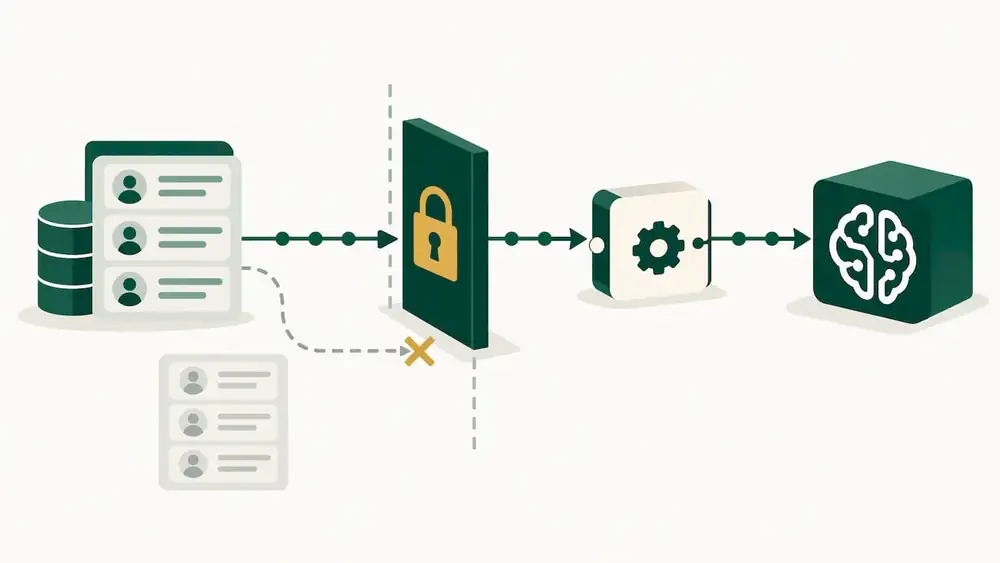
Privacy risks from generative AI include data memorization and representational harms, meaning a model can confidently produce an incorrect inference about a person that still causes harm.
A practical governance checklist from a detailed guest travel coordination workflow for event planners:
- Declare which data inputs and outputs each AI tool handles.
- Require human approval before AI-generated content reaches attendees.
- Run a basic vendor risk assessment covering data storage and encryption.
- Schedule periodic reviews of tools already in use, not just new ones.
- Designate one person accountable for AI-related decisions and retain records of outputs used in official communications.
Measuring impact: time savings, ROI, and the metrics to track
Track a small set of numbers rather than everything at once. Useful KPIs include weekly hours saved, registration conversion rate, email open and click rates, and staffing hours saved per event. Our guide to event analytics metrics and this piece on why data analytics matters for organizers both offer deeper tracking frameworks.
AI-using planners report average weekly time savings of close to 30%, a useful benchmark against which to measure your own pilot.
- Run a before and after comparison: measure hours spent on the target task before and during the AI pilot.
- Set a defined pilot window with a clear baseline and a single owner tracking results.
- Scale the tool if time savings or engagement metrics hold steady past the pilot.
- Re-evaluate or drop it if staff spend more time correcting output than the tool saves.
Lessons learned and where planners should focus first
Start with content and analytics. They are low-risk, fast to measure, and show results within a single event cycle, unlike logistics automation, which takes longer to configure correctly. Governance should not be an afterthought bolted on after an incident. Build the approval workflow and staff training into the pilot from day one, because teams that skip this step end up redoing work when a mistake reaches attendees.
Pair every pilot with a number you can report back to your team. A time-savings figure or a conversion lift builds internal buy-in far faster than a general sense that "the AI tool helped."
How Eventist supports planners adopting AI tools
We built Eventist to help organizers manage event workflows. Our platform includes AI event setup assistance alongside drag-and-drop scheduling, live interactive maps, and staff management tools.
For planners who prefer a vendor-led rollout, we offer done-for-you setup, team training, and on-site support. Our flat-rate pricing model gives organizers a clear way to assess costs for their events. If you run festivals, conferences, or competitions and want AI-assisted setup paired with transparent per-ticket pricing, check our pricing and plans to see what fits your event.
Frequently Asked Questions
Which AI is best for event planning?
No single tool fits every event, since the right choice depends on whether you need content drafting, attendee analytics, or chatbot support. Evaluate tools by category first (writing assistant, analytics platform, matchmaking engine, or concierge chatbot), then check integration with your existing ticketing and CRM systems before committing.
How can event planners use AI?
Planners commonly use AI for drafting event descriptions and emails, summarizing registration data, matching attendees to relevant sessions, and answering routine questions through chatbots. A PCMA industry pulse found that the large majority of meeting planners surveyed reported using AI in some form, with content creation and data analysis as the most common starting points.
What are the 5 C's of an event?
Definitions of the event-planning Cs vary across sources, but a common version covers concept, coordination, control, culmination, and closeout, the stages that structure an event planning cycle. These stages apply whether or not AI tools are involved, since AI mainly speeds up tasks within each stage rather than replacing the stages themselves.
What is the best app for event planning?
The best app depends on your event type and scale: a dance competition needs live scoring and heat scheduling, while a conference needs multi-track agenda tools and exhibitor management. Platforms like Eventist combine ticketing, scheduling, and AI-assisted setup in one system, which suits organizers who want fewer separate tools to manage.
What are the biggest barriers to adopting AI in event planning?
An industry survey identifies training gaps and cost as barriers to AI adoption. Starting with a single, well-scoped pilot and documenting results tends to reduce both the training burden and the perceived cost risk.
Sources
- AI in Event Management Study
- City of London Corporation introduces robust framework for ethical use of Generative AI
- Hai
Recommended
Tags
Ready to simplify your events?
Join hundreds of organizers, studios, and festival directors who trust Eventist to run their events.