Event Content Management: Repurpose Sessions for 90 Days
Event content management is the work of collecting speaker and session content, moving it through review and scheduling, and turning live sessions into assets that keep earning attention after the event closes. Done well, it replaces scattered spreadsheets and email threads with one system for curation, review and scheduling, and it gives you a plan for what happens to every session once the room empties.
Key takeaways
- Set the event goal before submissions open, then score abstracts from 1 to 5 for relevance, originality, speaker diversity and practical value.
- Choose software that links submissions, role-based approvals, room capacity, speaker availability and agenda updates; separate spreadsheets leave scheduling conflicts for someone to catch by hand.
- Plan content reuse across 90 days: clips in week one, a recap in week three, recordings in week six and partner distribution in week twelve.
- Restrict session materials by ticket tier and organizer role, document recording rights and retention periods, and keep access logs for post-event questions.
Why event content management matters for modern events
Attendees judge an event by the quality and relevance of its content, not just its logistics. When sessions feel disconnected or poorly matched to the audience, engagement drops, and attendance at the next edition tends to follow. Forrester's Event Content Framework, published in January 2025, describes a structured approach to planning, producing and repurposing content that prioritizes audience needs and long-term value, with the aim of sustaining engagement beyond the event. PCMA's Professional Meeting Management, 7th edition, which PCMA calls the industry-standard resource for planning excellence, covers the same ground from the planner's side: strategy, budgeting, contracts, risk and delivery.
The tools are changing quickly too. In PCMA's 2025 Convene salary survey of around 275 event professionals, 67 percent said they use generative AI tools in their work, up from 51 percent in 2024, and creating content was the most common use (69 percent). When drafts get faster to produce, the steps that decide what reaches the stage, and what happens to it afterward, carry more of the weight.
A few forces are pushing content management from a nice-to-have into a requirement:
- Audiences expect agendas that fit their interests, not generic tracks.
- Sponsors want measurable reach, not just logo placement.
- Teams running several events a year need repeatable workflows, not reinvented ones.
- Leadership increasingly asks for content performance data tied to budget decisions.
Core features and workflows of an event content management system
A working system covers four connected stages: intake, review, scheduling and publishing. Each stage needs its own tools, but they have to share data so nothing gets lost between teams. Five building blocks carry most of the load.
1. Submission portal. A call-for-papers or abstract portal collects speaker proposals through structured fields (title, abstract, format, audience level, accessibility needs) rather than free-form email attachments, which makes comparison and scoring far faster.
2. Approval workflows. Role-based review lets content leads, subject matter reviewers and program chairs weigh in without stepping on each other's edits, with a clear record of who approved what and when.
3. Agenda scheduler. Multi-track scheduling has to respect room capacity, speaker availability and buffer time between sessions, so one delayed talk doesn't cascade through the whole day.
4. Automated communications. Confirmation emails, reminder sequences and upload requests should go out automatically once a session is approved, freeing staff from manual follow-up.
5. Media handling. Slide decks, video files and speaker bios need a central home tied to the session record, not a folder buried in someone's inbox.
Everything else, from analytics to repurposing, depends on these five. Skipping the submission portal or the approval workflow usually means the scheduling stage inherits the chaos instead of fixing it.
How to curate speakers and select session content that meets event goals
Strong curation starts before a single abstract arrives. Decide what the event needs to achieve, whether that's sales pipeline, brand authority or attendee education, and map session formats to that goal before opening submissions.
- Set the goal first, then design the call for papers around it.
- Score every submission against a simple rubric: relevance to the goal, originality, speaker diversity and a clear practical takeaway.
- Build a communication timeline for shortlisted speakers covering acceptance, agreement signing and material deadlines.
- Keep a reserve list in case a confirmed speaker drops out close to the event.
Pro tip: score abstracts on a 1 to 5 scale for each rubric criterion, then rank by total. It turns subjective debates into a fast, defensible shortlist.
Formal speaker agreements matter as much as the scoring. A short agreement covering recording rights, cancellation terms and material deadlines prevents last-minute confusion when a session changes format or a speaker needs to swap a time slot. This is general guidance, not legal advice; have anything covering rights or cancellations reviewed by someone qualified where you operate.
Agenda scheduling and onsite logistics that content management should support
Scheduling is where good content planning either holds up or falls apart in front of a live audience. The system needs to handle room and track assignment, leave buffers between sessions, and publish an attendee-facing agenda that updates the moment something changes.
1. Room and track assignment. Assign rooms by expected attendance per session, not alphabetical order or submission date.
2. Buffer rules. Gaps between sessions absorb the inevitable five-minute overruns without pushing the whole day off schedule.
3. Staff and volunteer schedules. Link them to session records so the right people are stationed in the right room without a separate spreadsheet.
4. Check-in and access control. Tie attendee data to session capacity, which matters most for ticketed workshops and capacity-limited rooms.
5. Live updates. When a room changes or a session runs late, attendees need to hear about it straight away, on the screens and channels they actually check rather than a printed program nobody reads twice.
In Eventist, for example, the event calendar gives each room its own column: you drag sessions into a room and time slot, drag a block's bottom edge to change its length, and drag staff and speakers onto the sessions they're working, so the staffing plan lives on the same grid as the agenda. Whatever tool you use, plan room layout early rather than retrofitting it once the agenda is locked.
Measuring session performance after the event
Content value doesn't end when the last session wraps. The sessions with the highest attendance, longest average watch time and strongest engagement signals (polls answered, questions submitted) tell you what to repeat and what to retire next year.
- Track attendance per session against room capacity to spot over- or under-booked topics.
- Measure watch time on recorded sessions, not just view counts, to gauge real engagement.
- Log sponsor-related reach, including booth visits and sponsored session attendance, for post-event reporting.
- Flag the top-performing sessions for repurposing before the event even ends.
A 90-day plan to repurpose event sessions
Experienced organizers plan repurposing while they plan the event, rather than scrambling afterward. A 90-day roadmap keeps the content working long after the event closes, and it gives programming committees real data instead of guesswork when they plan next year's tracks.
| By the end of | Publish | What it does |
|---|---|---|
| Week 1 | Short clips from the top-performing sessions | Keeps the event in front of attendees while it's fresh |
| Week 3 | A recap blog post | Gathers the main ideas in one place you can link to |
| Week 6 | Full recordings, gated behind a login or email capture | Protects speakers' intellectual property and turns on-demand viewers into leads |
| Week 12 | Partner or sponsor distribution | Extends reach and gives sponsors something to report on |
Pick the week-one sessions before the event ends, using the attendance and engagement signals above, so the first clips go out while attendees are still talking about what they saw.
Content security and access control during and after the event
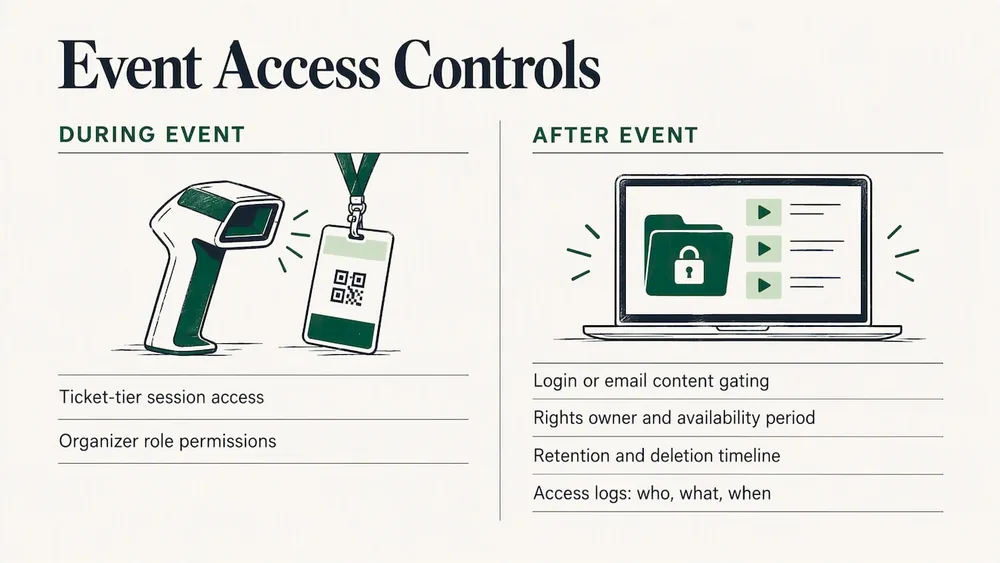
Session materials, recordings and attendee data need protection both while the event is live and long after it closes. During the event, access should follow ticket type or registration tier, so a workshop limited to paid attendees isn't visible to everyone with a general pass. Role-based permissions matter just as much on the organizer side: a volunteer coordinating check-in doesn't need the same access as a program chair approving final slide decks.
After the event, recorded sessions and materials are often gated behind a login or email capture, both to protect speakers' intellectual property and to generate leads from the on-demand audience. Speaker agreements should spell out who owns recording rights and how long content stays available, since disputes over reused footage are far easier to prevent than resolve.
Data retention deserves the same attention as access rules. Attendee information collected through session sign-ups or Q&A tools should have a clear retention and deletion timeline, particularly for events that draw attendees from several countries with different privacy rules. A system that logs who accessed what, and when, makes it far easier to answer a speaker's or sponsor's question about where their material ended up. As with agreements, this is general guidance, not legal advice: check the privacy requirements that apply where you and your attendees are.
Tools for content collaboration among multiple organizers and speakers
Most events run on contributions from more than one organizer, and often from speakers who need to update their own session details right up until showtime. A shared system beats email threads because every change lives in one place with a visible history, instead of three people editing three versions of the same slide deck.
Shared editing permissions let a program committee divide review work by track without duplicating effort, while speakers get a limited view where they can update their own bio, slides or session description without touching anyone else's content. Comment threads tied directly to a session record keep feedback in context, so a reviewer's note about tightening an abstract doesn't get lost three replies deep.
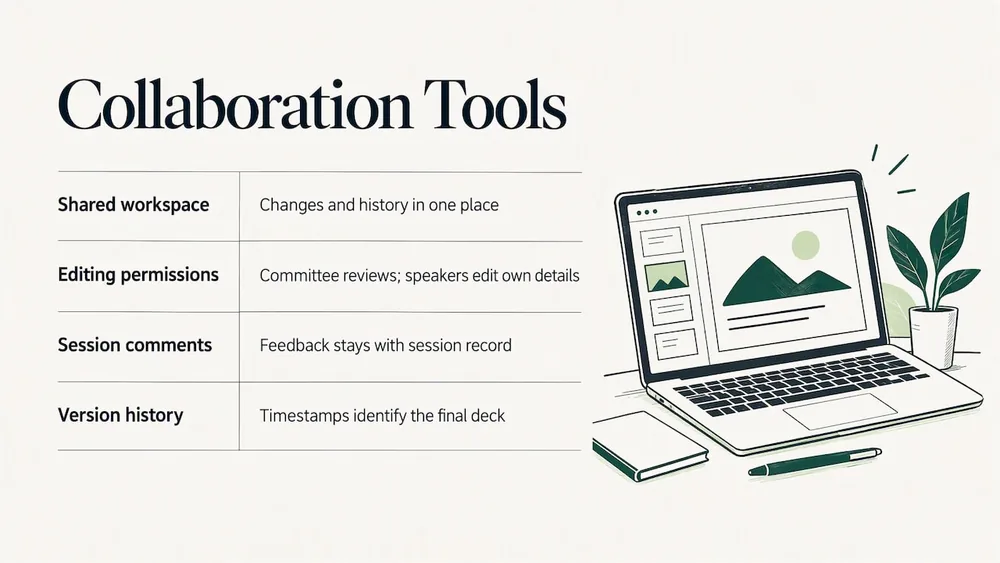
Version history matters more than it seems until the week before the event, when a speaker swaps their deck twice and someone needs to confirm which version is final. A system that timestamps every change removes the guesswork. For multi-day or multi-track events with several co-organizers, a shared workspace cuts down the back-and-forth that otherwise eats into the final weeks before doors open, and keeps everyone working from the same agenda instead of a spreadsheet forwarded three days ago.
Eventist covers part of this with a dashboard for each speaker or performer: they update their own bio and photo, sign the agreement you've assigned them, and upload documents to their own session, so files stay attached to the session rather than scattered across inboxes.
Five actions to take this week
1. Set one clear content goal. Decide what the event needs to achieve before you open submissions, and build the call for papers around it.
2. Shortlist three sessions to repurpose first. Choose them on expected attendance and engagement so the first clips are ready in week one.
3. Map the 90-day distribution plan now. Put the week 1, 3, 6 and 12 milestones on the calendar before the event, not after it.
4. Automate speaker reminder emails. Set confirmations, material deadlines and upload requests to send on their own.
5. Book a post-event analytics review. Put it on the calendar today so session data turns into decisions for next year.
The last one guards against one of the biggest mistakes event organizers make: no follow-up once the doors close.
Frequently Asked Questions
What is event content management?
Event content management is the process of collecting speaker and session content, reviewing and scheduling it, and turning live sessions into lasting assets after the event. It usually runs through four stages (intake, review, scheduling and publishing) backed by a submission portal, approval workflows, an agenda scheduler, automated communications and a central home for media.
What are the 5 C's of an event?
One widely used framework splits an event into Concept, Coordination, Control, Culmination and Closeout, running from the first idea through the post-event wrap-up. Content management sits mostly in Coordination and Control, where sessions are selected and scheduled, while repurposing belongs to Closeout.
What are the 7 P's of event management?
The 7 P's borrow the services marketing mix: Product, Price, Place, Promotion, People, Process and Physical Evidence. Content management touches Product (the sessions themselves) and Process (how content moves from submission to delivery) most directly.
How long should you keep repurposing event content?
Plan for at least 90 days: short clips in the first week, a recap post by week three, gated full recordings by week six and partner or sponsor distribution by week twelve. Choosing the top sessions before the event ends lets the first clips go out while attendees are still talking about it.
What should event content management software include?
Look for a submission portal, role-based approvals, a multi-track scheduler that respects room capacity and speaker availability, automated speaker communications, and a central place for slides, recordings and bios tied to each session. The right mix depends on your event type, your budget and whether you want ticketing in the same system.
How much does event content management software cost?
Pricing models vary: some platforms charge per user or per year, others per ticket. As of October 2026, Eventist charges a flat fee per paid ticket, $0.75 USD for event ticketing and $3.50 USD for festivals and conferences, with free tickets and registrations on monthly plans from $100 CAD. Card processing is paid to Stripe or Square at their rate. The pricing page has the details.
Sources
- Master B2B Event Content Best Practices To Drive Engagement, Forrester
- Salary Survey 2025: Payment Due?, PCMA Convene
- Professional Meeting Management, 7th Edition, PCMA
To turn session results into something sponsors and committees can use, the post-event report template lays out the sections to write, and drag and drop scheduling covers what to test in the tool that builds your agenda.
Tags
Ready to simplify your events?
Join hundreds of organizers, studios, and festival directors who trust Eventist to run their events.