Event Revenue Reconciliation: Why Your Ticketing Report and Your Bank Deposit Never Match
Every organizer hits this eventually. The ticketing dashboard says you sold $48,200. The bank shows $44,810.57. Nothing is broken, nobody stole anything, and both numbers are correct. They are simply answering different questions.
The gap is made of five or six separate things, each small and each invisible in a different place. Organizers who have not taken them apart tend to assume the platform is wrong, or worse, assume it is fine and discover a four-figure hole during year-end. Neither is necessary.
This is what sits between gross ticket sales and money in the account, why your payout dates will never line up with your event dates, and a reconciliation routine that takes about twenty minutes a month once it is set up.
Key takeaways
- Gross sales, net revenue and deposited funds are three different numbers. A report that shows only one of them cannot be reconciled.
- Reconcile per payout, not per event. Payouts cover a settlement window that has nothing to do with your event dates.
- Refunds usually return the ticket price but not the fees, so a refunded sale is not a neutral event in your accounts.
- Disputes and non-charge debits often never appear in ticketing reports at all, because most platforms read charges rather than the processor's full ledger.
- Keep your own record of the fee split at the moment of sale. Rebuilding it afterwards from a payout statement is painful and sometimes impossible.
The three numbers, and why only one of them is in your bank
Gross sales is the face value of everything sold. It is the number on your dashboard and the number you quote in a board meeting. It includes tickets you later refunded and money the buyer paid in fees that was never yours.
Net revenue is what you actually earned: gross, minus the platform fee, minus card processing, minus refunds, adjusted for anything absorbed rather than passed to the buyer.
Deposited funds is what the processor moved to your bank in a given payout. It is net revenue shifted in time and sliced by settlement window, and it is the only one of the three your accountant can tie to a bank line.
Most disagreements between an organizer and a platform turn out to be someone comparing a gross number to a deposited number.
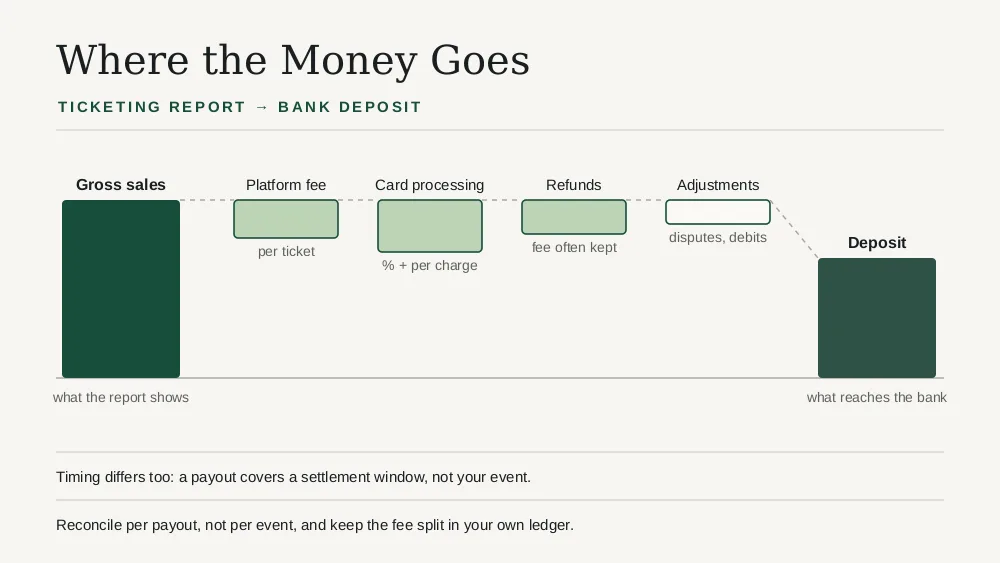
Where the money actually goes
1. The platform fee, and who paid it
If you absorb the fee, it comes out of your revenue and your deposit is smaller. If you pass it to the buyer, the buyer paid a higher total, your revenue is unchanged, and your gross sales figure may or may not include that fee depending on how your platform reports it.
That last part causes more confusion than anything else on this list. Two platforms can show you a different gross for identical sales purely because one counts the buyer-paid fee as revenue and the other does not.
2. Card processing
Separate from the ticketing fee and charged by Stripe, Square or whoever actually moves the money, typically a percentage plus a flat amount per transaction. Per *transaction*, not per ticket, which is why an order of six tickets costs proportionally less to process than six single-ticket orders.
If you run card processing through your own processor account, this is deducted before the payout reaches you and appears on the processor's statement, not necessarily in your ticketing reports.
3. Refunds, which are not symmetrical
Refunding a $60 ticket rarely returns you to where you started. The ticket price goes back to the buyer, but the platform fee is often retained, and processing fees are commonly not returned either. A refunded sale can cost you money even though your gross sales figure drops back as if nothing happened.
4. Disputes and chargebacks
A disputed charge pulls the amount back and usually adds a dispute fee. These land on the processor's ledger on the day they happen, which may be months after the event, and they very often do not appear in a ticketing platform's revenue reports at all.
5. The ones nobody sees: non-charge debits
This is the quiet one. Payment processors post entries to your balance that are not charges and not refunds: adjustments, reserves, network fees, currency conversion, account debits. They are small individually and they add up.
Most ticketing platforms build their reports from *charges*. The processor's own ledger contains charges plus everything else. So a platform can report your sales perfectly accurately and still be unable to explain your deposit, because the missing pieces were never in its data.
If you want the real figure, the processor's balance report is the source of truth, not the ticketing dashboard. That is not a criticism of either; it is a statement about which system holds which facts.
Timing: why your payout will never match your event
A payout covers a settlement window, not an event. If your festival ran Friday to Sunday, the money will arrive across several payouts, some of which also contain sales from a completely different event.
Three things drive this:
- Payout schedule. Daily, weekly or monthly, with a rolling delay that is commonly a couple of business days but is longer for newer accounts.
- When the sale settled, not when it was made. A card authorised late on a Friday may settle Monday.
- Negative entries land when they land. A dispute from August can reduce a November payout.
The practical consequence: reconcile per payout, not per event. Trying to tie a single event to a single deposit is the most common reason this work feels impossible.
A reconciliation that takes twenty minutes
Do this monthly, not after each event.
1. Export the processor's balance report for the period. Not the charges list, the balance report that includes every entry type.
2. Export gross sales from your ticketing platform for the same period, with refunds as their own line.
3. Reconcile each payout individually. Every payout should equal the charges inside it, minus processing, minus refunds and disputes that fell in that window, minus other debits.
4. Tag the unexplained difference rather than forcing it. A recurring small difference is usually one entry type you have not accounted for yet; find it once and it is solved forever.
5. Record the fee split at the point of sale. Keep, per order, what the buyer paid, what the platform took and what processing cost. Rebuilding this from a payout statement months later is the painful version.
What each report actually answers
| Report | Answers | Does not answer |
|---|---|---|
| Ticketing gross sales | What did we sell, by ticket type | What reached the bank |
| Ticketing net revenue | What did we earn after fees | Timing, disputes, processor adjustments |
| Processor balance report | Every entry that moved your balance | What any of it was for, in event terms |
| Payout statement | What was transferred, and when | Which event it belonged to |
| Your own ledger | The fee split per order | Nothing, if you keep it properly |
No single report answers everything, which is the whole reason reconciliation exists as a task.
When the platform genuinely is wrong
Rare, but worth knowing the signatures:
- Gross sales that change retroactively for a closed period with no refund to explain it.
- Refunds that reduce gross but leave the fee line untouched, so net overstates earnings.
- Fees calculated per order where the pricing says per ticket, or the reverse. Check this against a multi-ticket order specifically.
- Buyer-paid fees counted as your revenue, which inflates both gross and your tax position.
Test the third one deliberately before you commit to a platform: buy one order containing several tickets and check the fee against the published rate. We wrote about how to stress-test a platform before an on-sale, and this belongs in the same afternoon.
What good looks like in a ticketing platform
You want gross, fees, refunds and net as separate lines rather than one blended figure; the arithmetic between them shown rather than implied; buyer-paid fees disclosed separately so you know whether they are inside your gross; refunds showing whether the fee was returned; filters by date range that match your payout windows rather than only by event; and, ideally, a platform that reads the processor's full balance ledger rather than only its charges.
Eventist does this. Net Sales is stated as an explicit subtraction, gross minus taxes minus fees, with the fee line itself broken into the Eventist fee, card processing and anything else, so you can see the whole calculation rather than trust a single number. Gross Sales separately discloses how much of it was donations and how much was fees paid by buyers, which is precisely the ambiguity described earlier in this article.
More unusually, Eventist mirrors every balance transaction on your Stripe account, not just the charges: Stripe's standalone fees, the fees Stripe keeps when you refund an order, and disputes. Those are the entries that normally explain a deposit a ticketing report cannot, and reading them is what lets the reports match the account rather than approximate it. Card processing runs through your own Stripe or Square account either way, so the processor's own statement stays directly available to you. The balance mirror is Stripe-specific today.
Our comparison of festival revenue reporting across platforms covers how the alternatives handle the same nine reports.
Frequently Asked Questions
Why is my ticketing payout less than my ticket sales?
Because gross ticket sales and a payout are different measurements. Between them sit the platform fee, card processing charged per transaction, refunds where the fee was often not returned, disputes and dispute fees, and non-charge debits such as adjustments or currency conversion. On top of that, a payout covers a settlement window rather than your event, so it may also exclude sales that have not settled yet and include negative entries from months earlier.
What is the difference between gross sales and net revenue for an event?
Gross sales is the face value of everything sold, including tickets later refunded and any fee the buyer paid. Net revenue is what you earned after the platform fee, card processing and refunds. Deposited funds is a third number again: net revenue sliced by payout window and shifted in time. Reconciliation is the work of connecting the three.
Should I reconcile per event or per payout?
Per payout. A payout covers a settlement window that has no relationship to your event dates, and will frequently contain sales from more than one event while excluding sales from the event you are looking at. Reconcile each payout against the processor's balance report, then attribute revenue to events separately.
Why do refunds still cost me money?
Because refunds are usually not symmetrical. The ticket price returns to the buyer, but the platform fee is commonly retained and processing fees are often not returned either. A refunded sale therefore leaves you slightly worse off than if it had never happened, even though gross sales drops back as though it were neutral.
Why do chargebacks not show in my ticketing reports?
Most ticketing platforms build reports from charge data. Disputes, chargebacks, dispute fees and other adjustments are entries on the payment processor's balance ledger, which is a larger dataset that includes much more than charges. Unless a platform reads that full ledger, those entries are invisible to it, so the processor's balance report is the authoritative source.
Can a ticketing platform show me the non-charge debits?
Only if it reads the payment processor's balance ledger rather than just its charge data, which most do not. Eventist mirrors every balance transaction on a host's Stripe account, including Stripe's standalone fees, the fees retained on refunded orders and disputes, so those entries appear in reporting instead of surfacing later as an unexplained gap between the dashboard and the deposit.
How often should I reconcile event revenue?
Monthly is the right rhythm for most organizers, aligned to payouts rather than events. Doing it after each event tempts you into matching a deposit to an event, which does not work, and doing it annually means tracing a twelve-month-old discrepancy through entry types you no longer remember.
Sources
- Stripe, Payouts: https://docs.stripe.com/payouts
- Stripe, Balance transaction types: https://docs.stripe.com/reports/balance-transaction-types
- Stripe, Disputes and chargebacks: https://docs.stripe.com/disputes
- Square, Deposit options: https://squareup.com/help/ca/en/article/3807-deposit-options-with-square
The gap between the dashboard and the bank is not a mystery and it is not usually an error. It is five or six small, knowable things, and once you have found each of them a single time, the monthly check takes twenty minutes. If you want gross, fees, refunds and net as separate lines with processing running through your own processor account, the Eventist events platform works that way, and the pricing page shows exactly what the fee line will be.
Tags
Ready to simplify your events?
Join hundreds of organizers, studios, and festival directors who trust Eventist to run their events.