Group Registration Forms: One Submission, Separate Attendee Records
A group registration form turns one submission into several attendee records. The setup we recommend is a repeatable per-attendee block plus a few shared organiser fields, built on data minimization and GDPR-style consent. An integrated platform such as Eventist can run the whole flow, from sign-up to roster export and check-in, so you do not stitch tools together.
Key takeaways
- Use membership applications for recurring enrollment, event bookings for one group payment, and business forms when an organization enrolls staff under a named representative.
- Collect only fields tied to event operations, keep card numbers out of registration forms, and request separate consent for privacy terms and event conditions.
- Map attendee details to individual records and billing details to the group; validate each block, compare emails for duplicates, and offer a final review screen.
- If a group discount requires one transaction, state that condition before checkout, show the discount and final total, and send receipts to billing contacts.
- Publish change deadlines, substitution rules, refund terms, and discount thresholds, then let organizers edit attendee blocks and recalculate totals before confirming changes.
Which type of group registration form fits your group?
Not every group needs the same template. The right choice depends on group size, whether membership recurs, and how payment works.
- Membership application template: best for ongoing clubs and associations. One person joins at a time, though a family or household can share one block. Shared fields are minimal; most data repeats per member.
- Group event booking or team registration template: best when one organiser books several attendees into the same event or session. The organiser fills the shared fields once (group name, billing contact, total attendees), and each attendee gets a repeated block.
- Business or chamber membership template: collects organisation details, a named representative and company info once, then lets the business add team members as separate records.
Group size matters most. A small team may fit a simple booking form, while a larger company may need a block that adds and removes rows cleanly. Recurring membership pushes you toward an application template with renewal dates. A single payment for the whole group pushes you toward the booking template, where totals and discounts are calculated across all blocks.
Here is how the fields split in practice:
- Shared once: group or organisation name, billing contact, purchase order number, total attendee count, consent to terms.
- Repeated per registrant: name, email, phone, role, membership category, dietary and accessibility needs.
Regulators that oversee membership bodies set expectations of their own. For example, New Zealand's register of incorporated societies guidance says a society keeps a member register with names, contact details and the date each person became a member, which is a good model for what your application form should capture.
Which fields should a group registration form include?
Every field you add is one more thing to collect, secure and explain. Start with what you need to run the event, then stop.
Per registrant:
- First name and last name
- Email address
- Phone number
- Role or relationship to the group
- Date of birth, only if eligibility depends on age
Shared organiser and billing fields:
- Billing contact name and email
- Group or organisation name
- Purchase order number
- Total number of attendees
Operational fields:
- Dietary requirements
- Accessibility needs
- Emergency contact
- T-shirt size
- Membership category
Sensitive and financial fields: keep these out of the main form where you can. Do not ask people to type card numbers into a registration form. Send them to a secure payment link or checkout instead, and store as little financial data as possible. Health-related answers, such as allergies with medical detail, belong in a separate field with its own purpose statement.
Make each field earn its place. If you cannot name the task a field supports, such as catering counts, badge printing or safety planning, drop it. Mark only the truly required fields as required, and let organisers skip the rest.
Pro Tip: Ask for the emergency contact and dietary needs in an optional step at the end of each attendee block, so the core registration stays focused.
How do you set up repeatable registration blocks?
A registration block is a sub-form that repeats inside one submission. The organiser fills the shared fields once, then adds one block per attendee. This prevents the common headache of reconciling many separate sign-ups into a single roster.
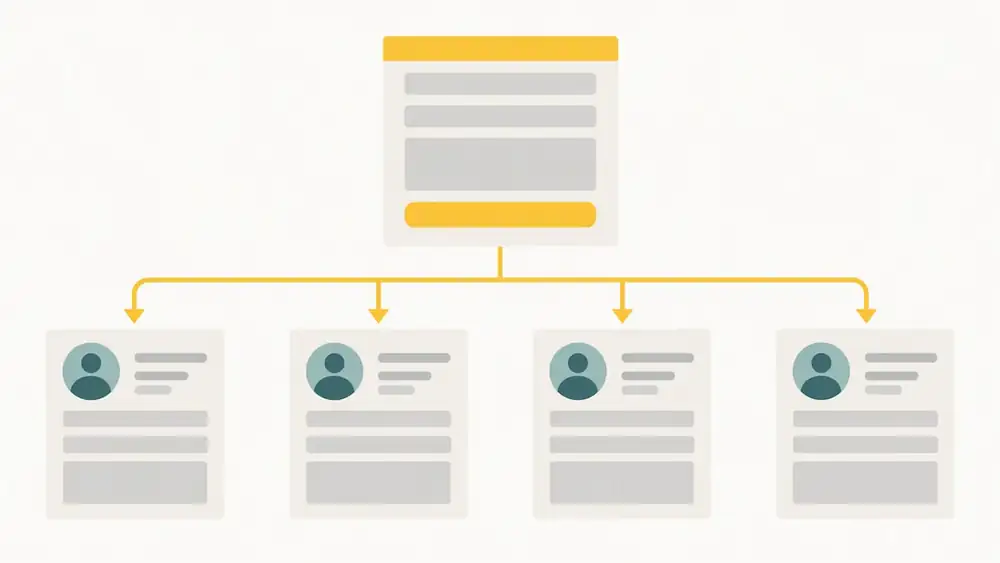
Technolutions' documentation on group registrations describes the pattern well: a single block replicates the per-registrant fields, and each block creates a unique record for that person, while aggregates can sum or count values for payment calculation.
Configuration checklist:
1. Turn on the repeat or replicate setting for the registrant block.
2. Set a clear registration title and label, such as "Attendee 1", so people know which person they are entering.
3. Define a minimum and maximum number of registrants.
4. Choose which per-registrant fields are required.
5. Add conditional logic inside the block, for example showing a guardian field when appropriate.
6. Map each block field to an individual record, and attach shared fields to the group.
UX tips that prevent abandoned forms:
- Use a clear "Add another attendee" link rather than a vague button.
- Show a visible count and the remaining limit, such as "3 of 10 added".
- Validate each block as it is completed, not only at final submit.
- Let people edit or delete a block without losing the others.
- Test on a phone. Long repeated blocks that work on a laptop often break on a small screen.
The data-mapping step is where many setups fail. Decide up front which answers become separate people (name, email, dietary needs) and which belong to the whole group (billing contact, purchase order). Getting this wrong means you cannot export a clean roster later. For the confirmation and thank-you pages that follow submission, the CiviCRM user guide recommends configuring profiles so the top profile collects at least first name, last name and email.
How should you handle payments and group discounts?
You have two basic options: one payment for the whole group, or each attendee paying separately. A single payment is simpler for the organiser and makes discounts easy to apply. Individual payments spread the cost but make it harder to reconcile who has paid and who still owes.
Many events tie the discount to the payment method. The ASHA group registration form is a clear example: group discounts require payment in a single transaction, and card payments are collected through a secure payment link rather than by entering card numbers on the form.
Common billing rules:
- Offer a "register N, get one free" rule or a staged early-bird window for groups.
- State on the form that the discount applies only when the full group pays in one transaction.
- Accept a purchase order number for organisations that pay by invoice, and say how the invoice is issued.
- Send a receipt to the billing contact the moment payment clears.
- Decide in advance what happens when a payment fails, such as whether to hold the spots, and say so on the form.
- Publish your refund and transfer policy before payment, not after.
Keep the arithmetic visible. Show the group total, the discount and the final amount before the organiser pays, so nobody is surprised at checkout. If your rules are complicated, a short worked example next to the form saves a lot of support emails.
What privacy and consent rules apply to group forms?
Group forms collect data about people who may never see your form, because one organiser enters everyone's details. That raises the bar on care. The European Commission's GDPR principles set out data minimization: personal data must be adequate, relevant and limited to what is necessary for the stated purpose.
Data collection must be limited to information that is adequate, relevant, and necessary for the stated purpose. This is the test every optional field on your form should pass.
This is general guidance, not legal advice. Check the rules that apply where your attendees live.
Practical checklist:
- Collect only what you need and state the purpose of each field.
- Use separate, explicit consent questions for the privacy policy and the event terms. The IEEE guide for event organizers recommends hyperlinks to both, shown before any personally identifiable information is collected.
- Store sensitive items, such as health or financial details, apart from general membership records.
- Securely destroy financial information you no longer need, for example for rejected applications. The BSAC GDPR policy models this approach.
- Use clear opt-in boxes for any public member listing.
- Check your vendors, audit your registration software on a routine schedule, and set retention periods and access controls. Our security and data page shows how we describe our own practices.
What happens after someone submits the form?
Submission is the start of the workflow, not the end. The first message should be a confirmation email with the payment receipt, the roster of people registered, and the next steps.
Export columns that save time later:
- Full name and email
- Ticket type or membership category
- Dietary needs
- Emergency contact
- Group name and billing contact
A clean CSV with these columns imports straight into a CRM or a badge printer without manual editing.
Integration and automation ideas:
- Sync registrations to your CRM so group contacts become tracked records.
- Feed the roster into automated check-in so staff scan or search instead of reading paper lists.
- Notify the organiser automatically when a required per-registrant field is missing.
- Reconcile payment totals against the number of attendee blocks.
- Run due diligence on any tool before connecting it to attendee data.
How do you validate group data and prevent duplicates?
Group forms invite errors because one person types for many. Validation catches problems while the organiser can still fix them.
Start with format checks. Require a valid email pattern, restrict phone fields to digits and common symbols, and use a date picker rather than free text for dates of birth. Then add rules that compare entries across the whole submission.
Duplicate prevention:
- Flag identical email addresses inside one submission for review.
- Compare new entries with existing records by email, and by name plus date of birth where you collect it, and offer to update rather than create a second record.
- Warn, rather than block, when two names look nearly identical. A parent and child can share a surname and an address.
Completeness checks:
- Confirm the number of blocks matches the stated total attendees.
- Make sure every required field in every block is filled before the form advances.
- Show errors next to the field that caused them, in plain language.
Finally, give the organiser a review screen listing every attendee before final submit. Typos are far cheaper to fix on that screen than after a badge has been printed with the wrong name. Re-run your checks on any edit, so a late change does not slip past the rules that caught the original entry.
How do you manage cancellations and changes to a group booking?
Groups change. Someone drops out, a substitute steps in, or the whole booking shrinks. Plan for this before the first registration arrives, and write the rules on the form.
Decide and publish these points:
- Who can make changes: the group organiser only, or each attendee for their own record.
- The deadline for changes without penalty.
- Whether substitutions are free, and whether the new person needs to complete their own block.
- How refunds work for one cancelled attendee versus the whole group.
- Whether a smaller group loses its discount, which matters when the discount depends on a minimum number.
The simplest model is to let the organiser edit the group through a link in the confirmation email. Removing one block should recalculate the total and update the roster automatically, and the organiser should receive a fresh receipt showing the change.
Keep a record of every modification with a date, so disputes are easy to settle. If a change affects payment, such as dropping below a discount threshold, show the new amount before the organiser confirms. For late changes close to the event, a simple manual approval step keeps the numbers accurate for catering and seating.
If your group runs an audience poll or award alongside registration, a partner tool like Izivote can handle live voting while your form handles the roster.
Organiser perspective: three quick mistakes and fixes
Most failing group forms share three problems. First, they over-collect: remove optional fields and explain any extra data you keep. Second, adding attendees is clumsy: use clear labels, show a count and validate every block. Third, discount rules are vague: state the payment terms on the form and require one transaction. Then test the whole flow with a realistic group size, not just two people.
How does an integrated platform simplify group registration?
Integrated platforms handle repeatable registration blocks, secure payment flows, roster exports and automated check-in without stitching separate tools together. Eventist is more than ticketing: our conference registration and management tools sit alongside automated check-in and staff coordination, and our security and data page explains how we handle attendee data.

On our pricing page, as of October 2026, conferences and festivals cost $3.50 USD per paid ticket. Say 200 attendees register in groups: that is $700 USD in platform fees, plus card processing paid to Stripe or Square at their own rate. Compared with percentage-based pricing, we are usually cheaper. Free registrations run on monthly plans from $100 CAD.
Frequently Asked Questions
What are the different types of forms?
Common types include membership applications, group event bookings and business membership forms. The right one depends on whether people join once, book together for an event, or enrol on behalf of an organisation.
What is a membership form?
A membership form collects the details a club or association needs to add someone to its member register. At minimum that means name, contact details and the date they join, plus consent to your privacy policy.
How do you fill out a group registration form?
Start with the shared organiser and billing fields, then add one attendee block per person. Review every entry on the summary screen, accept the separate consent questions, and pay in a single transaction if a group discount applies.
Why might a group discount require one payment?
Some organisers make a group discount conditional on payment in a single transaction. The ASHA group form is one example of that policy.
Sources
- Commission
- A Guide for IEEE Event Organizers
- Knowledge
- 2026 ASHA Convention Registration Form - Group
- docs/events/online-event-registration.md at master · civicrm/civicrm-user-guide
Recommended
Tags
Ready to simplify your events?
Join hundreds of organizers, studios, and festival directors who trust Eventist to run their events.