Interactive Venue Maps: Design, Types and What to Look For
An interactive venue map is a digital plan of your space in which every seat, booth, stage or service point is a clickable object tied to live information. A buyer taps a seat and sees whether it is still available and what it costs. An attendee taps a booth and sees the exhibitor, the session times and the way there. A flat PDF does neither. This guide explains the three kinds of map organizers actually need, how to design each one, and what to check before you commit to a tool.
TL;DR
- A true interactive map is a live inventory interface, not a picture: each seat or location is an object backed by current data on availability, price and eligibility.
- There are three jobs: a seating map for selling reserved seats, an exhibitor and booth map for trade shows, and a wayfinding map for festivals and multi-room conferences. Many events need more than one.
- Design for the crowd that will use it: zones first for big rooms, search and bookmarks for expos, step-free routes everywhere.
- Judge software on how fast changes go live, how it handles general admission next to reserved seats, and whether the map connects to ticketing and check-in.
- Treat the map as operational data that someone owns, updates and tests on a phone before the on-sale.
What makes a venue map interactive
The test is whether the map is connected to inventory. According to Seatlayer's guide to interactive seat maps, a buyer can click or tap an exact seat, see its current availability and price, and complete the selection against live inventory, which a static seating-plan image cannot provide. The same guide stresses that the map must reflect server-side seat state while a buyer is deciding. If it only reproduces the architecture of the room, a busy on-sale can show stale availability and create duplicate sales.
That distinction is operational rather than visual. A beautiful drawing with no live data behind it is still a drawing. When you compare tools, ask what happens in the three seconds after a buyer clicks a seat: is it held for them, released if they leave, and removed from every other buyer's screen?
The same logic applies away from seats. A booth, a food truck pitch or a stage is a location with a status, a name and a schedule. If the map reads from the same records that your team edits, a change in one place appears everywhere.
Three kinds of map, three different jobs
Most searches for an interactive map blur together things that are quite different. Pick the type before you pick a tool.
| Map type | Best for | What the visitor does | What the organizer needs |
|---|---|---|---|
| Seating map | Theatres, concert halls, clubs, galas, conferences with reserved plenary seating | Selects exact seats or a section, sees price, checks out | Seat-level inventory, holds, price tiers, accessible-seat flags |
| Exhibitor and booth map | Trade shows, expos, craft fairs, vendor markets | Searches a company, bookmarks it, gets directions | Booth records, exhibitor profiles, floor plan changes without reprinting |
| Wayfinding and site map | Festivals, multi-stage events, multi-room conferences | Finds stages, washrooms, water, first aid, sessions | Points of interest, schedule links, routes, live edits |
A festival may sell general admission and a reserved VIP deck, which means it needs a seating zone inside a wayfinding map. A conference may sell reserved seating in the main hall and also run a sponsor floor. Choose a system that can combine types, or you will end up stitching three tools together.
Designing a seating map
Start with zones, then go to seats
For large venues, navigating from zone to seat is better than drawing every seat at once. Seatlayer contrasts a 300-seat room with a 60,000-seat bowl: the small room can show each seat immediately, while the bowl should let buyers choose a section first and then zoom in. Think about the device. A buyer on a phone cannot reasonably tap one of 4,000 tiny circles on a first screen.
Model mixed inventory in one map
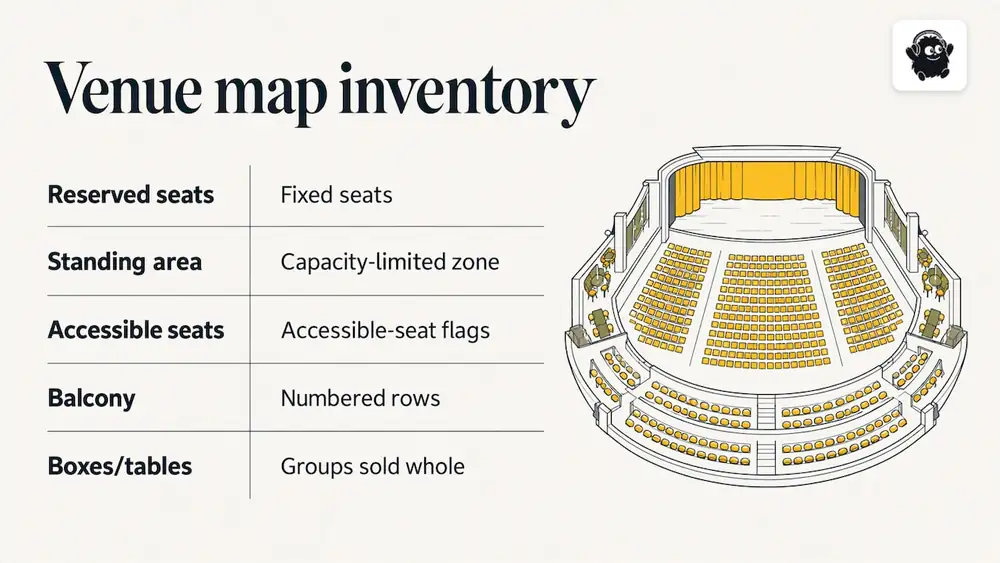
Real venues are rarely pure. Seatmap.pro's description of its theatre map model shows the pattern: fixed reserved seats, standing or general-admission zones and accessible-seat flags sit in one model, and the renderer scales from a 200-seat black box to a 5,000-seat opera house. Whatever tool you use, build your map the same way. Draw the floor standing area as a capacity-limited zone, the balcony as numbered rows, and any boxes or tables as groups that can be sold whole.
Make accessible seating visible, and enforce the rules elsewhere
The map layer should visually distinguish accessible positions, but the same source notes that companion rules and sales restrictions have to be enforced by the ticketing system. In practice, that means two checks. First, can a buyer filter for accessible seats and see them clearly marked? Second, does the checkout stop a single buyer from taking accessible seating they cannot use, and does it attach a companion seat where your policy requires it? Test both with real orders before you go on sale.
Label for people, not for the floor plan
- Use the names buyers know: "Orchestra Left", "Balcony Row C", "Pit", not internal codes.
- Colour by price tier, and add a text or pattern cue so the tiers are not distinguishable by colour alone.
- Show sightline notes honestly: obstructed view, side stage, limited legroom.
- Keep the legend on screen while the buyer zooms.
If you want a ticketing-side view of what to compare, our comparison of ticketing platforms with reserved seating covers the seating features that matter at checkout.
Designing an exhibitor and booth map
For trade shows and expos, the map is a discovery tool as much as a floor plan. ExpoFP's attendee map describes the pattern well: searchable exhibitor records connected to booth locations, bookmarks for companies a visitor wants to see, directions, and a mobile-browser link that works without an app download or sign-in. Its feature set also includes multi-floor and multi-building maps, accessible routing, QR-based "You Are Here" positioning and a kiosk mode.
For attendees, the most useful functions are search, filtering, bookmarks, directions and a visible current-location marker. For organizers, the same map becomes an information layer for exhibitor discovery, session navigation and sponsor visibility. That is why exhibitors care about your map: a searchable, well-labelled booth is a better product to sell than a number on a printed plan.
Practical steps:
1. Build the booth grid from the venue's certified floor plan, with aisles and fire exits drawn to scale.
2. Give every booth a unique ID and tie it to the exhibitor's record: name, category, description, logo, contact.
3. Add categories visitors will actually search for, such as "packaging" or "municipal services", rather than internal sales tags.
4. Mark washrooms, registration, food, first aid, coat check and charging points.
5. Link rooms and stages to the session schedule so a visitor can go from a talk to its location in one tap.
6. Print a QR code at entrances and on signage that opens the map in the phone's browser.
On the sales side, a booth map doubles as the exhibitor purchasing screen: exhibitors pick an available booth, and sold booths turn off. Our venue management page and conference registration page show how this fits with the rest of the event run.
Designing a festival map
Festival site maps have a different problem: no walls, changing weather and crowds that move in waves. A festival map has to answer "where is the next stage, and how long will it take me to get there?" more than "where is my seat?".
Layout principles
- Separate flows. Entry queues, bar queues and exit routes should not cross. Draw them on the map, then walk the site to test the drawing.
- Spread the draws. Stages, food and water placed in clusters create congestion. Place water and washrooms near stage edges, not just at the perimeter.
- Plan the paths. Accessibility Canada's guide to accessible festivals and outdoor events advises planning accessible paths across the site that link all attractions and essential services, and notes that temporary flooring can stabilize paths on sand or grass. It also recommends quiet spaces for rest on long or crowded events and notes that your site may need to meet the Design of Public Spaces Standard under Ontario's AODA.
- Show the services. First aid, lost-and-found, information and quiet areas belong on the map from day one.
- Keep cables off the routes. The same guide flags electrical wires as a tripping hazard and suggests cable protectors that wheelchairs can cross.
This is general guidance, not legal advice. Permits, fire and safety layouts, insurance and accessibility obligations vary by municipality and province, so confirm requirements with your local authority, your insurer and the venue before you finalize a site plan.
Multi-stage events
A live map linked to the schedule lets attendees see what is on now and what is next at each stage. When a set is delayed or a stage is closed because of weather, the map and schedule should change together. If you run multiple tracks or stages, read how to structure them in our event blog alongside your map plan.
Keeping the map current
Last-minute changes are normal at events, not exceptions. MapsPeople's guide to indoor maps for events frames frequent late changes as a core event-management problem and argues that a map connected to a CMS or API is more resilient than a static PDF, because edits to rooms, routes and points of interest reach the live experience immediately.
That has staffing consequences. Someone has to own the map, the same way someone owns the run of show. A short change log and a named approver prevent two staff members from moving the same booth in conflicting ways. The tools you use to coordinate that work matter too; this roundup of project management tools for event planners is a useful starting point for choosing where tasks and approvals live.
A simple routine works at any size:
1. Freeze the base layout at a set date, for example two weeks out.
2. After the freeze, accept changes only through the map owner.
3. Re-test the map on an iPhone and an Android phone on mobile data, not just on office Wi-Fi.
4. Check the map again on the morning of the event with the venue walkthrough in hand.
5. Announce major changes in your attendee emails and texts, and link to the map instead of attaching a new file.
How to evaluate interactive map software
MapsPeople's guide suggests looking beyond whether a tool can display a floor plan. For complex events it asks whether the system supports CMS or API updates, mobile, web and kiosk delivery, multilingual content, role-based areas and step-free routes. Add questions specific to your use:
| Question | Why it matters |
|---|---|
| Is the map tied to live ticket inventory? | Prevents double sales and stale availability |
| Can it mix reserved seats, standing zones and tables? | Most real venues are mixed |
| How quickly do edits go live? | Late changes are routine |
| Does it work in a mobile browser without an app? | Fewer barriers for attendees |
| Are accessible seats and routes shown clearly? | Legal, practical and reputational reasons |
| Can the same data feed check-in and reporting? | Avoids double entry on the day |
| Does it offer French as well as English content? | Important for bilingual Canadian audiences |
| What is the full cost per ticket or per month? | Maps are cheap to demo and expensive to switch away from |
On the last point, look past the headline. Our posts on ticketing platforms compared beyond the fee and venue management software pricing explain what to ask about fees, payouts and add-ons.
Our perspective
We think of the map as part of running the event, not a decoration on the ticket page. The seat a buyer picks, the booth an exhibitor is assigned, the stage a performer is booked on and the door where staff scan a QR code are all the same location data seen from different sides. When those live in separate tools, someone ends up retyping them the night before the event.
That is why, at Eventist, we build seat maps and booth maps alongside registration, check-in, scheduling and staff roles, rather than as a separate product. We would rather an organizer draw the space once and have every part of the event read from it.
Our advice is to start with the questions your attendees ask most. If the top question is "which seat can I get?", invest in the seating map. If it is "where is that company?", invest in search and booth records. If it is "how do I get to the second stage?", invest in routes and a schedule link. Then test with someone who has never seen the venue.
Costs and how a map fits into ticketing
A map is rarely billed on its own. It usually comes with the ticketing platform or as a per-event or per-ticket add-on, so the question is the total cost of selling a seat.
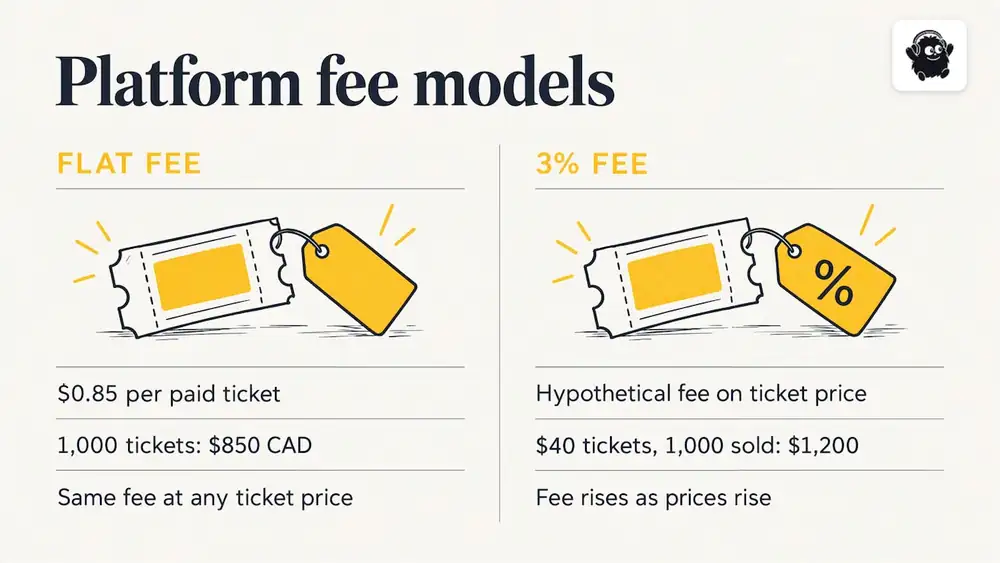
Eventist's pricing page lists, as of October 2026, a flat fee per paid ticket for Canadian organizers: $0.85 CAD for event ticketing, $4.99 CAD for festivals and conferences and $9.99 CAD for competitions. Venues are priced differently: they pay 0.5% to 1.9% of what they charge on everything they sell, single tickets included, so check the venues page for details. Tickets and registrations that are free run on monthly plans starting from $100 CAD. Card processing fees are paid to Stripe or Square at their own rate and are separate from the platform fee.
The arithmetic is straightforward. Selling 1,000 paid tickets under event ticketing at $0.85 CAD comes to $850 CAD in platform fees, whatever the ticket price. A hypothetical 3% platform fee on the same 1,000 tickets at $40 would come to $1,200. The gap widens as prices rise, which is why a flat fee is usually cheaper than a percentage for reserved seating, where tickets tend to cost more. Your own comparison should use your real average ticket price and expected volume.
Putting a map to work with Eventist
If you are planning a reserved-seat show, a conference with exhibitors or a multi-stage festival, Eventist includes seat map and booth map builders, live interactive maps and multi-stage scheduling in the same system as ticketing, QR check-in and door sales. Organizers also get setup help from a Canadian team, and optional done-for-you setup and training are priced on the services page. For concerts and independent promoters, the concerts page shows how reserved seating works for a typical show.
Frequently Asked Questions
What is the difference between a seating chart and an interactive seat map?
A seating chart is an image that shows where seats are. An interactive seat map makes each seat an object that the buyer can select, backed by live data on whether that seat is still available and at what price. The interactivity is the connection to inventory, not the zoom.
Do attendees need to download an app to use an event map?
Not necessarily. Some expo maps work from a link in a mobile browser without an app download or sign-in, according to ExpoFP. A browser link is usually the easier choice for one-off events, because fewer people give up before they start.
How should I show accessible seating on a map?
Mark accessible positions clearly on the map and let buyers filter for them. Companion rules and sales restrictions are best enforced by the ticketing system rather than the drawing, so test checkout as well as the visual. Follow your venue's and province's accessibility requirements, and treat this as general guidance, not legal advice.
Can one map handle reserved seats and general admission?
Yes, if the tool supports mixed inventory. A good model combines numbered seats, standing zones with a capacity and accessible-seat flags in one map. Ask for a demo using your own floor plan before you decide.
How far ahead should the map be finished?
Finish the seating map before tickets go on sale, since buyers choose from it. For a site or booth map, freeze the base layout about two weeks before the event and route later changes through one owner. That keeps late edits controlled without making the map stale.
Sources
- Interactive seat map software for event ticketing, Seatlayer
- Attendee map, ExpoFP
- Interactive Indoor Mapping Software for Events, MapsPeople
- Theater Ticketing Software, Seatmap.pro
- Guide to Accessible Festivals and Outdoor Events, Accessibility Canada
Recommended
Tags
Ready to simplify your events?
Join hundreds of organizers, studios, and festival directors who trust Eventist to run their events.