Hybrid and Livestream Event Ticketing: How to Sell the Room and the Stream at Once
Selling a ticket to a stream is the easy part. Any checkout can take $20 and send a confirmation email.
The hard parts arrive afterwards. Only the people who paid should be able to watch, and a link in a confirmation email is not access control. Online attendees have to land in the same attendee list as the room, or your numbers, your emails and your sponsor report are all split in two. And the online price has to be low enough to reach people who were never coming anyway, without being so low that locals who would have bought a seat stay home instead.
Here is how organizers actually solve those three, what each approach costs, and what to test before you announce.
Key takeaways
- A link in an email is not access control. If it can be forwarded, it will be.
- Register online buyers on the meeting or stream, not just in your ticketing system, so the platform itself knows who belongs.
- Keep one attendee list. Two systems means two headcounts, two exports and a sponsor report nobody trusts.
- Price the stream as a different product, not a discount on the same one, or you will cannibalise your door.
- Decide before you announce whether the recording is included. Changing your mind afterwards annoys both audiences.
The four jobs hybrid ticketing has to do
1. Sell both ticket types from one checkout, so a buyer picks in-person or online without visiting two sites.
2. Control access to the stream, per person, in a way that survives forwarding.
3. Report both audiences together, so attendance, revenue and the mailing list are one set of numbers.
4. Handle the aftermath: recordings, replacements for people who could not connect, refunds when the stream fails.
Most tools do one or two of these well. Very few do all four, which is why hybrid so often ends up stitched together.
The three ways organizers do it
| Approach | How it works | Strengths | What it costs you |
|---|---|---|---|
| Ticketing plus a separate streaming platform | Sell on your ticketing site, deliver the stream on a webinar or streaming service, paste a link into the confirmation | Flexible, use any streaming tool | Two attendee lists, manual link handling, access control only as good as the link |
| All-in-one virtual event platform | One vendor sells the ticket, hosts the stream, runs chat, networking and sponsor booths | Everything integrated, strong virtual-first features | Priced for virtual-first events, usually a per-event or annual contract; weaker at the physical door |
| Ticketing with a meeting integration | Sell the ticket, and the platform registers each buyer directly on the webinar, emailing them their own join link | One list, per-person access, no manual steps | Depends on the meeting tool for the viewing experience; not a broadcast studio |
There is no universally right answer. A virtual-first conference with 3,000 remote attendees and sponsor booths genuinely needs the second row. A festival streaming its main stage, or a conference with a room and an online tier, is usually better served by the first or third.
Access control: the part people get wrong
Almost every hybrid failure traces back to one decision: how the online attendee reaches the stream.
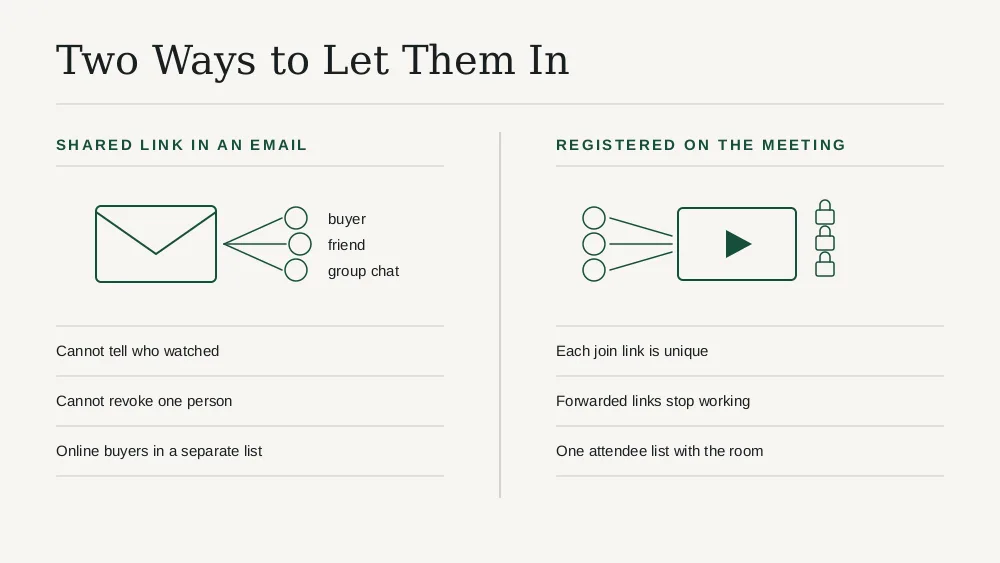
A shared link in the confirmation email is the default and the weakest. It works, right up until somebody posts it in a group chat. You cannot tell who watched, you cannot cap concurrent viewers, and you cannot revoke one person.
A per-person registration on the meeting is the meaningful upgrade. The buyer is registered on the webinar itself, gets a join link unique to them, and the meeting platform knows who they are. Forwarded links stop working, your attendance numbers come from the platform rather than guesswork, and the whole thing happens without anyone copying links by hand.
A gated player on your own page is the strongest and the most work: the attendee signs in and the video is served only to an authenticated session. Worth it above a certain size, overkill below it.
Eventist takes the middle route and does it properly. A host connects their own Zoom account, each session can carry its own meeting, and everyone registered for that session — whether they bought it or signed up through the attendee portal when it is included in general admission — is registered on the meeting itself and emailed their own join link. The join link is also an email template variable, so your own branded emails can carry it. We are a ticketing platform with a meeting integration, not a streaming studio, and for most hybrid events that is the right shape.
Pricing the stream without eating your own door
The instinct is to price online at half the in-person ticket. It is usually wrong, because it reframes the stream as a cheaper version of the same product and invites locals to take the discount.
Better framings:
- A different product. The stream is not "the event, cheaper". It is the main stage without the site, the bar, the people or the merch. Price it against what else that person would do with an evening, not against your gate price.
- A geography test. If your online price is tempting to somebody who lives twenty minutes away, it is too close to the gate price.
- Bundle the recording. Access to the replay for a defined window is a genuine reason the online ticket exists, and it is something the room does not get unless you sell it to them too.
- Decide about the recording before you announce. Whether it is included, for how long, and whether in-person buyers get it. Retrofitting this annoys everybody.
What to test before you announce
- Forward a join link to yourself on a different account and see whether it works. If it does, you do not have access control.
- Buy an online ticket end to end and confirm the join details arrive without anyone doing anything manually.
- Check the attendee export contains in-person and online buyers in one file, flagged by type.
- Run the stream for ten minutes at the real resolution from the real venue's connection, not the office.
- Decide the failure policy in advance. If the stream drops for twenty minutes, what does an online buyer get? Write it down before you need it.
Frequently Asked Questions
How do you sell tickets for a hybrid event?
Sell both ticket types from one checkout so buyers choose in-person or online in a single transaction, then make sure online buyers are registered on the stream itself rather than simply emailed a shared link. Keep both audiences in one attendee list so attendance, revenue and your mailing list stay as one set of numbers, and decide before you announce whether a recording is included and for how long.
How do you stop people sharing a livestream link?
Register each buyer individually on the meeting or webinar so their join link is unique to them, which makes a forwarded link useless. A shared link in a confirmation email cannot be revoked, capped or attributed. The strongest option is a gated player on your own site behind a sign-in, though that is more work than most events need.
What should an online ticket cost compared to in-person?
Price it as a different product rather than a discount on the same one. The stream lacks the venue, the atmosphere and everything around the performance, so it competes with other things that person could do with an evening, not with your gate price. A useful test: if the online price tempts someone who lives twenty minutes away, it is too close to the in-person price and will cost you door sales.
Do I need a virtual event platform for a hybrid event?
Only if the online audience is the main audience. All-in-one virtual platforms are built for virtual-first events with chat, networking and sponsor booths, and are usually priced accordingly. An event with a real room and an online tier is generally better served by ticketing software that integrates with a meeting tool, which keeps one attendee list without paying for a virtual venue you do not need.
Can the same platform handle in-person check-in and online access?
Yes, and it is the main reason to keep both in one system. The in-person side needs QR scanning at the door; the online side needs per-person registration on the stream. When both run from the same ticket, your attendance report covers the whole event and your post-event email reaches everyone at once.
Sources
- Zoom, Server-to-Server OAuth: https://developers.zoom.us/docs/internal-apps/
- Zoom, Managing webinar registration: https://support.zoom.com/hc/en/article?id=zm_kb&sysparm_article=KB0064140
Hybrid stops being painful when the online ticket behaves like a ticket rather than an email attachment. One checkout, per-person access to the stream, one attendee list, and a price that reflects a different product. If you want that without buying a virtual venue you do not need, the Eventist events platform connects your own Zoom account and registers buyers on the session automatically, and the pricing page shows the flat per-ticket fee that applies to both kinds of ticket.
Tags
Ready to simplify your events?
Join hundreds of organizers, studios, and festival directors who trust Eventist to run their events.