Real-Time Sales Dashboard: What to Track and How Fresh
A real-time sales dashboard is a live view of revenue, orders and conversion that updates quickly enough for you to act on it before the next refresh. For ticketed events, that usually means a few numbers refreshed every minute or so, not a wall of charts updating every second. This guide covers what to put on the dashboard, how fresh the data really needs to be, and how to keep it honest by reconciling it against your financial reports.
It is written for organizers of festivals, conferences, trade shows, venues, concerts and everyday ticketed events, though the principles apply to any business selling to the public.
TL;DR
- "Real-time" is defined by the decision you need to make, not by the speed of the data. For event operations, a refresh every one to five minutes is usually enough.
- Start with five to seven numbers: gross and net sales, tickets sold by type, sales velocity, conversion rate, average order value and sales by channel.
- Show data age on screen. If feeds stop, the dashboard should say so rather than display a frozen number.
- Use the live dashboard for tactical calls (staffing, door sales, promotion pushes) and monthly reports for strategy.
- Fees change what "net" means. Work out your per-ticket cost before you read a revenue figure as profit.
What "real-time" actually means for ticket sales
Real-time analytics processes data as events happen or shortly afterward, and Snowflake's overview of real-time analytics notes that the definition varies with business need. Near-real-time, with a delay of seconds to minutes, is enough for most operational monitoring. Only use cases such as high-frequency trading demand sub-second latency.
The same guidance suggests tying refresh frequency to the decision deadline rather than to how fast raw data arrives. It describes tiers: sub-minute for immediate responses, a few minutes for operational monitoring, hourly for intraday sales and logistics, and daily for management and financial reporting.
Translated to events, the tiers look like this:
| Decision | Who makes it | Useful refresh |
|---|---|---|
| Open another entry lane or door sales table | Gate or box office lead | Every 1 to 5 minutes on event day |
| Send a last-minute promotion to a mailing list | Marketing lead | Hourly during the on-sale push |
| Adjust staff schedules for tomorrow | Operations manager | Daily |
| Report revenue against budget | Finance or board | Monthly, after reconciliation |
A useful test comes from Sumboard's live dashboard best practices: a dashboard is only real-time if fresher data can change the outcome of an action before the next refresh. If nobody can realistically respond faster than every 10 minutes, a one-second refresh adds system load without adding value.
Freshness is not the same as speed
Two different delays get confused. Data freshness is how old the underlying records are. Query latency is how long the dashboard takes to calculate and draw the result. Snowflake points out that a chart can load instantly and still show stale data if the ingestion pipeline has lagged.
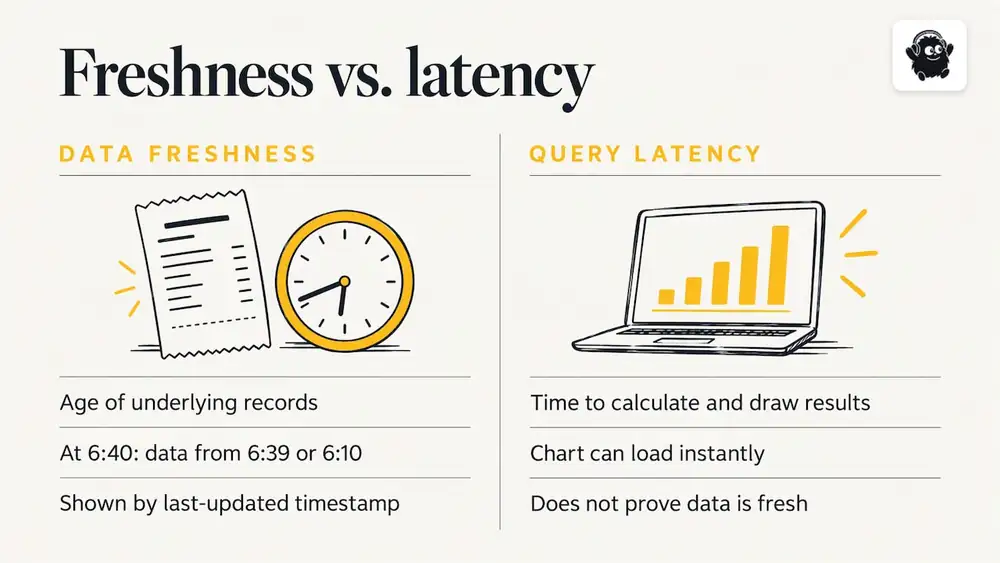
For a ticketing dashboard, this means every tile should carry a "last updated" timestamp. When you are looking at a number at 6:40 p.m. with doors at 7:00, you need to know whether it describes 6:39 or 6:10.
The numbers worth putting on the dashboard
Standard sales KPIs include gross and net sales, conversion rate, average order value and units per transaction, as listed on Geckoboard's ecommerce dashboard page. Event sales add a few of their own, because inventory is limited and the deadline is fixed.
Core tiles
1. Gross sales and net sales. Gross is what buyers paid. Net is what remains after refunds, platform fees and card processing. Show both, and keep them visibly separate.
2. Tickets sold by type. General admission, reserved seating sections, VIP, early bird, group. This is the tile that shows which tier is about to sell out.
3. Sales velocity. Tickets sold per day in the run-up, and per hour on a launch day. Compare it to the pace you planned.
4. Conversion rate. The share of checkout sessions that become orders. A drop during an on-sale usually points to a problem in checkout, not in demand.
5. Average order value. Useful for spotting whether add-ons, parking or merchandise are being picked up.
6. Sales by channel. Online, door sales at a point of sale, referral links, email campaigns.
7. Capacity remaining. Per ticket type, per session or per zone, so nobody has to do subtraction in their head.
Event-day tiles
Once gates open, the dashboard changes job. It should show check-ins against tickets sold, door sales so far, and the current pace compared with the same point at last year's event, if you have it. A trade show organizer cares about registrations and badge scans by hour; a festival cares about gate throughput and last-minute sales; a theatre or concert venue cares about unsold seats by section.
What to leave off
The most common design mistake is visual overload. According to the De Anza College data analytics course on LibreTexts, streaming data makes complex charts illegible. Better designs use sliding windows, such as the last five minutes of activity, and simple threshold alerts, such as color-coding when sales fall below the expected pace, instead of trying to show every transaction as it happens.
The same source notes that pushing for sub-second updates tends to produce jittery numbers that staff cannot read or act on. Keep the screen calm: a handful of large figures, one trend line, one alert state.
Designing for the moment of decision
Before building anything, write down the three decisions the dashboard is meant to support. Then work backward.
- Decision: "Do we add a second door sales table?" Needs: door sales per 10 minutes, queue length, staff on shift.
- Decision: "Do we push a last-chance email?" Needs: tickets remaining by type, velocity over the last 24 hours, conversion rate.
- Decision: "Is the on-sale broken?" Needs: conversion rate, failed payments, orders per minute against the usual pattern.
If a tile does not feed any of these decisions, it belongs in a weekly report rather than on the live screen.
Plan for failure
Live dashboards fail quietly. A feed drops, the number stops changing, and everyone assumes sales have stalled. Sumboard recommends graceful degradation: when data stops flowing, the dashboard should show a clear "no data" or stale status rather than a frozen figure that looks current. The LibreTexts material makes the same point about preventing staff from making urgent decisions on old information.
A practical rule is to grey out any tile whose last update is older than twice its normal refresh interval, and to name a person responsible for checking the source when that happens.
Why fees change what the dashboard tells you
A revenue number is only as useful as your understanding of what it costs to earn. On a ticketing platform, the fee model determines the gap between gross and net, and that gap behaves very differently under a flat fee and a percentage fee.
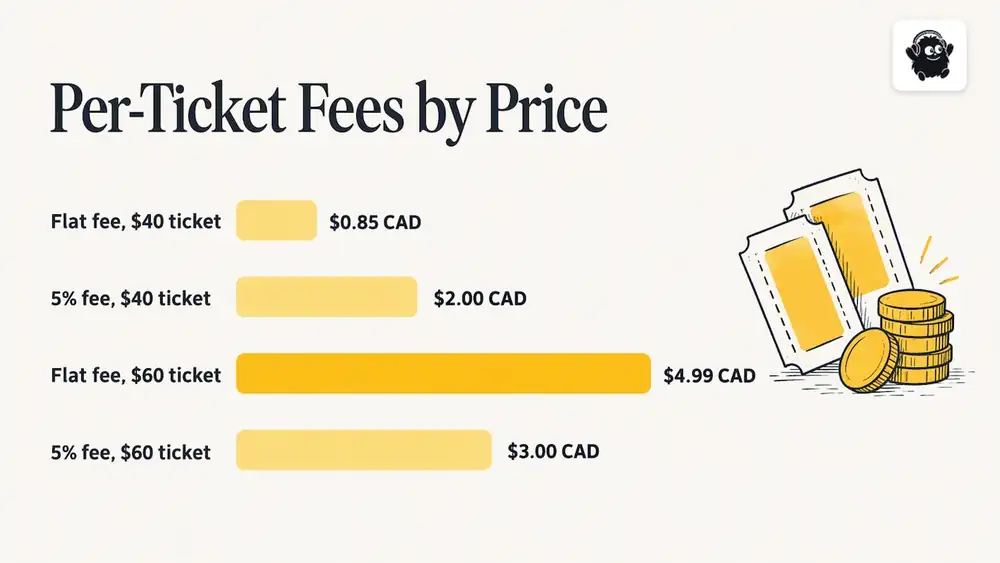
A flat fee per paid ticket stays the same whether the ticket costs $20 or $200. A percentage fee grows with the price. That makes percentage models relatively cheap on low-priced tickets and relatively expensive on higher-priced ones.
Here is a hypothetical for a Canadian organizer selling 2,000 tickets at $40 each. The 5% figure is an illustrative percentage fee, not a quote from any specific platform.
| Model | Calculation | Fee total |
|---|---|---|
| Eventist event ticketing, flat $0.85 CAD per paid ticket | 2,000 × $0.85 | $1,700 |
| Illustrative 5% percentage fee | 2,000 × $40 × 5% = 2,000 × $2.00 | $4,000 |
In this example the flat fee costs $2,300 less. Eventist is usually cheaper than percentage models for this reason, but not in every case: the result depends on your ticket price and the percentage you are comparing against. For festivals and conferences, where the flat fee is $4.99 CAD per paid ticket, a 5% fee on a $60 ticket would be $3.00, so the percentage model could come out lower at that price. Run your own numbers with the ticketing fee comparison calculator or read the breakdown of ticketing fees by platform before you commit.
Two more points about fees belong on your net sales tile. Card processing fees are paid to Stripe or Square at their own rates, separate from any platform fee. And venues that run all their sales through Eventist pay 0.5% to 1.9% of what they charge on everything they sell, single tickets included, rather than a per-ticket flat fee.
Real-time dashboards and monthly reports do different jobs
Practitioners describe sales reporting as two layers. Real-time dashboards support in-the-moment operational adjustments such as staffing, queue management and door sales. Monthly reports support strategic assessment, as the LibreTexts dashboard considerations and related reporting guidance suggest.
What belongs in the monthly view
A monthly report compares revenue with targets, looks at year-over-year growth and flags friction in the sales funnel. Contentsquare's guide to sales performance reports lists metrics such as total dollar volume and percentage change against the previous year. For an events business, add:
- Revenue by event and by ticket type, net of fees and refunds
- Sales channel mix: online, door, referral, partner
- Refund and chargeback rate
- Days from on-sale to sell-out, or to a given percentage of capacity
- Marketing spend per ticket sold
The monthly view is also where you bring in qualitative signals. Attendee comments, survey scores and repeat-purchase rates explain why numbers moved. For a wider look at connecting feedback to revenue, see this piece on how customer feedback feeds revenue growth.
Reconcile live numbers against the source of truth
A live dashboard is a working view. Your payment processor statements and accounting records are the record. After each event, compare the dashboard's final gross, refunds and fees with the settled figures. Small gaps from timing, pending refunds or currency conversion are normal. Large ones mean a tile is built on the wrong data. This is general guidance, not accounting or tax advice; ask your accountant how to treat ticket revenue, deferred income and sales tax for your organization.
Our perspective: a dashboard is only as good as the system behind it
We see the same pattern with organizers who come to us after a hard event day. The dashboard was not the problem. The data was split across a ticketing tool, a spreadsheet for door sales and a separate registration list, so no single screen could be trusted.
That is why we build Eventist as one system for the whole event. Online tickets, seat maps, registration, QR check-in from any phone and the built-in point of sale for door sales feed the same real-time analytics, so a door sale and an online sale land in the same count. Staff roles and the run of show sit in the same place, so the person watching sales is looking at the same event the gate team is working.
Our advice is to keep the screen small. Pick the three decisions that matter on event day, show only the numbers that serve them, and agree beforehand who acts when a number crosses a line. A dashboard nobody has authority to act on is decoration.
Setting up your own dashboard: a short checklist
1. List your decisions for the on-sale period and for event day, with an owner for each.
2. Map every sales channel to one data source. If door sales are on paper, they are invisible until later.
3. Choose a refresh interval per tile. One to five minutes for operations, hourly for marketing, daily for management.
4. Show data age on every tile and define a stale state.
5. Set thresholds against your plan: for example, a color change when sales velocity falls below the pace needed to hit your target.
6. Test under load before the on-sale opens, ideally with a staged set of test purchases across each channel.
7. Reconcile after the event and adjust the tiles that drifted.
If your goal is to lift sales rather than just watch them, the guide on how to increase event ticket sales in seven steps covers what to do once the dashboard shows a slow pace.
Where Eventist fits
Eventist is a Canadian event management and ticketing platform. Paid ticketing is billed per paid ticket, and as of October 2026 the published rates on the pricing page for Canadian organizers are $0.85 CAD for event ticketing, $4.99 CAD for festivals and conferences and $9.99 CAD for competitions. US organizers pay $0.75 USD, $3.50 USD and $7 USD respectively. Free tickets and registrations run on monthly plans starting from $100 CAD. If you want help configuring an event, the services page lists setup and training options.
Frequently Asked Questions
What is a real-time sales dashboard?
It is a visual summary of sales metrics that updates continuously or near-continuously, so you can monitor revenue, orders and conversion as they happen. For most events, near-real-time with a delay of seconds to a few minutes is enough.
How often should a sales dashboard refresh?
Match the refresh to the decision. Operational calls on event day justify one to five minutes, intraday marketing pushes can use hourly updates, and management reporting can be daily. Faster than you can act adds cost and noise without benefit.
Which KPIs matter most for ticket sales?
Start with gross and net sales, tickets sold by type, sales velocity, conversion rate, average order value and sales by channel. Add capacity remaining and, on event day, check-ins against tickets sold.
How is a monthly sales report different from a live dashboard?
A live dashboard supports tactical adjustments while an event or on-sale is under way. A monthly report benchmarks results against targets and the previous year, and it should be built from reconciled financial records rather than live feeds.
Sources
- Real-Time Analytics: Architecture & Use Cases, Snowflake
- Live Dashboard Best Practices for Real-Time Data, Sumboard
- 9.4: Real-Time Dashboard Considerations, Workforce LibreTexts
- Shopify Dashboards That Update in Real Time, Geckoboard
- How to Create a Sales Performance Report, Contentsquare
Recommended
Tags
Ready to simplify your events?
Join hundreds of organizers, studios, and festival directors who trust Eventist to run their events.