Role-Based Permissions: How They Work and How to Set Them Up
Role-based permissions give people access to a system according to the job they hold, not who they are as individuals. You define a role such as admin, editor or viewer, attach a set of permissions to it, and then assign people to the role. When someone's job changes, you change the role, not dozens of individual settings. This guide explains the model, how it compares with other approaches, and how to build a role structure that holds up, with examples from the world we work in: festivals, conferences, trade shows and ticketed events where many people touch the same system for a short, high-pressure window.
TL;DR
- Role-based permissions (RBAC) tie access rights to predefined job roles, so a person inherits only what the role allows.
- The goal is least privilege: each person gets the minimum access needed for their tasks, nothing "just in case".
- RBAC is simpler and cheaper to run than attribute-based (ABAC) or policy-based (PBAC) models, but it is coarser and can become rigid.
- The main failure is privilege creep: people change roles and keep old access. Schedule access reviews and remove access when a role ends.
- For events, plan roles around real jobs (box office, gate staff, stage managers, vendors, volunteers) and set them up well before load-in.
What role-based permissions mean
The formal name is role-based access control, or RBAC. NIST's glossary defines it as a model where permitted actions on resources are identified with roles rather than with individual identities. IBM describes the same idea as authorizing end-user access to systems, applications and data based on a user's predefined role.
Three terms do most of the work:
- Role: a named job function, such as "box office lead" or "stage manager".
- Permission: a specific action on a specific thing, such as "view attendee list", "edit schedule" or "issue refund".
- Assignment: the link between a person and a role.
Per NIST's description of the model, RBAC relies on three principles: a user must have an active role, a user can only take on roles they are authorized for, and every permission must be granted through an authorized role. In practice that means there is no side door. If you want someone to do something, you either give their role that permission or give them a different role.
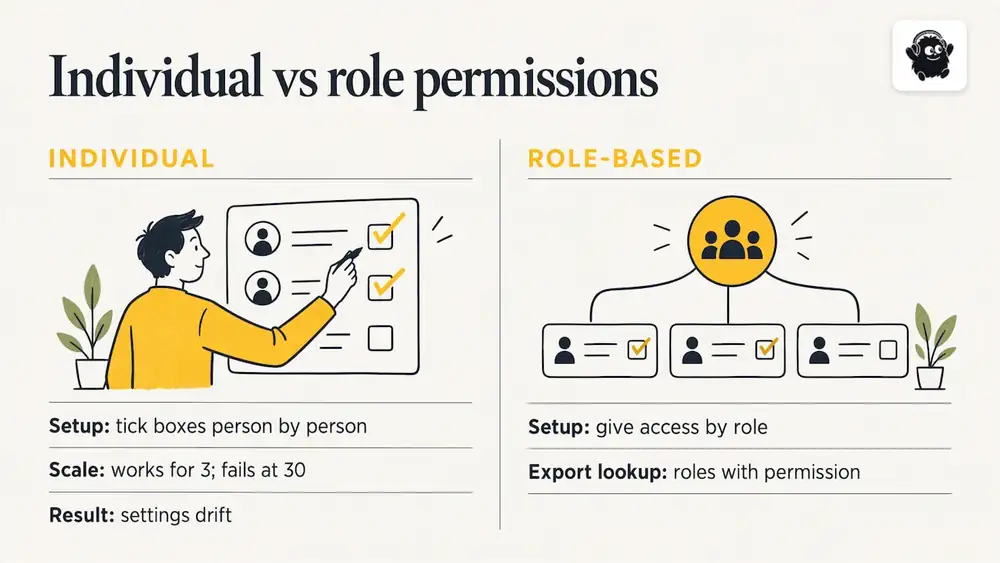
Role-based permissions versus individual permissions
Without roles, an administrator ticks boxes person by person. That works for three people. It fails at thirty, because no one can say at a glance who can do what, and the settings drift. With roles, the question "who can export attendee data?" has a short answer: the people holding roles that include that permission.
Why it matters: least privilege
The principle behind good role design is least privilege: grant users only the minimum access they need for their specific tasks. CISA's identity and access management guidance for administrators treats this as essential for limiting the damage from insider threats, accidental data exposure and account takeover.
The event version of this is easy to picture. A volunteer scanning tickets at a gate does not need to see sales revenue, edit pricing or download the full attendee list. If that volunteer's phone is lost or their login is shared, a narrow role limits the problem to scanning.
There are three practical benefits:
1. Fewer accidental changes. A vendor cannot rewrite a ticket description if their role never included editing it.
2. Less data exposure. Attendee names, emails and order details reach only the people who need them.
3. Faster onboarding. Adding the 40th volunteer is a role assignment, not a new configuration project.
RBAC vs ABAC vs PBAC
Readers often ask which model is better. The honest answer is that it depends on how dynamic your decisions need to be. Frontegg's comparison describes RBAC as simple to implement and scalable, but potentially rigid in dynamic environments, while ABAC and PBAC allow decisions based on real-time attributes such as time, location or device status. Auth0's overview for SaaS gives the typical RBAC example: a user may be an admin, manager, editor or viewer, and each role carries a set of permissions.
| Model | How access is decided | Strength | Limitation |
|---|---|---|---|
| RBAC | The person's assigned role | Simple, predictable, easy to audit | Coarse-grained; can become rigid |
| ABAC | Attributes of the user, resource and context (time, location, device) | Fine-grained, context-aware | Needs more expertise to define and maintain |
| PBAC | Centrally defined policies evaluated at request time | Flexible across many systems | Policy sets can grow complex |
Frontegg also notes that RBAC implementation is generally lower cost and less complex than ABAC or PBAC, which often need extensive IT expertise. For a festival team, a conference committee or a venue box office, RBAC is almost always the right starting point. Event teams change quickly, but the jobs themselves (gate, box office, stage, vendor liaison) are stable and well understood. Attribute rules, such as "scanning allowed only between doors-open and doors-close", are a refinement you may or may not need.
How to design roles that work
The most common mistake is copying a generic list of roles instead of mapping real jobs. Use this sequence instead.
1. List the tasks, not the titles
Write down every task someone performs in the system: create events, change prices, issue refunds, view attendee data, scan tickets, take door payments, edit the schedule, upload speaker material, approve vendor booths, and export reports. Titles vary between organizations; tasks do not.
2. Group tasks into jobs
Tasks that always travel together become a role. Scanning tickets and looking up a name on a list belong together. Changing prices and issuing refunds do not belong with them.
3. Start with the narrowest role and add
Begin every role at zero and add permissions only when someone cannot do their job without them. This is easier than starting broad and trying to take things away later, because people notice a missing permission immediately but never notice a surplus one.
4. Keep the number of roles small
A dozen well-defined roles beat sixty near-duplicates. If you find yourself creating "gate staff, north entrance, Friday only", step back: that is a staffing schedule, not a role.
5. Separate sensitive duties
The person who sets prices should not be the only person who can refund. The person who exports attendee data should be a named, small group. Money and personal data deserve the tightest roles.
Example role structure for a ticketed event
The table below is a working template for a mid-sized festival or conference. It is an illustration of how to think about roles, not a description of any particular product's settings, so adapt it to what your system offers.
| Role | Typically needs | Should not have |
|---|---|---|
| Event owner / administrator | Everything, including billing and user management | Nothing is off limits, so keep this group to two or three people |
| Finance lead | Sales reports, payouts, refunds | Schedule editing, vendor management |
| Marketing lead | Event page content, promo codes, email campaigns | Refunds, full attendee data exports |
| Box office / door sales | Look up orders, take door payments, reprint tickets | Price changes, reports on total revenue |
| Gate or check-in staff | Scan tickets, mark attendance | Order edits, attendee exports |
| Stage or track manager | Edit their own stage's schedule | Other stages, ticketing |
| Speaker or artist | View and update their own session details and material | Anyone else's content, attendee data |
| Vendor or exhibitor | Their own booth details and assigned location | Ticketing, other vendors' information |
| Volunteer | A defined shift and task list | Everything not on that list |
Notice that the outside parties (speakers, vendors, volunteers) get access to their own slice only. That is where event teams most often over-share, usually because a shared login is quicker than creating a proper account on the Tuesday before the festival.
Perspective: roles are part of the run of show
We build event software, and the pattern we see is that permissions are treated as an IT afterthought when they are really an operations decision. On event day, the question is not abstract security. It is whether the person at the gate can scan tickets quickly, whether the stage manager can fix a changeover time without calling the office, and whether the volunteer who joined at noon can see only their tasks.
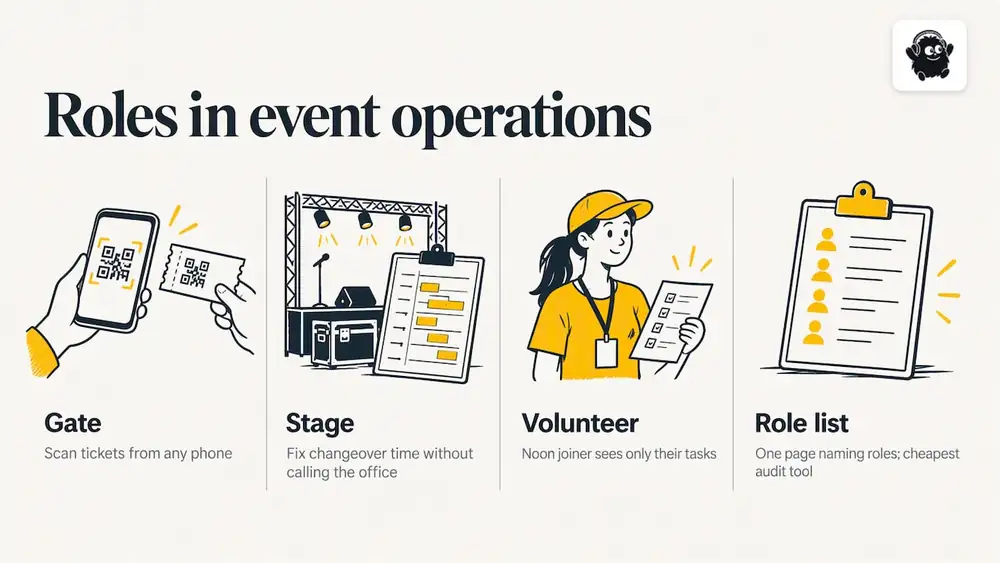
That is why we think of staff roles and the run of show as one piece of work. Decide who does what, then give each job the access it needs and no more. Eventist includes staff roles and a run of show alongside ticketing, QR check-in from any phone, and a built-in point of sale for door sales, so the people scanning and selling at the door can work from the same system the organizers plan in.
Our advice: decide roles before you recruit volunteers, not after. And write the role list down. A one-page document that says who holds which role is the cheapest audit tool an event team will ever own.
Privilege creep and access reviews
Roles solve the setup problem. They do not solve the maintenance problem. CISA's guidance describes how failing to audit and prune privileges, especially when staff change roles, leads to privilege creep: people gradually accumulate permissions, which raises the damage an account compromise can do. The same guidance points to managing the access lifecycle (join, move, leave) so that privileges are revoked when a staff member or contractor changes role or departs.
Events make this worse. Teams are temporary, contractors rotate between editions, and last year's volunteer coordinator may still have last year's login. A short routine helps:
- Before the event: confirm every account maps to a named person and a current role.
- After the event: remove access for anyone who is not returning, and downgrade anyone whose job has changed.
- Before the next edition: review the full list again, rather than assuming it is still right.
The logic is the same one that applies when you restrict who may open content at all, as with password-protected virtual tours: decide who needs access, give it deliberately, and withdraw it when the need ends.
A note on the legal side: privacy obligations, contracts with vendors and insurance requirements all touch how you handle attendee data. This article is general guidance, not legal advice. For your specific situation, speak with a lawyer or your organization's privacy officer.
Common mistakes
- Shared logins. One account for "the gate" makes it impossible to know who did what, and impossible to revoke access for one person.
- Everyone is an admin. It feels efficient until someone deletes a ticket type after sales have started.
- Roles named after people. "Sam's role" is not a role. Name the job.
- No exit step. Access is granted at onboarding and never removed.
- Over-engineering. If you need a spreadsheet to explain your roles, there are too many of them.
Choosing event software with permissions in mind
When you evaluate any platform, test the permission model against your own role table. Ask:
1. Can I give door staff scanning and sales abilities without exposing reporting?
2. Can speakers, artists and vendors see and edit only their own material?
3. Can I remove one person's access quickly, in the middle of an event?
4. How does the vendor describe its handling of data and security? Eventist publishes a page on security and data for organizers who want to review it.
If the answers are vague, treat that as information. Our own pricing is on the pricing page; as of October 2026, Canadian organizers pay $0.85 CAD per paid ticket for event ticketing and $4.99 CAD per paid ticket for festivals and conferences, with card processing fees paid to Stripe or Square at their own rate. Free tickets and registrations run on monthly plans starting from $100 CAD. For multi-day festivals and conferences, our conference registration software page shows how registration, scheduling and staff work fit together.
Frequently Asked Questions
What are role-based permissions?
They are a way of controlling access in which permissions belong to roles and people are assigned to roles. A box office lead, for example, holds a role with order lookup and refund permissions, and anyone given that role inherits exactly those abilities. NIST's glossary defines the model as one where permitted actions are identified with roles instead of individual identities.
What is the difference between RBAC, ABAC and PBAC?
RBAC decides access by role. ABAC decides by attributes such as time, location or device status, and PBAC by centrally defined policies. RBAC is simpler and cheaper to run, while ABAC and PBAC are more flexible but need more expertise to maintain.
Which is better, RBAC or ABAC?
Neither is better in every case. RBAC suits organizations with stable, predictable jobs, which describes most event teams. ABAC makes sense when decisions depend on changing context, and many systems combine the two, using roles as the base and attributes for exceptions.
What does role-based access mean for volunteers?
It means a volunteer receives a role limited to their tasks, such as scanning tickets during a shift, and nothing more. This protects attendee data and prevents accidental changes. When the shift or event ends, you remove the role.
How often should permissions be reviewed?
Review at least before and after each event, and whenever someone changes jobs. CISA's guidance links failure to prune privileges after role changes to privilege creep, so a short, regular review is the practical safeguard.
Sources
- NIST CSRC glossary: role-based access control
- IBM: What is role-based access control (RBAC)?
- CISA: Identity and Access Management Recommended Best Practices for Administrators
- Frontegg: RBAC vs ABAC vs PBAC
- Auth0: ABAC vs RBAC vs PBAC for SaaS
Recommended
Tags
Ready to simplify your events?
Join hundreds of organizers, studios, and festival directors who trust Eventist to run their events.