Run of Show Template: Free Layout, Example and Steps
A run of show is a minute-by-minute document that lists every segment of your event in order, who owns each one, and what has to happen at each cue. This guide gives you a template layout you can copy into a spreadsheet, a filled-in example, and the steps to build one for a festival, conference, concert or community event.
TL;DR
- A run of show is the internal, minute-level sequence of your event. It is not the attendee agenda and not a script.
- Use one row per segment, with columns for time, duration, activity, owner, location, technical cues and notes.
- Give every segment one clear owner, add buffers for transitions, and write what-if notes for the things most likely to slip.
- Keep one live version, share one link, and agree a point after which changes need sign-off.
- Adapt the same layout for multi-stage festivals, hybrid sessions and fundraisers by adding columns, not by starting over.
What a run of show is, and what it is not
A run of show is a detailed timeline that sets out the sequence and order of event segments down to the minute. Stage managers, AV crews, hosts, volunteers and organizers all work from it on the day.
It is easy to confuse with three neighbouring documents:
- Agenda: lists what will happen and when. It is attendee-facing and high level.
- Production schedule: covers pre-event logistics such as load-in and sound checks, according to Centric Events. The run of show starts where that work hands over to live delivery.
- Script: details what will be said and how. The run of show only points to the script by segment, so a host can find the right page.
The same idea goes by other names: show flow, rundown, run sheet. If your team uses one of those, the template below still applies.
What to include in a run of show template
The best templates stay on one screen for the segment currently running. That means a small number of columns, each with a job. Here is a layout that works for most live events.
| Column | What goes in it | Why it matters |
|---|---|---|
| Start time | Clock time in 24-hour or 12-hour format, used consistently | Everyone reads the same time |
| Duration | Minutes allotted | Lets you see drift as the day runs |
| Segment | Short name: doors, opening remarks, keynote, set change | Fast scanning |
| Description | What actually happens, in one line | Removes guesswork for new staff |
| Owner | One named person per segment | Someone is accountable for each cue |
| Location | Stage, room, entrance, zone | Essential once you have more than one space |
| Tech and AV cues | Mics, slides, lighting, playback, stream | Gives the technical crew their own instructions |
| Talent or speaker | Name, call time, contact | Shows who needs to be where, and when |
| Notes and contingency | What to do if the segment runs long, a speaker is late or equipment fails | Keeps the team moving under pressure |
Above the table, add a header block with the event name, date, venue address, emergency contacts, key vendor phone numbers and the version number with the last-edited time. A run of show passed around by text message goes stale quickly, and a visible version stamp shows people which copy is current.
Details that are easy to forget
- Load-in and doors: include them as rows even if they sit in the production schedule, so the live team sees the first hour in context.
- Breaks and changeovers: give them a duration and an owner like any other segment.
- Sponsor mentions and announcements: list each one with the exact slot so nothing is promised twice or not at all.
- Accessibility and safety notes: where a segment affects seating, lighting or sound levels, record it in the notes so the right staff member is ready.
- Teardown: end with the last cue, not the last speaker.
A run of show example
The City of Seattle publishes an example completed run of show for event permit applicants, laid out as a table that pairs each time with an activity. It shows the basic principle: a plain grid beats a long paragraph.
Here is an illustrative layout for a one-day community conference with a single stage. The times, names and roles are placeholders to show the structure, not a real event.
| Start | Min | Segment | Owner | Cues and notes |
|---|---|---|---|---|
| 7:30 | 60 | Vendor and AV setup finished | Production lead | Sound check complete by 8:15. Radios issued |
| 8:30 | 30 | Doors and registration | Registration lead | QR scanners at two entrances. Spare printed list at desk |
| 9:00 | 10 | Welcome | Host | Slide 1 up, house music down at 8:58 |
| 9:10 | 40 | Opening keynote | Stage manager | Clicker and lapel mic. Speaker called to wings at 9:00 |
| 9:50 | 10 | Transition | Stage manager | Reset water, load next deck. Buffer absorbs overrun |
| 10:00 | 45 | Panel | Moderator | Four mics. If a panelist is late, moderator opens with audience Q&A |
| 10:45 | 30 | Break | Venue lead | Coffee refill at 10:40. Sponsor slide on loop |
| 11:15 | 45 | Workshop block | Room captains | Doors close after 5 minutes. Overflow to room B |
| 12:00 | 60 | Lunch | Catering lead | Dietary tags checked. Announcements at 12:30 |
Notice three things. Every row has one owner. The transition rows are real rows with their own time. And the notes column contains an instruction a staff member could act on without asking anyone.
How to build your run of show, step by step
The research on this topic is consistent: define your goals, outline the key segments, gather the details, choose a tool, detail each segment, review, share for feedback and rehearse where you can. Here is how that plays out in practice.
1. Start with the outcome. Write one sentence about what the event must achieve: a sold-out headliner, a smooth exhibitor day, a fundraiser that hits its ask. It helps you decide which segments deserve more time.
2. List the fixed points. Doors, the headline slot, meals, venue curfews and any broadcast or stream start. Everything else is arranged around these.
3. Fill in segments in chronological order. List segments in chronological order, schedule time realistically with buffers for transitions, and assign one clear owner per segment.
4. Gather the missing information. Speaker and artist call times, stage plots, slide deadlines, vendor arrival windows, venue rules.
5. Choose your tool. A spreadsheet is enough for most events. Pick whichever your whole team can open on a phone.
6. Add cues and contingency notes. Be specific: who calls the cue, and by what signal.
7. Share it for feedback. Send it to the stage manager, the AV lead, the host and one person who has not seen it before. Fresh eyes catch the unclear rows.
8. Rehearse. A walkthrough lets performers, crews and organizers set, adjust and practise acts and transitions. Even a 20-minute read-through of the first hour exposes timing errors.
How much buffer to build in
There is no universal figure, so base it on the segment type. Live speech and panels tend to overrun, so give them a transition row after each. Music sets with a changeover need time for the crew, not just the artists. If you have a hard curfew, work backward from it and put the flexible content earliest in the day, so that any overrun does not push into the closing segment.
Who owns the run of show, and how to handle changes
The stage or production manager usually manages the rundown, though anyone involved in the show can contribute to creating and refining it. The point is to have one person who holds the master copy.
The Ganjier Guild's flagship run-of-show template is a useful model of change control. It has the Producer, or run-of-show owner, maintain the document from T-45 days through the event. The AV and tech lead reviews and signs off at T-7, and any change after T-7 requires both of them to initial the notes column. You do not need that exact schedule, but you do need a cut-off after which changes are deliberate rather than casual.
A few habits make this work:
- One live document, one link. Use a live document and share one link so nobody works from an old copy.
- Log revisions. Record what changed, who approved it and when, in the notes column or a version line.
- Print one paper copy. Phones die and Wi-Fi fails. The stage manager should have the current version on paper.
- Brief changes out loud. When a time shifts on the day, tell the affected owners by radio or in person, not only in the document.
If you are comparing software for keeping the timeline in sync with tasks and deadlines, this roundup of project management tools for event planners can help you shortlist options.
Contingency notes: planning for what goes wrong
Contingency planning is a core part of a good run of show, and the notes column is where it lives. The Ganjier Guild, Centric Events and Expo Pass all recommend what-if scenarios such as speaker delays or technical failures. A show flow also acts as a proxy to keep the event moving when something goes wrong, because the team does not have to improvise from nothing.
Write notes in an if-then format:
- If the keynote speaker is not in the wings by T-10 minutes, the host fills with the sponsor message and the stage manager phones the speaker.
- If the projector fails, the AV lead switches to the backup display and the speaker continues without slides for up to five minutes.
- If the previous segment runs over by more than five minutes, the stage manager cuts the next transition buffer first, then trims the Q&A.
- If a stage is paused for weather or a safety issue, the venue lead makes the announcement and the production lead decides on the restart time.
For anything that touches permits, security, AV contracts, insurance or tax, treat the run of show as a reminder of who to call, not as the authority. This article is general guidance, not legal advice. Confirm your obligations with your venue, municipality and insurer.
Adapting the template to your type of event
The same grid flexes to different formats. Add or remove columns rather than building a new document.
Conferences and trade shows
Add a room column and a column for session capacity or moderator. For trade shows, add exhibitor move-in and move-out windows, floor opening and closing times, and any hosted sessions on the show floor. Keep the attendee agenda and the run of show separate so changes to internal cues do not confuse registrants.
Festivals and concerts
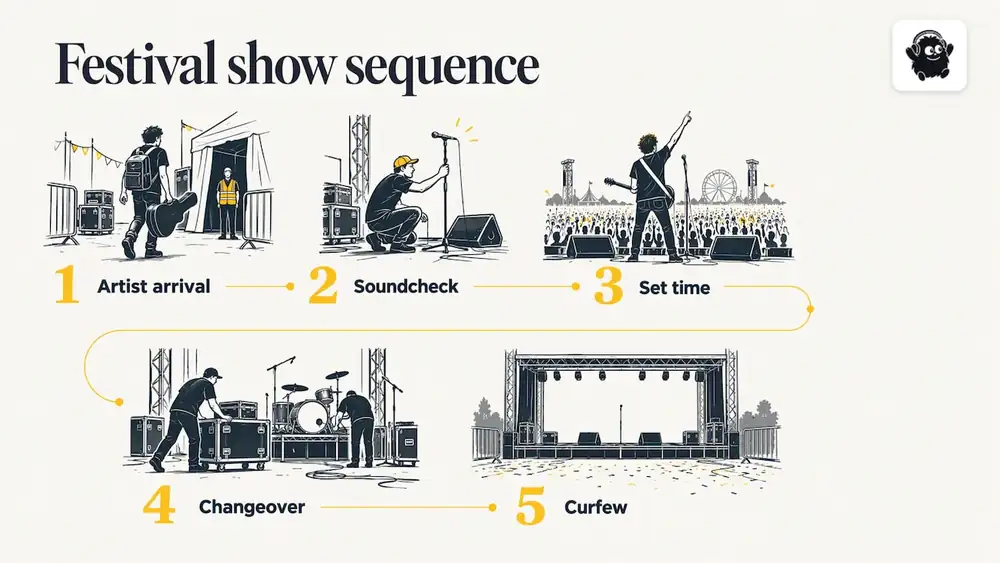
Multi-stage events need one tab or one block per stage, plus a master view that shows every stage by time. Include artist arrival, soundcheck, set time, changeover and curfew. Mark clashes between stages that share crew or equipment. Stage managers generally need only their own stage, while the production lead needs the combined view.
Fundraisers and galas
Build around the programme: reception, seating, dinner service, speeches, auction or paddle raise, entertainment. Note the exact moment servers pause for speeches, and who cues the donation appeal. Add a column for visuals and videos so the AV lead knows which file runs when.
Hybrid and virtual events
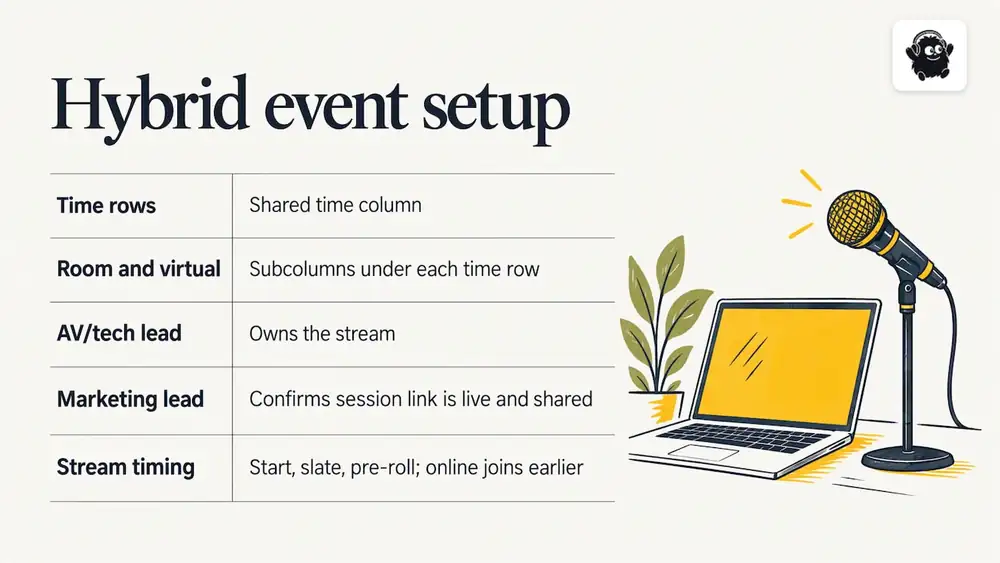
For hybrid events, add in-room and virtual sub-columns under each time row, with a shared time column. In that template, the AV and tech lead owns the stream and the marketing lead confirms the session link is live and shared. Add a row for stream start, slate and pre-roll, because online audiences join earlier than people do in the room.
Our perspective: the run of show works best when it sits next to the rest of the event
We see the same pattern across festivals, conferences and venue events: the run of show is only as reliable as the information feeding it. When ticketing, schedule, staff roles and door operations live in different places, the document drifts from what is really happening.
That is why we build Eventist to cover more than ticket sales. Organizers can build multi-stage and multi-track schedules, assign staff roles, and use QR check-in from any phone, so the run of show draws on the same schedule that attendees and staff already see.
Our advice is practical: keep your master timeline short, give every segment a single owner, and make sure your door and check-in plan is in it as clearly as your stage plan. Opening a doors row at 8:30 means little if nobody knows how many people are scanning in at once.
If you want a longer walkthrough, our own guide on how to build a run of show goes through it step by step.
— Ciara
Running the document on the day
A good run of show earns its value in the final hours. A few routines help:
- Call times, not just start times. Give performers and speakers a call time well before their segment, and put it in the document.
- Time check. The stage manager announces actual versus planned time at set moments, for example at each break, so every owner knows how much slack remains.
- Mark what actually happened. A column for actual start time makes debriefs easier and gives you better estimates next year.
- Debrief within a few days. Walk through the document row by row and note which durations were wrong. Update your template while it is fresh.
Where Eventist fits
If you sell tickets for the event, the same platform can run the day. Eventist handles ticketing with seat maps, registration, QR check-in and a built-in point of sale for door sales, alongside multi-stage scheduling, live maps, vendor and exhibitor booths, and staff roles. Our pricing page lists the current rates. As of November 2026, Canadian organizers pay $0.85 CAD per paid ticket for event ticketing and $4.99 CAD per paid ticket for festivals and conferences. Card processing fees go to Stripe or Square at their own rate. Free tickets and registrations run on monthly plans starting from $100 CAD.
As a simple example, 500 paid tickets at $0.85 CAD comes to $425 CAD in Eventist fees, before card processing. The fee is a flat amount per ticket, so it does not rise with your ticket price the way a percentage does, which is why it is usually cheaper for events with higher-priced tickets. Venues are priced differently: they pay 0.5% to 1.9% of what they charge on everything they sell, single tickets included, and the venue page has the details.
If you want help getting the schedule and operations set up, our services page lists done-for-you setup and team training from a Canadian team.
Frequently Asked Questions
What is the difference between a run of show and an event schedule?
An event schedule or agenda is attendee-facing and high level, listing what happens and when. A run of show is internal and goes down to the minute, adding owners, cues, locations and contingency notes. Most events need both, kept in sync.
How long should a run of show be?
It should be as long as your event requires and no longer. A single-stage evening may fit on one page, while a multi-day festival needs one block per stage and day. If a stage manager cannot see the current segment and the next two without scrolling, the document is too dense.
Who should have access to the run of show?
Give everyone who has a cue or owns a segment access: the stage manager, AV and technical crew, hosts, registration and door leads, and the production lead. Share one live link so everyone sees the current version. Keep editing rights limited to the owner and a backup so that changes stay controlled.
Do I need special software, or is a spreadsheet enough?
A spreadsheet is enough for most events, provided it is shared as one live document and your team can open it on a phone. Dedicated show-flow tools or project management software help when many people edit at once or when you want timers and cue calling. Choose the simplest tool your team will actually use on the day.
Sources
- Pros and cons of using Excel run of shows (+ templates), Rundown Studio
- What Is a Run of Show? Centric Events
- Event Rundown & Show Flow Guide with Examples, Stagetimer
- Example Completed Run of Show, City of Seattle
- How to Create a Run of Show, Xtimer
- Run-of-Show Flagship template, Ganjier Guild
- EMU Ballroom Stage Show Planning Guide, University of Oregon
- How to Create a Run of Show, Nextshow
Recommended
Tags
Ready to simplify your events?
Join hundreds of organizers, studios, and festival directors who trust Eventist to run their events.