Last-Minute Ticket Sales: How to Fill Remaining Seats
Last-minute ticket sales are the tickets you sell in the final two to three weeks before an event, and especially in the final 72 hours. To sell more of them, start a dedicated closing campaign early, give buyers one clear reason to act now, make checkout fast, and keep door sales, seats and check-in under control so a late rush never becomes an entry problem. This guide covers each step for festivals, conferences, trade shows, venues, concerts and everyday ticketed events.
TL;DR
- Treat the final two to three weeks as a separate campaign with its own plan, budget and messages, not as leftovers from the main launch.
- Use real urgency (a genuine deadline, a genuine capacity limit) and keep it short. Urgency stretched over two weeks stops working.
- Decide on discounts before you need them: protect earlier buyers with a rule, such as a bundle or an add-on, rather than a blanket price cut.
- Plan door sales, held seats and check-in together so the last sale is as smooth as the first.
- Track sales by day and by source so next year's plan starts with data, not guesses.
When the last-minute window actually starts
For most events, the last-minute phase is not the final day. One marketing timeline describes a conversion phase of roughly the final two to three weeks, in which organizers lean on urgency messaging, retargeting, SMS reminders, limited-time incentives and abandoned cart recovery.
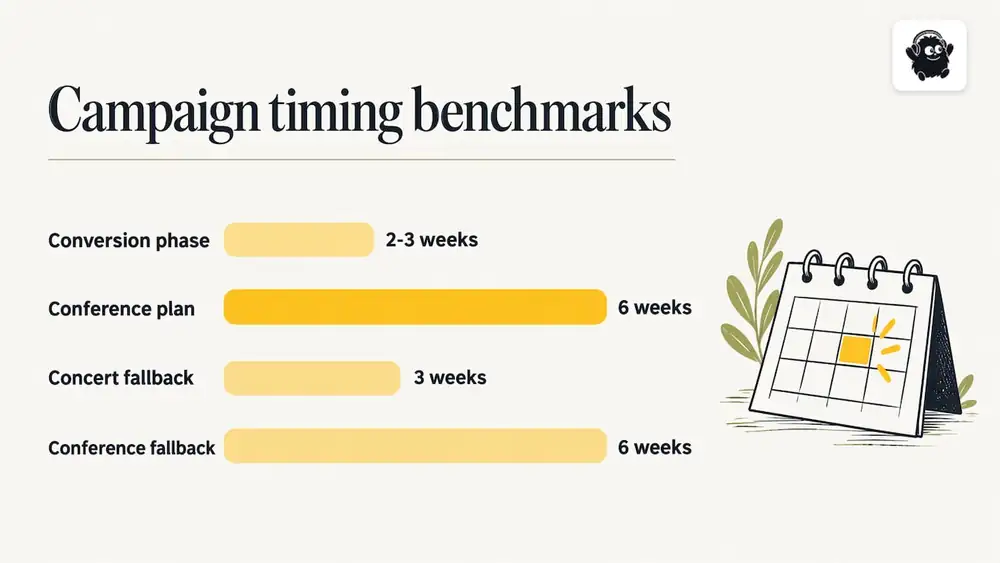
Conferences make the case for starting even earlier. A 2026 conference marketing guide reports that roughly a third of registrations for many conferences arrive in the last month, which is why it suggests giving the final six weeks their own campaign plan. These are published guides from marketing firms, not industry-wide measurements, so use them as a starting benchmark and check your own past sales curve.
A practical way to set your own start date:
1. Pull the daily sales from your last comparable event and mark when sales climbed.
2. Start the closing campaign a week before that climb began, so your messages are already running when buyers decide.
3. Set a hard internal date, usually 72 hours out, when the campaign switches from awareness to pure urgency.
If you have no history, use three weeks for a concert or community event and six weeks for a conference or trade show, then adjust after the first event.
Decide first: discount or hold the price
The worst time to design a pricing policy is the night before the event, when empty seats make every option feel attractive. Decide the rules early.
Hold the price when sales are on pace and the remaining inventory is a small share of capacity, when the event has a strong draw (a headliner, a keynote, a sold-out history), or when earlier buyers paid a visible early-bird price and would notice a cut.
Consider an incentive when the sales curve is clearly behind plan, when a section is visibly empty, or when your break-even point is still some tickets away.
If you do offer an incentive, there are ways to do it without cutting the ticket price for everyone:
- Group bundles. A set price for four or more tickets brings in friends of existing buyers without discounting single tickets.
- Add-ons instead of discounts. A drink voucher, a merchandise item or a workshop seat adds value to the ticket and leaves the price intact.
- Targeted codes. Give a code to a specific audience, such as a newsletter list, a partner organization or an influencer's followers, so you can see what it earned.
- A short, announced window. A 48-hour offer with a real end time reads as honest. An offer that is quietly extended teaches buyers to wait.
A quick arithmetic check
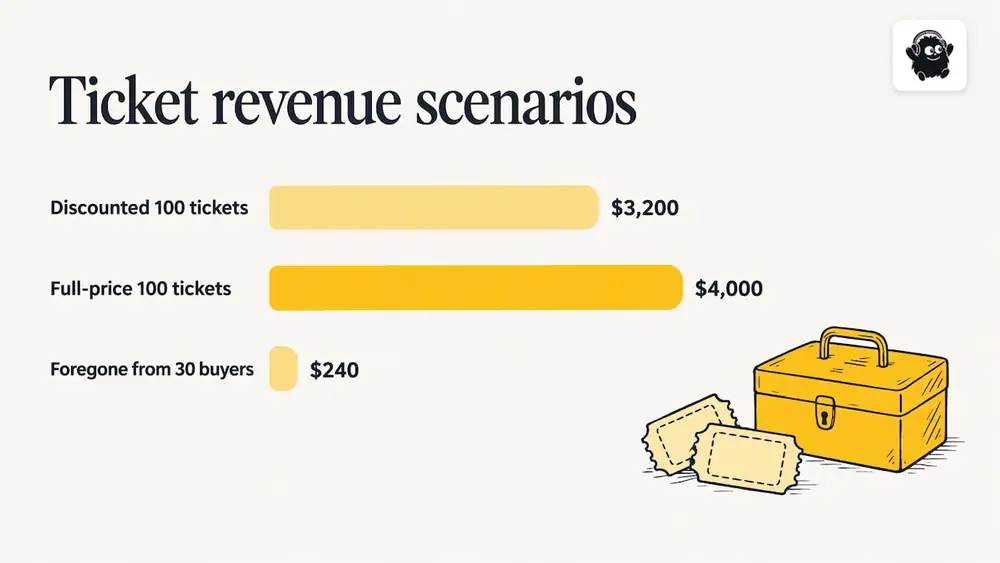
Before discounting, compare the cost to the likely gain. Say 400 of 500 tickets are sold at $40 and you want to sell the last 100. A 20% discount on only the last 100 tickets gives up $8 on each, so the final tickets bring in $32 each, or $3,200. That is better than empty seats if your costs are already covered, but it only makes sense if the discount does not pull forward buyers who would have paid $40. If you expect 30 of those 100 to have bought at full price anyway, you lose $240 on them. That is the number to weigh against the extra sales the offer brings in.
Messages and channels that work in the last days
The final stretch is about reaching people who already know the event. Warm audiences convert faster and cost less than cold ones.
Start with your own list
- Email to past attendees and to everyone who viewed but did not buy. Keep it short, with the date, the venue, what is left and one button.
- Abandoned-cart emails. People who started checkout are your closest buyers. A reminder an hour later and another a day later recovers a share of them.
- SMS reminders. Short and sent sparingly, usually once at the 72-hour mark and once on the day. Only message people who agreed to receive texts.
If you are building these flows from scratch, a marketing automation checklist walks through the triggers and sequences to set up so that none of them depend on someone remembering to hit send.
Use paid social with a short closing window
One paid social playbook for events recommends a 72-hour closing window, noting that urgency stretched across two weeks stops reading as urgency, and that warm audiences should carry most of the delivery in the final week. In practice that means retargeting people who visited your ticket page, watched your videos or follow your pages, rather than spending to reach strangers.
Creative fatigue is the usual problem when the same ad runs for days. Tools that generate and rotate ad variations, such as automated Meta and TikTok ads, can help keep the final-week creative fresh without a designer on call.
Message ideas that stay honest
- "Doors open Saturday at 7 p.m. Tickets are available online until 5 p.m. that day."
- "Section B is now the only section with seats together for groups of six."
- "Last day for the group rate."
- "The speaker lineup is final. Here is the full schedule."
Each one gives a fact the buyer can act on. Avoid inventing scarcity. Telling buyers only a few tickets remain when plenty do is a quick way to lose trust, and in some places it creates legal exposure (see the section on staying accurate below).
Use partners and people
In the last week, ask each speaker, performer, sponsor, vendor and exhibitor to share one post with their own link. Referral links let you see who actually sent buyers, and a personal message from a performer often outperforms an event page post.
Door sales, online sales and check-in
A last-minute rush is a throughput problem. Plan it like one.
Keep online sales open as late as you safely can. Many buyers decide on their phones while travelling to the event. Closing online sales too early pushes them to the door, where lines form. A reasonable approach is to keep online sales open until shortly before doors, and to switch to a door-only mode once the entrance team needs to focus on the line.
Decide how door sales work before the day.
- Set a door price. Many organizers charge the same as the last online price to avoid punishing early buyers and to avoid rewarding waiting.
- Staff the door with enough point-of-sale stations to match your expected walk-up volume, plus one backup.
- Pre-decide payment methods. Card-only is faster than cash, and it makes the end-of-night reconciliation simpler.
- Have a way to sell and scan on the same device or system, so a ticket sold at 7:50 is valid at 7:51.
Deliver tickets instantly. Buyers expect a digital ticket within seconds. Make sure the confirmation email and the ticket link work on a phone, since last-minute buyers are almost always on mobile. For conferences, include the schedule or agenda link in the confirmation.
Check-in must match your sales channels. Every channel (online, door, comp, will-call) should produce a ticket that scans the same way. Test the process with a few real devices at the actual entrance before the day, in the actual Wi-Fi or cellular conditions, and have a manual name lookup for people who cannot find their ticket.
Brief your staff members. On the day, they should know the door price, the refund rule, what to do with a duplicate or screenshot ticket, and who makes exceptions. A one-page cheat sheet saves a lot of line time.
For more on onsite tools, see our comparison of festival ticketing onsite features.
Reserved seats, held inventory and capacity
Last-minute sales get complicated when seats are assigned or when part of your capacity is held back.
- Audit holds early. Review every held seat or ticket three to five days out: artist comps, sponsor blocks, accessibility seating, production holds, staff and press. Release anything you will not use, because those seats are inventory you can sell.
- Release in stages, not all at once. Release held seats in batches so you can message each release as news ("a new block of seats near the stage").
- Keep accessible seating protected. Before releasing any accessible seats to general sale, follow your venue's policy and any applicable accessibility requirements.
- Never sell above capacity. Capacity is set by the venue, the fire code and your permits, and it includes staff, performers and vendors in many cases. This is general guidance, not legal advice: confirm your limits with the venue and your local authority, and check your insurance and permit terms for any capacity conditions.
- Watch the online and door counts as one number. If two systems sell the same inventory, a rush can oversell. Use a single inventory source, or split the capacity in advance (for example, 450 online and 50 door) and enforce the split.
- Show the real seat map. Buyers decide faster when they can pick seats on a map and see what is left. For general admission events, show remaining capacity by tier or zone instead.
For events with reserved seating, our guide to event ticketing covers how seat maps and ticket types fit together.
Staying accurate: urgency, resale and earlier buyers
Urgency only helps when it is true. Rules vary by jurisdiction, so check yours. As one example, Australia's ticketing code of practice states that under Australian Consumer Law, claims such as "sold out" or a low percentage of tickets remaining may be misleading or deceptive in certain contexts if they are not clear and accurate. That is an Australian rule and not a Canadian one, but it reflects a principle worth following everywhere: do not say tickets are nearly gone unless that is accurate. For Canadian consumer protection and advertising rules, check with your provincial consumer protection office or a lawyer. This is general guidance, not legal advice.
Other risks to manage:
- Upsetting earlier buyers. If you offer a late discount, consider a goodwill gesture for people who bought at full price in the previous week, such as an upgrade or a perk. Or avoid the problem by using bundles and add-ons.
- Fraud and duplicates. Last-minute buyers are a common target for fake resale listings. Tell buyers in your emails that the only valid tickets are those bought from your official page, and use unique QR codes so duplicates are rejected at the door.
- Refunds. State your refund policy at checkout so there are no surprises. Last-minute buyers are more likely to ask for a change when plans shift.
- Chargebacks. A clear event name on the card statement and a prompt confirmation email reduce disputes.
Measure what worked
The closing campaign is also your best data for next time. Record these figures once the event is over:
| Metric | Why it matters |
|---|---|
| Tickets sold per day for the final 21 days | Shows when buyers actually decided |
| Sales by source (email, SMS, social, referral, direct) | Shows which channel deserves budget next time |
| Abandoned carts and how many were recovered | Shows the value of reminder emails |
| Discount code redemptions versus full-price sales | Shows whether the incentive created sales or just lowered revenue |
| Door sales as a share of total | Helps you plan staffing and stations |
| No-show rate | Helps you set realistic capacity and catering numbers |
Compare each figure against the previous event and write down one change for next time: start the campaign a week earlier, move the SMS reminder, or release held seats sooner. For more tactics on filling an event, our 14-day rescue plan and 25 ways to sell more tickets go deeper on each lever.
Our perspective: make the last sale as easy as the first
Most last-minute problems are really planning problems. Organizers discover on the final weekend that holds were never released, that the door system does not match the online one, or that no one set up a reminder for people who left checkout.
We built Eventist so the pieces of an event run in one place. Abandoned-cart recovery emails and SMS reminders cover the people who nearly bought. Seat maps show buyers what is actually left. QR check-in from any phone and a built-in point of sale for door sales mean a ticket sold minutes before doors is valid at the entrance. Staff roles and the run of show keep the team working from the same plan.
Our advice is to set your closing campaign, your discount rule and your door plan two weeks out, and to have them all running from one system. A late rush then becomes an opportunity rather than a scramble.
— Ciara
What Eventist charges for ticketing
We price per paid ticket rather than as a percentage, which matters most when you sell a lot of tickets at higher prices. As of November 2026, based on our pricing page, Canadian organizers pay $0.85 CAD per paid ticket for event ticketing and $4.99 CAD per paid ticket for festivals and conferences. Card processing fees are paid to Stripe or Square at their own rates. Venues pay 0.5% to 1.9% of what they charge on everything they sell, single tickets included. Free tickets and registrations run on monthly plans starting from $100 CAD.
Here is the arithmetic, using a hypothetical percentage fee of 5% for comparison, since percentage rates vary by platform. On 500 tickets at $40, a 5% fee is $2.00 per ticket, or $1,000. At $0.85 per paid ticket, the same sale is $425. That is why Eventist is usually cheaper, though the gap narrows as ticket prices fall: at a $17 ticket, 5% equals $0.85, so the two fees match. Compare your own ticket price and volume against any platform you consider.

To see how the ticketing, seat maps and onsite tools fit your event type, visit our event ticketing page, and compare options in our ticketing platform comparison.
Frequently Asked Questions
How late can I still sell tickets online?
As late as your entrance process can handle. Many organizers keep online sales open until shortly before doors, then move to door-only sales so the entrance team can focus on the line. Whatever you choose, announce the cutoff in your final messages.
Should I discount tickets in the final week?
Only if the sales curve is clearly behind plan and the discount will not mostly go to people who would have paid full price. Bundles, add-ons and targeted codes protect earlier buyers better than a blanket cut. Decide the rule before the final week so it does not become a reaction.
Is it legal to say tickets are almost sold out?
It is safe only when it is accurate. Some jurisdictions, such as Australia, treat unclear or inaccurate scarcity claims as potentially misleading. In Canada, check with your provincial consumer protection office or a lawyer. This is general guidance, not legal advice.
How do I avoid overselling when I sell online and at the door?
Use one inventory source for both, or split your capacity in advance and stick to the split. Release held seats in batches, and confirm your total capacity, including staff and performers, with your venue.
Sources
- Event Promotion Timeline: Launch, Ramp-Up & Convert
- How Far Out Should You Start Marketing a Conference?
- Facebook Ads for Events: 4-Phase Playbook
- Ticketing Code of Practice, 8th edition (RPAC, Australia)
Recommended
Tags
Ready to simplify your events?
Join hundreds of organizers, studios, and festival directors who trust Eventist to run their events.