Cvent Alternatives for 2026: How to Choose the Right Platform
The best Cvent alternative depends on what you run. Bizzabo and Swoogo suit B2B conferences, Whova suits app-led conferences, Eventbrite suits simple public ticketing, and flat-fee platforms suit organizers who sell tickets, seats and booths and want a predictable bill. This guide compares the main options on the criteria that decide a purchase: event type, pricing model, registration and ticketing, seating, exhibitor tools, on-site operations and contract terms.
TL;DR
- Cvent is built for large enterprises with complex logistics and procurement. Many festivals, venues, associations and mid-sized conferences need less software and a simpler price.
- Cvent and Whova generally ask you to request a quote, so compare total cost on a real event, not a headline figure.
- Match the tool to the event: app-first conference platforms, hybrid platforms, public ticketing marketplaces and all-in-one ticketing and operations platforms solve different problems.
- Check pricing structure first. A percentage of ticket revenue grows with your ticket price, while a flat fee per paid ticket stays fixed.
- Before signing, run one full workflow in a demo: registration setup, payment, check-in, reporting and data export.
Why organizers look beyond Cvent
Cvent is one of the best-known names in event management software. It covers registration, attendee apps, onsite check-in and badging, sponsor tooling and reporting, and it is aimed at large organizations with a lot of moving parts. That depth is also the reason many teams start looking elsewhere.
The common reasons are practical:
- Price opacity. Pricing is quote-based, so you cannot budget before a sales conversation.
- Setup effort. Enterprise suites tend to take longer to configure, which matters when you are launching sales in weeks.
- Fit. A two-day festival, a community gala, a venue with a reserved-seat season or a 300-person conference rarely uses the full suite.
- Contract terms. Multi-year agreements and add-on modules are harder to justify for events that run once or twice a year.
None of that makes Cvent a poor product. It makes the question "which platform fits my event and my budget?" worth asking before you renew or sign.
The main types of Cvent alternatives
Most searches for "Cvent competitors" end up at one of four kinds of tool. Knowing the category narrows eight or ten vendors to two or three.
Enterprise and B2B conference platforms
Bizzabo, Stova, RainFocus and Swoogo sit closest to Cvent. They handle multi-session registration, sponsor and exhibitor tooling, badges and reporting for corporate and association events. Bizzabo is often positioned around attendee experience for in-person and hybrid B2B conferences, including smart badges. Pricing for this tier is generally contract-based and sits well above self-serve tools, so expect a sales process and an annual commitment.
Conference app-first platforms
Whova and EventMobi centre on the attendee app: agenda, networking, messaging and push notifications. They suit conferences where the mobile experience is the product. Branded native apps and similar extras are often priced as add-ons, so ask what is in the base package.
Virtual and hybrid platforms
RingCentral Events (formerly Hopin), ON24 and Webex Events are built around streaming and webinars. They are the right shelf if most of your audience attends online. If your event is mostly in person, you will pay for capabilities you do not use.
Ticketing-first and all-in-one operations platforms
Eventbrite is the familiar choice for public ticketing and discovery. A newer group of platforms, including ours, combines ticketing with the operational side of the event: seat maps, registration, check-in, scheduling, vendor booths and staff roles in one system. These suit festivals, trade shows, concerts, venues and conferences that sell tickets and also have to run a floor.
Cvent alternatives compared
The table summarizes how the options usually differ. Treat it as a screening tool, then confirm module availability and current pricing with each vendor.
| Platform | Best suited to | Pricing approach | Typical strength |
|---|---|---|---|
| Cvent | Large enterprises with complex logistics | Quote-based | Breadth: registration, app, onsite, reporting |
| Bizzabo | B2B conferences, hybrid and in-person | Annual contract, sales-led | Attendee experience, smart badges |
| Whova | Conferences that rely on a mobile app | Check the vendor's current plans | Agenda and networking in the app |
| Swoogo | Teams wanting customizable registration | Sales-led | Registration flexibility |
| Stova and RainFocus | Large corporate and association events | Sales-led | Enterprise event programs |
| EventMobi | App-led conferences | Check the vendor's current plans | Branded apps |
| Eventbrite | Simple public ticketing | Fees on tickets sold | Audience reach and easy setup |
| RingCentral Events, ON24, Webex Events | Virtual and webinar-heavy events | Sales-led | Streaming and webinars |
| Eventist | Festivals, conferences, trade shows, venues, concerts | Flat fee per paid ticket for events; monthly plans for free tickets and registrations | Ticketing, seat maps, booths, check-in and run of show in one system |
Our own entry is there because Eventist is an alternative for Canadian organizers, with a flat fee per paid ticket, a built-in point of sale for door sales and QR check-in from any phone.
How to compare platforms on what matters
Event type and size
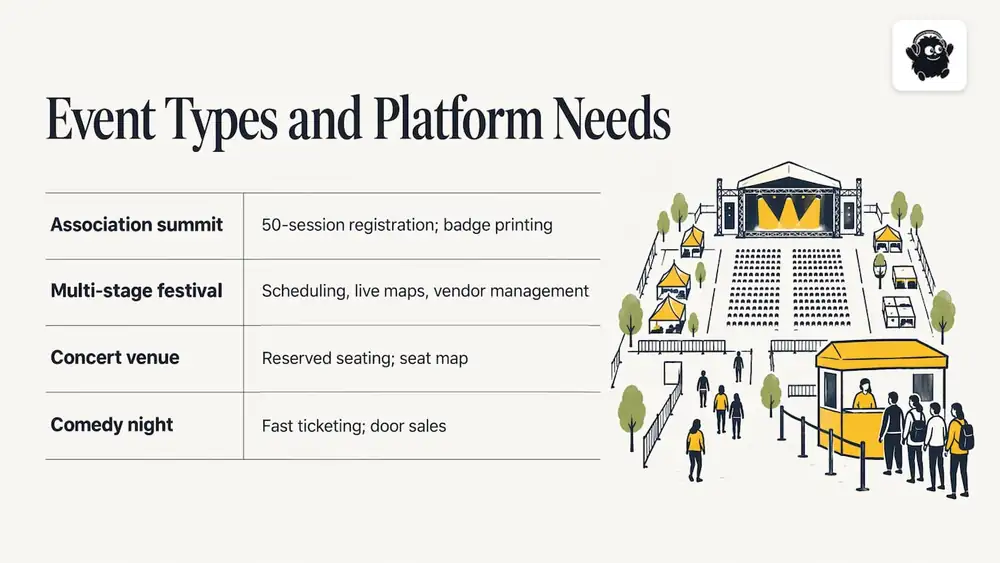
Start with the event, not the feature list. A 700-person association summit with 50 breakout sessions needs strong session registration and badge printing. A multi-stage festival needs scheduling across stages, live maps and vendor management. A concert venue needs reserved seating with a seat map. A comedy night needs fast ticketing and door sales. A platform that excels at one of these may be mediocre at the next.
If you want a broader framework before you shortlist, our buyer's guide to event management software walks through requirements in order, and the full event management software guide covers the wider market.
Registration and ticketing
Check how each platform handles ticket types, promo codes, group sales, tiered pricing, reserved seating and waitlists. Ask whether abandoned-cart emails and SMS reminders are included or sold separately. For a closer look at ticketing specifically, see this comparison of event ticketing platforms.
Seating, booths and exhibitors
If you sell reserved seats, the seat map builder matters more than almost any other feature. If you run a trade show, look for a booth map, exhibitor profiles and a way to manage vendor requirements. Enterprise suites often cover this well, but sometimes as separate modules. Confirm what is in the base package.
Onsite operations
Check-in speed is where a platform is tested. Look at whether staff can scan QR codes from their own phones or need dedicated hardware, whether door sales can be taken at the same entrance, and how attendee lists sync when Wi-Fi is weak. We keep a comparison of event check-in apps if this is your priority.
Integrations and data
Confirm the integrations you actually use: CRM, email, accounting and payments. Ask who owns attendee data, how you export it and who on your team can see what. This is the part of an evaluation that price tables never show.
Feature fit and migration
Switching platforms is a project in its own right: you move attendee lists, templates, ticket types and workflows, and retrain staff. Tracking that work in a task tool helps, and a roundup of project management tools for event planners is a useful place to pick one before the migration starts.
Cvent vs Bizzabo vs Whova: how they differ
These are the three names readers most often pair with Cvent, and they are not interchangeable.
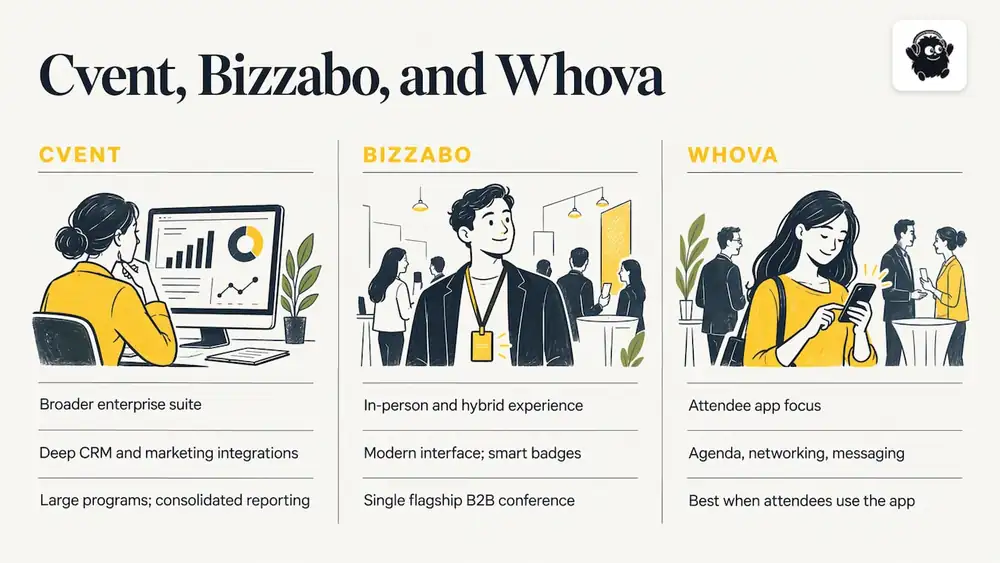
Cvent vs Bizzabo. Both target professional events. Cvent is usually described as the broader enterprise suite, with deep CRM and marketing integrations and procurement-friendly reporting. Bizzabo is usually described as stronger on in-person and hybrid attendee experience, with a modern interface and smart badges, at a price that sits above many mid-market budgets. If your event is a single flagship B2B conference, Bizzabo is the likelier fit. If you run a large program of events and need consolidated reporting, Cvent's breadth is the argument for it. If you want more options in this tier, we have a list of Bizzabo alternatives.
Cvent vs Whova. Whova is best known for the attendee app: agenda, networking and messaging. Cvent covers registration, apps, onsite and reporting across a larger program. The practical question is where your effort goes. If attendees spend the event in the app, Whova's focus is attractive. If your event depends on ticket sales, seating and exhibitors, a platform built around those workflows will serve you better. Our list of Whova alternatives covers that ground.
The ordering above is general. Verify module availability, equipment, support and contract terms with each vendor, because feature lists and price tables can be misleading until you see them in a demo.
Pricing models: flat fee, percentage and quote-based
The model matters more than the headline number. There are three common shapes.
- Quote-based annual contract. Typical for enterprise suites. You get a bespoke package, but you cannot compare it with anything until you have several quotes.
- Percentage of ticket revenue. Common in ticketing marketplaces. The fee rises with your ticket price, so a $150 conference ticket costs far more to process than a $20 workshop ticket, even though the work is the same.
- Flat fee per paid ticket. The fee stays the same whatever the ticket price, which makes budgeting simple.
Card processing is a separate line on most platforms. On Eventist, card processing fees are paid to Stripe or Square at their own rate. For reference, Stripe's Canadian standard rate for domestic cards is 2.9% + CA$0.30 per successful transaction. Always add the processor's cost when you compare any two platforms, since it applies on top of platform fees.
Worked example: 1,000 tickets at $40
Suppose you sell 1,000 paid tickets at $40 each, which is $40,000 in gross sales.
- Under a percentage model, for illustration only, a platform fee of 3% would cost $1,200 (1,000 × $40 × 0.03).
- On Eventist, Canadian organizers pay $0.85 CAD per paid ticket for event ticketing: 1,000 × $0.85 = $850 CAD.
At that ticket price, the flat fee is $350 lower. Double the ticket price to $80 and the 3% model rises to $2,400, while the flat fee stays at $850 CAD. That is why we say Eventist is usually cheaper than percentage pricing, and the gap widens as ticket prices rise. Your actual saving depends on the percentage and add-on fees you are comparing against, so run the same sum with each vendor's real rate.
What Eventist charges
These figures are from the Eventist pricing page, as of October 2026:
| Event type | Canadian organizers | US organizers |
|---|---|---|
| Event ticketing, per paid ticket | $0.85 CAD | $0.75 USD |
| Festivals and conferences, per paid ticket | $4.99 CAD | $3.50 USD |
| Competitions, per paid ticket | $9.99 CAD | $7 USD |
Free tickets and registrations run on monthly plans starting from $100 CAD. Venues are priced differently: they pay 0.5% to 1.9% of what they charge on everything they sell, single tickets included, so there is no flat per-ticket fee for venues. Our venue management page explains how that works.
A shortlist by event type
- Large corporate or association conference with a complex program: Cvent, Bizzabo, Stova, RainFocus or Swoogo. Expect a sales process and an annual agreement.
- App-driven conference: Whova or EventMobi. Confirm what the base package includes and what is an add-on.
- Mostly virtual or webinar events: RingCentral Events, ON24 or Webex Events.
- Simple public events and discovery: Eventbrite. Our Eventist vs Eventbrite comparison sets out the fee differences.
- Festivals, trade shows, concerts, venues and conferences that sell tickets and run a floor: an all-in-one ticketing and operations platform, such as Eventist, where tickets, seat maps, booths, scheduling and staff roles live in the same system.
For a deeper side-by-side, read our Cvent comparison for conferences and the longer list of Cvent alternatives.
How to run a fair evaluation
A structured trial protects you from a polished demo. Follow these steps with every shortlisted vendor, using the same scenario each time.
1. Write the scenario. Pick one real event: ticket types, price points, seating, sessions, vendors and staff roles.
2. Ask for a total cost. Get platform fees, add-ons, support and processing in writing for that scenario.
3. Build it end to end. Set up registration, take a test payment, issue tickets, check someone in and pull a report.
4. Test roles and data. Check who sees which data, how consent is recorded and how you export attendee records after the event.
5. Read the contract. Note the term, renewal, cancellation and what happens to your data if you leave. This is general guidance, not legal advice, so have your own counsel review any agreement.
6. Plan the migration. List what must move, who does it and when you will stop selling on the old system.
Support and setup help
Support differs more than most buyers expect. Enterprise vendors typically bundle account managers into larger contracts. Self-serve tools rely on help articles and chat. Ask how quickly you can reach a person on the day of the event, and what help with setup is available. Our services page lists the setup, training and on-site support we offer Canadian and US organizers.
Our perspective
We build event software for organizers who sell tickets and then have to run the day, and that shapes how we look at the Cvent question.
Most platforms in this market are strong at one part of the job. We think the better question is how many separate tools an event needs to stitch together. Tickets, seat maps, registration, QR check-in, door sales, multi-track schedules, live maps, vendor booths, staff roles and the run of show are all part of one event, so we designed Eventist to keep them in a single system, with setup help from a Canadian team.
We price on a flat fee per paid ticket because we believe organizers should be able to forecast costs before they sell a ticket. A flat fee does not rise as your ticket price does, which is why it is usually cheaper than percentage pricing once tickets cost more than a few dollars.
If you run festivals, conferences, trade shows, concerts or venues, we recommend building a shortlist around your event's real workflow rather than the longest feature list.
— Ciara
Eventist for Canadian organizers
If your event looks like the ones above, Eventist is built for it: ticketing with general admission or reserved seating, registration, QR check-in from any phone, a built-in point of sale for door sales, and tools for schedules, booths and staff. Canadian organizers pay $0.85 CAD per paid ticket for event ticketing, and you can see current rates on our pricing page.

If your conference needs registration and attendee management, start with our conference registration page. For everyday ticketed events, the flat-fee ticketing page shows how a typical event is set up.
Frequently Asked Questions
Who is Cvent's biggest competitor?
It depends on the event. For large B2B conferences, Bizzabo, Stova, RainFocus and Swoogo are the usual comparisons. For public ticketing, Eventbrite is the closest. For festivals, trade shows and venues, all-in-one ticketing and operations platforms are the more relevant alternative.
Is Cvent difficult to use?
Cvent is a broad suite, and broad suites take time to configure. Teams running a single event often find that the learning curve and setup time outweigh the value of modules they never use. If you are leaving it for that reason, choose a tool scoped to your event type.
Is Cvent a CRM system?
No. Cvent is an event management platform that integrates with CRM systems, and its reporting and marketing tools sit alongside them. If CRM integration matters to you, confirm exactly which systems each alternative connects to.
How should I compare pricing between Cvent alternatives?
Use one real event as the scenario and ask each vendor for a total in writing, including platform fees, add-ons, support and card processing. Then do the arithmetic yourself, as in the 1,000-ticket example above. That puts quote-based, percentage and flat-fee models on the same footing.
Sources
Recommended
Tags
Ready to simplify your events?
Join hundreds of organizers, studios, and festival directors who trust Eventist to run their events.