Vendor Onboarding Portal: 6 RFP Checks for Event Producers and Venues
A vendor onboarding portal is the organizer-controlled hub where exhibitors, sponsors, food vendors and contractors register, sign contracts, pick booths, pay fees and hand over the documents your event needs before move-in. The setups that work best give vendors self-service tools while keeping task ownership and approvals clearly with the organizer, and the simplest way to hold a platform to that is to write it into your RFP as a short list of checks before you sign anything.
Key takeaways
- Score every portal against six checks before your RFP goes out: exhibitor profiles and contracts, booth and space management, sponsor fulfilment, task automation, reconciliation reporting, and permissions and data controls.
- Give exhibitors, sponsors, food vendors and contractors their own branch of the workflow, and assign one named person to every task so approvals don't stall.
- Ask how the portal connects to registration, badges, lead retrieval and accounting, and whether supporting those connections is included in the price; IAEE's own RFP for exhibitor data management made it part of the contract.
- Work backwards from opening day, and test badge printing and payment reconciliation at least two weeks before the show rather than the week of.
- Roll the portal out to your service contractor first, then give exhibitors a short walkthrough; most adoption friction comes from unclear instructions, not the software.
The six checks every vendor onboarding portal should pass
Before signing with any platform, score it against the features that prevent manual bottlenecks in the busiest weeks of planning. IAEE's CEM event operations workbook describes the organizer's function book, a "quick reference guide to all aspects of the exhibition" that once lived in three-ring binders and is now digital or a mix of both. A vendor portal is where most of that information should start life, rather than being copied in from spreadsheets and email threads later.
1. Exhibitor profiles and contracts. Online contracts, digital signatures, payment processing and refund handling, all in one record per vendor.
2. Booth and space management. A live floor plan tied to booth or table selection, kept in step with what is marked out on site.
3. Sponsor fulfilment tracking. Asset uploads, entitlement checklists and fulfilment status that both sides can see.
4. Task automation. Deadline reminders, booth staff registration and credential printing for check-in.
5. Reporting for reconciliation. Financial and statistical reports you can export once the show closes.
6. Permissions and data controls. Role-based access, plus an API or exports for your other systems.
Trade show platforms describe the same split. A2Z by Momentive, for example, says exhibitors browse an interactive floor plan and reserve booth space through a self-service portal, with contracts, payments and deliverables managed in the platform and sponsorship packages tracked alongside exhibitor deals. That self-service half is what takes the back-and-forth off your inbox.
Pro tip: Score any portal against this list before your RFP goes out, not after you've already signed a contract.
How to build a vendor onboarding workflow step by step
A workflow only works when its order matches how vendors actually move through planning, so build it in sequence rather than trying to collect everything on day one.
1. Send the invite. A profile link and a deadline, not a blank form.
2. Collect the contract and payment together. A signed agreement and a deposit happen in one step.
3. Open booth or space assignment once payment clears. Tie it to the live floor plan so availability is always current.
4. Trigger pre-show tasks. Insurance certificates, exhibitor-appointed contractor (EAC) notices, utility orders, signage specs and lead retrieval preferences.
5. Collect sponsor assets separately. Sponsors have different deadlines and deliverables from exhibitor logistics.
6. Confirm on-site check-in details. Credential names, booth staff counts and arrival windows.
7. Close out with reconciliation. Once the show ends, reconcile payments, refunds and fulfilment status for every vendor.
Some platforms fold the middle steps together. In Eventist, for example, booths are laid out in the seat map builder and sold through a vendor-only checkout page, so a vendor picks a booth from the map and pays in one go. Completing the purchase adds them to the event's staff with the Vendor role, and their portal then shows the booth they reserved and any contract you've assigned them to sign.
Different vendor types need different branches
The same workflow branches by vendor type, so build conditional logic that shows each type only the fields relevant to them.
| Vendor type | What their branch collects |
|---|---|
| Exhibitor | Booth selection, contract, payment, booth staff list, utility and service orders |
| Sponsor | Logo files, signage specs, entitlement checklist and fulfilment deadlines |
| Food vendor | Health permits and power draw figures |
| Contractor | Certificate of insurance before badge approval |
Permit and insurance requirements are set by your venue, your municipality and the local public health unit, so confirm them there; this is general guidance, not legal advice.
Make ownership explicit
Ownership needs to be clear at every step. The organizer approves contracts and payments, the official service contractor (OSC) handles booth set-up, signage and freight on the show floor, the exhibitor submits assets and staff lists, and third-party vendors such as caterers handle their own permits. IAEE's workbook lists establishing roles and responsibilities for all stakeholders, from pre-event through post-event, among its learning objectives, and in its section on audiovisual services it tells organizers to understand "who is providing which services and the process for billing."
A named owner on every task is the simplest way to make that visible. Eventist's task board works this way: each task can have named assignees and a due date, and it shows up in that person's own task list when they sign in to their staff portal.
Pro tip: Assign one named owner per task, never a department, so nothing stalls waiting for someone to claim it.
Integrations and permissions a vendor portal needs to support
A portal that can't talk to your other systems just moves the manual work somewhere else. IAEE's own request for proposal for exhibitor data and floor plan management at Expo! Expo!, covering its 2019 to 2021 shows, opens its specifications with integration requirements: the contractor had to support third-party services such as RFID, lead retrieval, mobile apps, scheduling tools and audience polling, with that labour and expense counted as part of the contract. The same RFP asked for a real-time online floor plan that interfaces with the general service contractor, online space contracting with automated payment processing and date-triggered pricing, exhibitor self-service updates, integration with the registration system and event app, and standard and custom reports.
Use that as a model for your own checklist:
- Badge and credential printing that syncs with registration data in real time.
- Lead retrieval and payment integration so exhibitor purchases and attendee scans flow into one record.
- CRM and accounting exports in formats your finance team can actually open and reconcile.
- Role-based permissions so organizers, service contractors, exhibitors and their contractors each see only what they need, with an audit trail of who changed what.
- Data retention and security practices that protect payment details and compliance documents collected during registration.
- Floor plan sync with on-site systems, including RFID check-in where a venue uses it.
The same RFP also asked bidders for at least three references from customers who had used the service in the previous six months, which is a check worth copying. Treat post-show financial and statistical reporting as a contract deliverable with a stated turnaround, not a courtesy follow-up.
A practical timeline for rolling out vendor onboarding
Lead time matters more than any single feature. There's no single industry calendar, but the IAEE workbook gives one anchor: the exhibitor service manual, with its service order forms and rules, is "generally sent or made available three to six months before the show," and organizers can send customized bulletins from booth assignment until the week before the show to remind exhibitors of their deadlines. Work backwards from that.
1. Site launch. Profiles created and the floor plan loaded well before the service manual goes out.
2. Contract and payment deadline. Signed agreements and deposits collected, so booth assignments are final and the reminder bulletins can start.
3. Pre-show validation. Test badge printing, run a payment reconciliation check, and confirm the floor plan matches the venue layout.
4. On-site check-in. Credentials issued and booth staff confirmed.
5. Post-show closeout. Financial and statistical reports delivered to stakeholders. The CEM workbook points organizers to the Events Industry Council's Post-Event Report (PER), which it describes as the industry's accepted format for post-event data.
Pro tip: Run the badge and payment reconciliation tests at least two weeks before the show, never the week of.
What switching to a portal actually changes for organizers
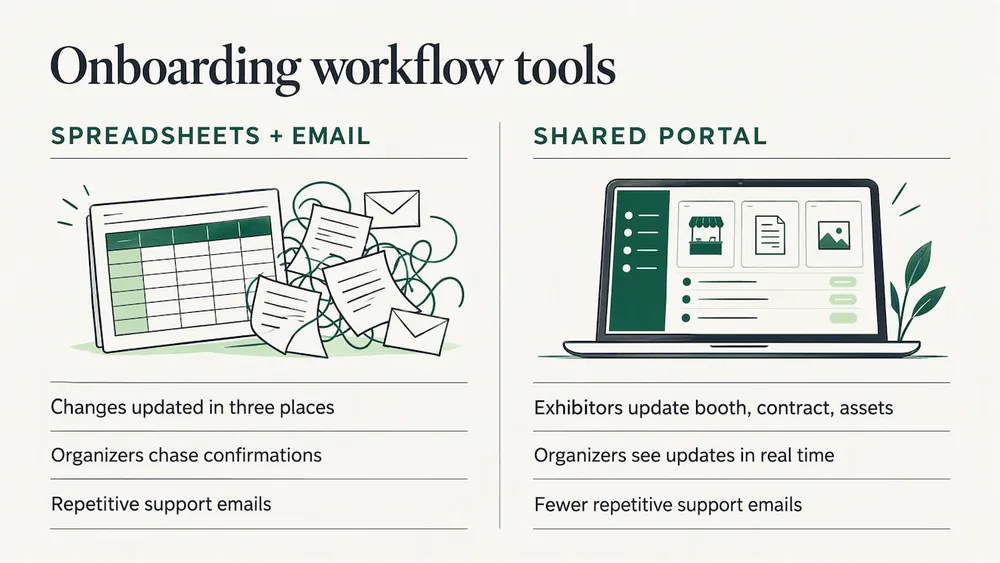
Spreadsheets and email chains fall apart once you have more than a handful of exhibitors, because one change can mean updating the same detail in three places: the spreadsheet, the email thread and the floor plan. A shared portal removes that duplication: exhibitors update their own booth, contract and asset status, and organizers see it as it happens instead of chasing confirmations. It's the same reason organizers are moving away from spreadsheets for the rest of their planning.
The payoff carries on site. IAEE suggests a master status chart that tracks the progress of each exhibit installation, kept by a floor manager or the OSC and updated daily, and that chart is far easier to keep when the portal already knows who has paid, signed and confirmed their arrival window.
Adoption friction usually comes from unclear instructions, not the software itself. A staged rollout with your service contractor, paired with a short exhibitor walkthrough, clears most of that friction before it becomes a support ticket. Watch three signals after rollout: fewer repetitive support emails, more tasks completed by their deadline without a reminder, and faster reconciliation once the show closes.
Frequently Asked Questions
What should a vendor onboarding portal include at minimum?
At minimum it needs exhibitor profiles with contracts and payments, booth or space assignment tied to a live floor plan, task tracking with deadlines, and post-show reporting for reconciliation. IAEE's own RFP for exhibitor data management also asked for integration with its registration system and event app, and for support of third-party services such as lead retrieval.
How far in advance should vendor onboarding start?
It depends on the size of the show, but work backwards from the exhibitor service manual, which IAEE's workbook says is generally sent or made available three to six months before the show. Profiles and the floor plan should be live before then, and badge names should be locked early enough to test credential printing at least two weeks before doors open.
What is the difference between an exhibitor and a sponsor in a portal workflow?
Exhibitors move through booth selection, contracts and staff registration, while sponsors follow a separate track focused on asset uploads, entitlement tracking and fulfilment deadlines tied to their package. Keeping them as distinct workflows avoids forcing sponsors through logistics fields that don't apply to them.
What is an exhibitor-appointed contractor (EAC)?
IAEE's workbook defines an EAC as any company other than the designated official contractor that provides a service to an exhibitor, such as an install and dismantle company, a photographer or a florist. Your portal should collect EAC notices and insurance certificates before badges are approved.
What reports should a portal deliver after the show ends?
Reconciled financial reports and statistical summaries covering revenue, attendance and exhibitor fulfilment status, in a format your team can export. Write the turnaround time into the contract, and consider structuring the summary around the Events Industry Council's Post-Event Report, which the IAEE workbook points to as the industry's accepted format.
What should a vendor portal RFP ask for besides features?
References and support. IAEE's RFP asked for at least three references from customers who had used the service in the previous six months, technical support by email and phone, training for its staff, and support staff on site during show hours to handle contract submissions.
Sources
- 2023 CEM Event Operations Workbook, International Association of Exhibitions and Events (IAEE)
- Request for Proposal: Online Floor Plan/Exhibitor/Speaker Data Management Services, IAEE
- Event management software, A2Z by Momentive
For the commercial side of vendor sales, the vendor and sponsorship packages guide covers booths, tiers, contracts and payment, and the festival vendor management software comparison puts the tools side by side.
Tags
Ready to simplify your events?
Join hundreds of organizers, studios, and festival directors who trust Eventist to run their events.