Crowd Tracking and Geolocation at Events
Steps at a glance
- Write down the question first. Which areas are busy, where the queue is forming, which vendor row was missed. The question decides how little you need to collect.
- Pick the method that answers it. Scans and map location cover most events without new hardware; sensors and cameras add reach, cost and obligations.
- Ask for location where it is used. The browser prompt on the event map, in plain words, with a map that works just as well for someone who declines.
- Count places rather than people. Store counts per pin per minute, use an identifier scoped to one event if you need one at all, and forget it quickly.
- Put the live view on one screen. The operations lead should have it open, so a backed-up gate or a full area moves staff within the hour rather than in the debrief.
- Read it as a sample, not a census. Compare areas and times rather than quoting totals, and say so in the room, because a sample used as a headcount makes bad decisions.
Knowing where people are at your event used to mean a radio call and a guess. Now a phone in every pocket makes it measurable: which stage is filling, which entrance is backing up, which vendor row nobody found all weekend. The technology is easy to buy and easy to get wrong, because what you are actually collecting is where people went, and that carries obligations you do not get to opt out of.
This guide covers the ways crowd location is measured at events, what each one actually tells you, what Canadian privacy law expects of you, and how to use the data on the day rather than three weeks later in a report nobody reads.
Key takeaways
- Every method is a sample, not a headcount. Know which slice you are counting before you make a decision with it.
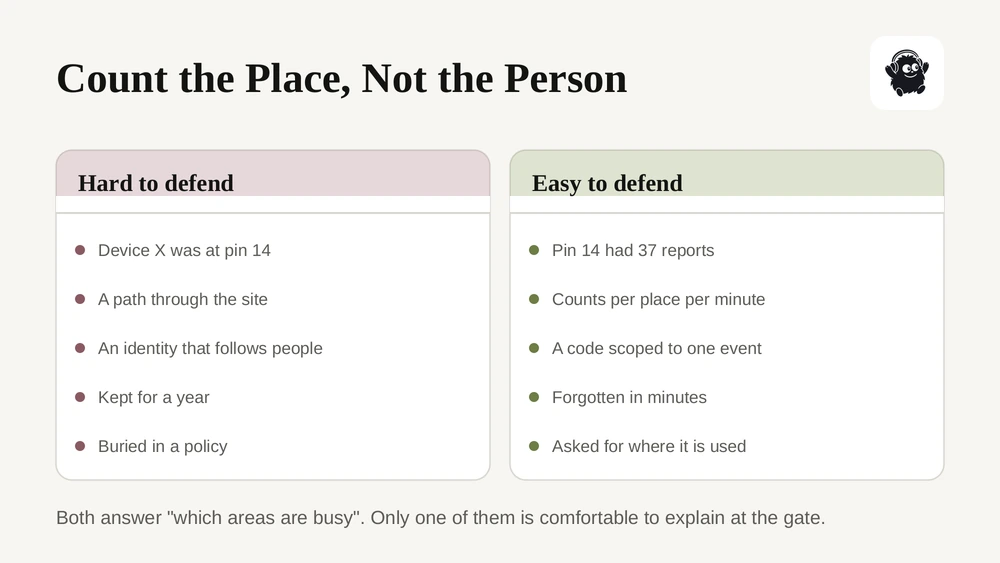
- Collect the least that answers your question. "Which areas are busy" needs far less than "where did this person go", and only one of them is comfortable to defend.
- Tell people in plain words, where they are, not in a privacy policy nobody opens.
- Live data is worth more than a report. A heat map you read after the event cannot move a food truck.
- The most useful signal at most events is not location at all. It is attendees telling you a place is busy.
The ways to measure a crowd
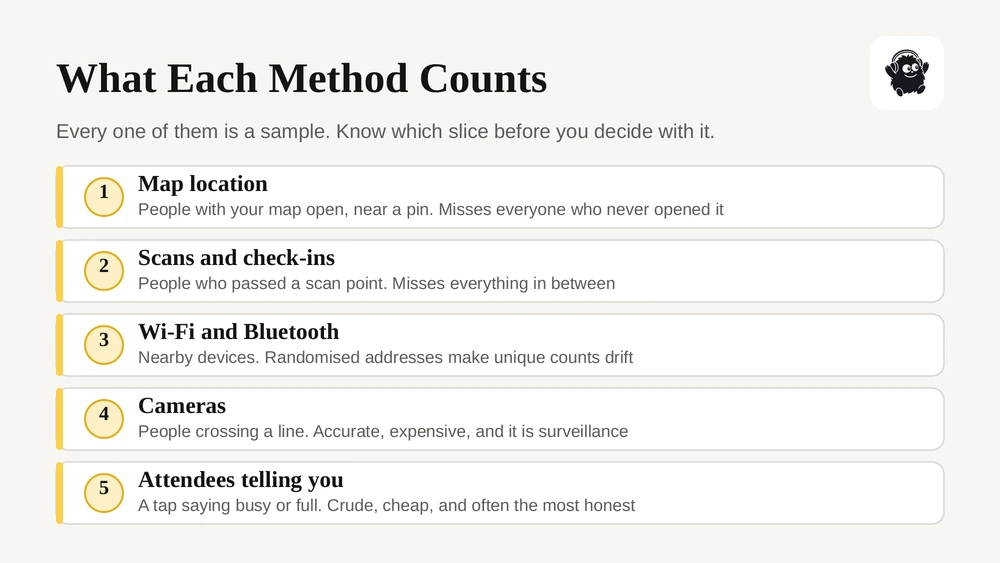
Phone location on your own map. The attendee opens the event map, the browser asks for location, and the pins they are near are counted. Accurate to a few metres outdoors, zero hardware, and it only counts people with the map open: engaged attendees, not everyone.
Scans and check-ins. Every QR scan at a gate, a session door or a booth is a timestamped count at a known place. The most accurate and the most boring, and for many events it is enough.
Wi-Fi and Bluetooth sensors. Hardware that counts nearby devices. Counts people who never open anything of yours, which is the appeal, but modern phones randomise their addresses, so counts drift and unique-visitor numbers should be treated with suspicion. In Canada, the Office of the Privacy Commissioner's position on mobile device tracking is that it is a collection of personal information and needs meaningful notice.
Cameras with people counting. Accurate for a doorway, expensive, and it is video surveillance with everything that implies. Signage, retention limits and a reason you can state out loud.
Staff reports. A guard saying "gate three is backing up" into a radio. Still the fastest signal at most events, and still the one most often lost because nobody writes it down.
Attendees telling you. A tap on the map saying a place is busy or full. Crude, cheap, honest, and the one organizers forget exists.
What the numbers are and are not
Any of these gives you a number. The question is what the number is a number of.
| Method | What it counts | What it misses |
|---|---|---|
| Map location | People with your map open, near a pin | Everyone who never opened it |
| Scans | People who passed a scan point | Everything between scan points |
| Wi-Fi sensors | Devices with Wi-Fi on nearby | Phones with it off; one person with two devices counts twice |
| Cameras | People crossing a line | Anywhere a camera does not point |
| Attendee reports | People willing to tap | Everyone who is busy enjoying themselves |
The honest use of all of them is comparison, not census. "This stage is twice as busy as it was an hour ago" and "row C is dead compared with row A" are solid conclusions from a sample. "We had 4,312 people at the main stage" is not, unless you counted them through a gate.
What Canadian privacy law expects
This is general guidance rather than legal advice, and your obligations depend on where your event is and where your attendees come from. Still, the shape is consistent.
Location is personal information. Under PIPEDA, information about an identifiable individual is personal information, and where someone was is squarely that. The Office of the Privacy Commissioner has made the same point about tracking devices in physical spaces.
Consent has to be meaningful. Burying it in a policy does not count. For location, that means asking at the moment it is collected, in language the person can act on, and working perfectly well for someone who says no.
Collect only what you need for a stated purpose. "To show which areas are busy" is a purpose. "Analytics" is not. If you only need counts, do not keep paths.
Keep it as briefly as the purpose allows. A busy-ness count does not need a person attached to it, and does not need to exist next month.
Quebec's Law 25 and the GDPR raise the bar for events with attendees from those jurisdictions, including rules on automated profiling and, in Quebec, privacy impact assessments for some projects. If you are collecting location at scale, get that reviewed rather than guessed.
The practical test: if you would not be comfortable explaining the collection to an attendee at the gate, redesign the collection.
Designing it so you do not have to apologise
- Ask in context. The browser's location prompt on the event map, when they open it, is honest. A consent checkbox at ticket purchase for something that happens six weeks later is not.
- Count the place, not the person. Store "pin 14 had 37 reports in this minute", not "device X was at pin 14". The first answers every operational question you have.
- Avoid identifiers that follow people. If a device needs to be told apart for rate limiting, a random code scoped to the one event and forgotten quickly does the job without building a profile.
- Match on the device where you can. Work that can be done in the attendee's browser, like deciding whether they are near a booth, does not need their position sent anywhere.
- Write down what you keep and for how long, before the event rather than after a complaint.
- Treat staff tracking as a different thing. Tracking employees is an employment matter, needs its own notice and purpose, and should be limited to shift hours.
Using it on the day
Live data earns its place by changing a decision within the hour.
- Move staff to the backed-up gate while the queue still exists, not in the debrief.
- Open the second bar when the first one's area goes busy, not when the complaints start.
- Redirect foot traffic with signage and announcements when a vendor row is dead, which is the difference between a vendor rebooking and not.
- Spot a full area before it is a safety problem. A crowd density signal that outranks everything else on your map is worth more than a graph.
- Give the operations lead one screen. If the data lives in a dashboard nobody has open, it is a report, not a tool.
Afterwards, the same data answers the questions that set next year's site plan: where the dead zones were, when each peak happened, how long people stayed in each area.
Where Eventist fits
Eventist's live map collects the least it can to answer the operational question.
When an attendee opens the event map, the browser asks for location. The map works either way; if they decline, they still get the map and the directions. If they allow it, their device works out which pins it is near, by area for stages and within a short radius for point pins, and reports counts for those pins. The report carries a random code scoped to that one event, kept on the device, used only to stop one phone reporting the same thing repeatedly. It is never stored and is forgotten within minutes, and it is not the phone number used anywhere else on the platform.
Attendees can also tell you directly: a tap on a pin saying it is busy, not busy, or full. Enough Full taps outrank every other signal and the pin is flagged, until enough people say it is no longer full. That is the signal that most often matches what a guard would radio in.
Hosts get live pin traffic, graphs over the day, a busiest-pins view and an export. Staff location sharing is separate and explicit, scoped to the dashboard, so crew positions appear on the staff map without touching how attendees are counted.
We are deliberately honest about the limit: these counts are a sample of the people with the map open, not a headcount, and the product says so rather than implying otherwise.

Our guide to interactive venue maps covers the map itself, and the festivals page has the live features.
Frequently Asked Questions
How do you track crowd density at an event?
The common methods are phone location on the event's own map, QR scans at gates and doors, Wi-Fi or Bluetooth sensors that count nearby devices, camera-based people counting, and attendee reports from the map. Most events get what they need from scans plus map location, because both are already part of running the event and neither requires new hardware.
Is tracking attendees at an event legal in Canada?
Collecting location about identifiable people is collecting personal information, which under PIPEDA requires meaningful consent, a stated purpose and limited retention. It can be done lawfully, and routinely is, but the design matters: ask at the moment of collection, keep counts rather than paths where you can, and do not retain anything longer than the purpose needs. Quebec's Law 25 adds further obligations. Confirm your own position with a privacy advisor.
What is geofencing at an event?
Geofencing means drawing a boundary on a map and treating a device as inside or outside it. At events it is used to count who is in an area, to flag a stage as busy, or to decide whether an offer is relevant to someone nearby. The boundary can be a drawn shape for a large area like a stage, or a radius around a point for something small like a booth.
How accurate is phone location at a festival?
Outdoors with a clear sky, a phone is usually accurate to within a few metres, which is enough to tell one stage from another but not always enough to tell neighbouring booths apart. Accuracy degrades indoors, under structures and in dense crowds, which is why readings below a quality threshold should be discarded rather than counted.
Do you need an app to track crowd movement?
No. A mobile browser can ask for location, which is how an event map on the web counts people near pins without anything to install. An app can run in the background and a web page cannot, which is the real difference: a web map counts people while they are looking at it, and that limitation is also what makes it easier to explain to attendees.
What should you do with crowd data during the event?
Use it to move resources while it still matters: staff to a backed-up gate, a second bar open, signage pointing at a quiet vendor row, a crowded area flagged before it becomes a safety issue. Put it on one screen the operations lead actually has open. Data that is only read in the post-event report is a report, not an operations tool.
Sources
- Personal Information Protection and Electronic Documents Act, Office of the Privacy Commissioner of Canada
- Guidelines for obtaining meaningful consent, Office of the Privacy Commissioner of Canada
- Main changes under Law 25, Commission d'accès à l'information du Québec
Recommended
Tags
Ready to simplify your events?
Join hundreds of organizers, studios, and festival directors who trust Eventist to run their events.