How to Choose Ticketing Software for a Music Festival
Steps at a glance
- Write your festival profile. Note days, capacity per day, entry points, camping, parking, re-entry, whether the site is cashless, and the size of your biggest expected on-sale.
- Shortlist three platforms. Cut any platform that cannot sell passes and add-ons in one cart, or that cannot scan tickets offline at the gate.
- Get the full cost for your ticket mix. Send each vendor your tiers and expected volume and ask for a total that includes processing, hardware, payouts and support.
- Run a demo against your profile. Ask the vendor to build your weekend pass with camping added, then scan it in and out on a multi-day pass.
- Read the contract for data, payouts and exit. Check data export, payout timing, reserves, cancellation terms and what happens to your attendee data if you leave.
- Test it yourself on a phone. Buy a ticket, transfer it, request a refund, and scan it with the phone in airplane mode to prove offline validation works.
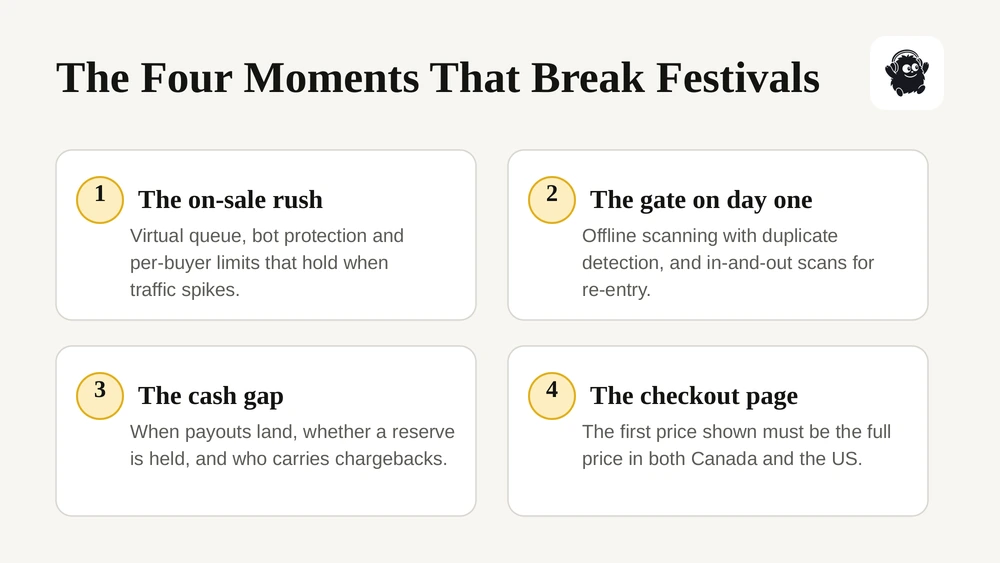
To choose ticketing software for a music festival, test it against the four moments that break festivals: the on-sale rush, the gate on day one, the cash gap before the event, and the checkout page a regulator might read. A platform built for one-night events can sell a ticket. A festival needs it to also sell passes and add-ons in one cart, scan without signal, survive a traffic spike, show the full price up front and hand you your own attendee data.
This guide walks through each of those in the order you should evaluate them, with the rules that now apply in Canada and the US, the questions to ask on a demo, and a short test plan to run before you sign anything. It is written for independent and mid-sized festival organizers, from a single-stage weekend to a multi-day camping event. It is general guidance, not legal advice: pricing, privacy and accessibility rules change, so check the current requirements in your province or state before you rely on them.
Key takeaways
- Start with how your festival actually runs: number of days, camping, parking, re-entry, cashless or not. Then check each platform against that list, not against its feature page.
- Gate scanning has to keep working when the cell network fails. Ask for offline validation with duplicate detection, and test it with your phone in airplane mode.
- Ask how the platform handles a high-demand on-sale: virtual queue, bot protection, per-buyer limits and what happens if checkout slows down.
- The first price a buyer sees must be the full price. Canada's Competition Act bans drip pricing, and the US FTC fee rule for live-event tickets has applied since May 12, 2025.
- Before you sign, confirm when you get paid, whether you own and can export your attendee data, and whether checkout is accessible.
Why a music festival needs more than standard ticketing
Standard event ticketing assumes one venue, one date and one scan per ticket. A festival breaks all three. People arrive on different days with different passes, leave and come back, park, camp, buy merch and food, and expect the whole thing to work from one wristband or one phone.
That changes what you are buying. You are not choosing a checkout page. You are choosing the system that holds your inventory, your gate, your cash flow and your customer list for the next several years, because switching platforms mid-cycle is painful once passes are on sale. Our guide on what to know before switching festival ticketing software covers that side if you are moving from an existing provider.
The practical consequence: write down how your festival runs before you look at a single demo. How many days, how many entry points, whether there is camping or RV parking, whether people can re-enter, whether the site is cashless, and roughly what your biggest on-sale looks like. Every section below is a test against that list.
The festival features to check first
These are the features that separate festival ticketing from general event ticketing. If a platform cannot do one of them natively, you will end up running it on a spreadsheet or a second tool.
| Feature | What to confirm | Why it matters |
|---|---|---|
| Multi-day and single-day passes | Both sold from one inventory, with capacity counted per day | Stops a Saturday sell-out from hiding behind weekend pass numbers |
| Tiers and release windows | Early bird, tier 1, tier 2, VIP, with automatic switching on date or quantity | Lets you run the tier plan without manual price changes at midnight |
| Add-ons in the same cart | Camping, RV, parking, shuttles, lockers sold alongside the pass | A second checkout for parking loses sales and creates support tickets |
| Payment plans | Deposit plus scheduled instalments, with automatic retries and clear rules for missed payments | Higher-priced passes sell earlier and to more people |
| Transfers and resale controls | Name changes, transfers to a friend, face-value resale or a capped exchange | Keeps resale visible to you instead of on scalper sites |
| Group orders | One buyer, separate attendee records and tickets | You need each person's name at the gate, not just the buyer's |
Payment plans deserve a closer look. Large US festivals now routinely sell passes on a deposit with monthly payments. Ask what happens when an instalment fails: how many retries, whether the buyer is notified, and whether the ticket is cancelled or held. Our guide to festival ticketing platforms with payment plans goes deeper.
For add-ons, the test is simple. Build a cart with a weekend pass, a camping spot and a parking pass on your phone. If that takes more than one checkout, or if the parking pass does not appear on the same ticket or wristband, attendees will feel it. The festival parking and shuttle passes guide covers how to set those up.
Access control: QR codes, rotating barcodes or RFID
The gate is where a festival's software choice becomes visible to every attendee. There are three common approaches, and each one trades security against speed and cost differently.
| Method | How it works | Strength | Weak spot |
|---|---|---|---|
| Static QR code | A unique code per ticket, checked against a list at the gate | Cheap, works on any phone or printout | Screenshots can be shared, so duplicate detection has to be strict |
| Rotating barcode | The code refreshes every few seconds inside an app | Screenshots stop working | The attendee's phone usually needs data at the gate |
| RFID wristband | A chip in a wristband, tapped at the entrance | Fast re-entry over several days, works offline, can link to cashless payments | Wristbands have to be produced and shipped before the event |
The question that matters most for a rural or outdoor site is what happens when the signal disappears. Fifty thousand phones in a field can overwhelm the local cell network within minutes of gates opening. A rotating barcode that cannot load stops the line.
For most independent festivals, a unique QR code with offline validation is the practical middle ground. The scanner keeps a local copy of valid tickets, flags a second scan of the same code straight away, and syncs with the other scanners when the connection comes back. That gets you most of the fraud protection without making entry depend on the network. Our explainer on how QR code check-in works at events covers the mechanics.
Re-entry is the other thing to check. If attendees can leave for the campground and come back, the system needs to know whether a pass is currently in or out, not just whether it was scanned once. Ask the vendor to show you an in-and-out scan on a multi-day pass during the demo.
High-demand on-sales: queues, bots and limits
If your festival sells out, the first hour of the on-sale is the riskiest moment of your year. Most of the damage people remember from big on-sales is not the sell-out itself. It is the frozen checkout, the queue that seemed to go backwards and the tickets that showed up on resale sites ten minutes later.
The Oasis reunion on-sale in 2024 is the cautionary example, with millions of fans queueing for far fewer tickets and major ticketing sites struggling under the load. For later dates the promoters dropped a single general on-sale and moved to staggered, allocated presales instead. Your festival is probably not that size, but the lesson scales down: plan the on-sale structure with the software, not around it.
What to ask about on-sale capacity
- Is there a virtual queue, and how is order decided? First come, randomised at the start, or lottery. Attendees forgive a queue. They do not forgive one that feels rigged, so ask what buyers see while they wait.
- What bot protection runs by default? CAPTCHA, purchase limits per buyer and per card, and checks for many orders from one source.
- Are per-buyer limits enforced at checkout, or only shown as a note? A limit that a second browser tab can get around is not a limit.
- What happened at the vendor's busiest on-sale last year? Ask for orders per minute and whether checkout slowed down. A real answer with a number is a good sign.
- Can you cancel tickets after the sale if you find bulk purchases or resale listings that break your terms?
In the US, the BOTS Act makes it illegal to get around a ticket issuer's security measures or purchase limits for public events with more than 200 attendees, and the FTC has enforced it. The law gives you a remedy, but only if your platform actually has limits and controls for buyers to circumvent. If you expect real demand, read why ticketing software fails during high-demand on-sales before you set your on-sale date.
Fee models and the all-in pricing rules
Ticketing platforms charge in one of two broad ways, and the difference matters more for festivals than for most events because pass prices are high.
- Percentage plus a fixed amount per ticket. The platform's cut grows with the ticket price. It feels cheap on a low-priced ticket and gets expensive on a multi-day or VIP pass.
- A flat fee per ticket. The platform's cut stays the same whatever the pass costs, with card processing usually charged separately by the payment provider.
The right comparison is total cost across your real ticket mix, not the headline rate. Model your own tiers, add-ons and expected volume before you compare quotes, and ask every vendor whether there are separate charges for scanning devices, payouts, refunds or support.
Canada: drip pricing is prohibited
Under the Competition Act, advertising a price that buyers cannot actually pay because mandatory fees are added later is treated as false or misleading. This is known as drip pricing, and the Competition Bureau has been enforcing it. In 2024 the Competition Tribunal ruled against Cineplex over a mandatory online booking fee added to movie tickets.
In practice, the first price a Canadian buyer sees on your event page, ad or ticket listing has to include every mandatory fee. You can absorb fees or pass them on, but the number shown has to be one they can actually pay. Sales taxes such as GST and HST can be added at checkout. Our guide to all-in ticket pricing in Canada covers how to comply.
United States: the FTC fee rule
The FTC's Rule on Unfair or Deceptive Fees took effect on May 12, 2025 and applies to live-event tickets. Any advertised price must be the total price including all mandatory fees, and it must be shown more prominently than other pricing information. Government taxes, shipping and genuinely optional add-ons can be excluded from the first number, as long as they are disclosed before payment.
The rule does not cap fees. It controls how they are shown. So the software question is concrete: does the platform show the all-in price automatically on every event page, embed and ticket listing, or does someone on your team have to remember to set it?
Payouts and cash flow
A festival spends most of its money months before the gates open: artist deposits, site rental, permits, fencing, staging and marketing. When the ticketing platform releases your ticket revenue decides whether those bills come out of sales or out of a loan.
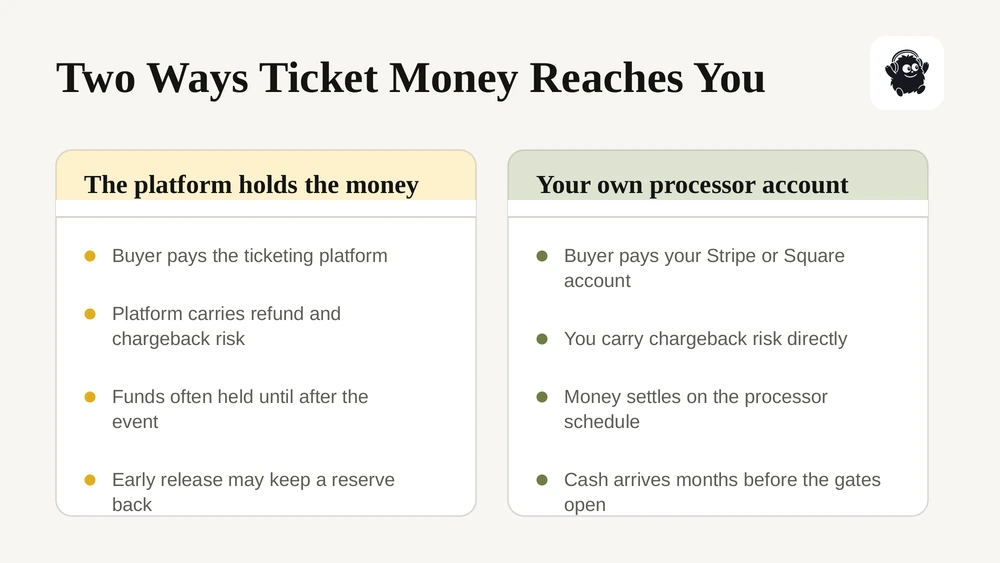
There are two common setups. In the first, the platform collects the money and pays you out. It carries the refund and chargeback risk, so it often holds funds until after the event or releases them early with a reserve held back. In the second, payments go into your own payment processor account. The platform connects to an account you hold with a provider such as Stripe or Square, and money settles to you on the processor's normal schedule. You get the cash sooner, and you also carry the chargeback risk directly.
Neither is wrong. What matters is that you know which one you are signing up for and plan around it. Ask every vendor:
- When does money reach my bank account, and does that change for sales made six months before the event?
- Is any reserve held back, how much, and when is it released?
- Is there a limit on how much can be paid out before the event?
- Who handles chargebacks, and what evidence does the platform give me to fight them?
- If the festival is cancelled, who issues refunds and from which funds?
When the money does land, reconcile it. A ticketing report and a bank deposit rarely match line for line, and our guide to event revenue reconciliation shows where the gaps come from.
Who owns your attendee data
Your attendee list is the most valuable thing a festival builds apart from its name. It is how you sell next year's early bird. Some ticketing platforms treat buyers as their own customers too, and use that data to promote other events on their marketplace. Read the data terms before you sign, not after.
Three things to confirm in writing:
- You can export everything, including names, emails, order history and custom question answers, at any time and in a usable format.
- The platform does not market other events to your buyers unless they opt in separately.
- You know where the data is stored and which companies process it for the vendor.
Under PIPEDA, Canada's federal private-sector privacy law, your organization stays accountable for personal information it hands to a service provider for processing. If your ticketing vendor stores data outside Canada, you are expected to use contracts to make sure it gets comparable protection. You also have to report breaches that pose a real risk of significant harm to the Privacy Commissioner and to the people affected.
If you sell to Quebec residents, Quebec's Law 25 adds stricter rules, including privacy impact assessments before transferring personal information outside the province. For marketing emails and texts, Canada's anti-spam law requires consent, so the checkout should collect a clear, separate opt-in rather than a pre-ticked box. Our guide to attendee data residency in Canada goes further if your board or sponsors ask where the data lives.
Accessible checkout and accessible tickets
Accessibility in ticketing has two parts: whether a person with a disability can use the checkout, and whether they can buy an accessible ticket on the same terms as everyone else.
In Ontario, under the AODA, private and non-profit organizations with 50 or more employees must make their public websites meet WCAG 2.0 Level AA, and that includes ticketing pages people use to buy from you. Even where no law requires it, an accessible checkout simply sells more tickets.
In the US, the ADA sets specific rules for how accessible seating and spaces are sold. Under Department of Justice guidance, accessible tickets must be sold during the same hours, through the same channels and on the same terms as other tickets, including presales, and a buyer must be able to purchase up to three companion tickets next to them. For festivals, the same logic applies to accessible viewing platforms, camping and parking.
Ask the vendor:
- Has the checkout been audited against WCAG 2.0 or 2.1 Level AA, and can you see the result?
- Can it be completed with a keyboard only and with a screen reader?
- Can accessible tickets and companion tickets be sold online in the same order, during every sale window?
- Can you collect accommodation requests at checkout and see them in the attendee list?
Our accessible event planning checklist covers the on-site side.
How to evaluate festival ticketing software, step by step
This is the order we would run an evaluation in. It moves from cheap checks to expensive ones, so you can drop a vendor early.
1. Write your festival profile. Days, capacity per day, entry points, camping, parking, re-entry, cashless or not, and your biggest expected on-sale. One page is enough.
2. Shortlist three platforms. Cut any that cannot sell passes and add-ons in one cart, or that cannot scan offline.
3. Get the full cost for your ticket mix. Send each vendor your tiers and expected volume and ask for a total, including processing, hardware, payouts and support.
4. Run a demo against your profile, not the vendor's script. Ask them to build your weekend pass with camping, then scan it in and out.
5. Read the contract for data, payouts and exit. Data export, payout timing, reserves, cancellation and what happens to your data if you leave.
6. Test it yourself on a phone. Buy a ticket, transfer it, request a refund and scan it with the phone in airplane mode.
7. Check references from a festival your size. Ask what went wrong on their busiest day and how fast support answered.
Where Eventist fits
Eventist is a Canadian event management and ticketing platform built for the whole festival, not just the checkout. Multi-day and single-day passes come out of one inventory, add-ons like camping and parking sell in the same cart, and tiers switch on date or quantity without anyone changing a price at midnight. Deposit and instalment payment plans are built in, and every ticket carries a QR code that any phone can scan.
Around the ticketing sit the parts festivals usually buy separately: multi-stage scheduling with conflict checks, an interactive site map with markers your crew can hide from the public, staff and volunteer roles with their own dashboards and shift schedules, vendor booths sold through the same checkout, and a built-in point of sale for door and bar sales. Pricing is a flat fee per paid ticket rather than a percentage, so a VIP pass does not cost you more to sell than a day pass, and card processing runs through your own Stripe or Square account at the processor's published rate.

You can see how it works on our festivals page, or compare the numbers on pricing.
Frequently Asked Questions
What ticketing software do music festivals use?
Festivals use a mix: large ones often sit with Ticketmaster, AXS or See Tickets, while independent and mid-sized festivals choose platforms that handle passes, add-ons and operations together, such as Eventist, Showpass, Ticket Tailor or Eventbrite. The useful question is not which name is most common but which one sells multi-day passes from one inventory, scans offline at the gate and pays you out on a schedule your cash flow can live with.
How much does festival ticketing software cost?
Most platforms charge either a percentage of the ticket price plus a fixed amount, or a flat fee per paid ticket, with card processing of roughly 2.9% plus 30 cents charged separately. The gap between the two models widens as pass prices rise, so model your own tiers rather than comparing headline rates. Our breakdown of event ticketing fees by platform sets the current rates side by side.
Can festival tickets be scanned without internet?
Yes, if the platform supports offline validation. The scanner downloads the valid ticket list before gates open, checks each code locally, flags duplicates immediately and syncs with the other scanners when the connection returns. Ask to see it in a demo with the device in airplane mode, because support for it varies and a rural site will test it.
Do I have to include ticket fees in the advertised price?
Yes, in both Canada and the US. Canada's Competition Act treats drip pricing, adding mandatory fees after the advertised price, as misleading, and the FTC's fee rule has required total-price advertising for live-event tickets since May 12, 2025. You can still pass fees to buyers, but the first price shown must include every mandatory fee, with taxes allowed at checkout.
When does a festival get paid for ticket sales?
It depends on the model. If the platform collects the money, it often holds funds until after the event or releases them early with a reserve held back. If payments go to your own Stripe or Square account, they settle on the processor's normal schedule, usually within a few days of each sale. Confirm the timing, any reserve and the pre-event payout limit in writing before you sign.
Sources
- Deceptive marketing practices: cases and outcomes, Competition Bureau Canada
- FTC Rule on Unfair or Deceptive Fees, Federal Trade Commission
- Better Online Ticket Sales (BOTS) Act enforcement, Federal Trade Commission
- PIPEDA fair information principles, Office of the Privacy Commissioner of Canada
- Accessibility requirements, Government of Ontario
- ADA guidance on ticket sales, US Department of Justice
Recommended
Tags
Ready to simplify your events?
Join hundreds of organizers, studios, and festival directors who trust Eventist to run their events.