Volunteer Hours Tracking: A Practical Guide for Events

To track volunteer hours reliably, build the shift roster before the event, pick one check-in method for everyone, record start and end times against a named role, and export a report within a week of the event. Everything else, from software to thank-you notes, depends on those four habits.
This guide is written for organizers of festivals, conferences, trade shows, concerts and community events in Canada, where volunteers often cover registration desks, stages, vendor loading and info booths. It also covers the other side of the request: how volunteers can log hours for school, funders or a résumé, and what organizers owe them in return.
TL;DR
- Decide what a logged hour means before you collect any: paid-for-nothing time on shift, training time, and travel are different things.
- Use one method per event (sign-in sheet, QR check-in, or manager entry) and keep it identical for every volunteer.
- Tie every hour to a role or project, so the report shows impact and not just a total.
- Confirm hours in writing within days. Students and funders often need a signed record.
- Small teams can start with a spreadsheet. Move to software when you run multiple shifts, stages or events at once.
Why volunteer hours are worth recording
Most organizers start tracking because someone asks for it: a student needs a signed form, a funder wants a number for a grant report, or a board member asks how much labour the festival really relied on. Those are valid reasons, but they are the minimum.
Hours data also shows you where an event is thin. If the gate team logged 60 hours and the stage team logged 240, you know where your next recruitment push belongs. A volunteer administration manual lists the number of registered and unregistered volunteers and the hours they worked among the figures a needs assessment should include, because counts alone give an incomplete picture.
There is also a fairness reason. Volunteers who see their time counted and acknowledged are more likely to come back. Research from the Urban Institute on volunteer management practices and retention links practices such as screening, matching people to suitable tasks, recognition and training with keeping volunteers.
Common reasons you will be asked for hours
- High school graduation. All Ontario high school students must complete 40 hours of community service, according to the Ottawa Catholic School Board. Students at your event will expect a signed record of their hours, and the activity must be unpaid.
- Grant and sponsor reports. Funders like to see volunteer contribution next to attendance and revenue.
- Volunteer references and awards. Long-serving volunteers deserve accurate totals, not estimates.
- Internal planning. Last year's hours by role are the best basis for next year's roster.
Decide what counts before you collect anything
The most common source of messy data is an unclear definition. Settle these points in writing before the first shift:
1. Start and end of an hour. Does the clock start at check-in, at the shift briefing, or when the volunteer reaches their post?
2. Training and orientation. Many organizers count it, because it is time given to the event. Whatever you choose, apply it to everyone.
3. Breaks. Decide whether meal breaks are deducted and say so in the shift confirmation.
4. Travel and setup days. Pre-event setup and teardown are often the longest shifts. Record them as their own hour type.
5. Minimum age and supervision. Students under 18 may need a named supervisor to sign off. Check your school board's or the student's requirements and ask the student what form they need.
This is also the moment to decide the unit. Quarter-hours are accurate enough for most events and easier to add up than minutes.
What to record for each volunteer
A useful record is short. For each shift, capture:
| Field | Why it matters |
|---|---|
| Volunteer name and contact | Needed for confirmations and thank-you messages |
| Date | Supports multi-day events and annual totals |
| Role or team (for example gate, stage, info desk) | Lets you report by activity |
| Start and end time | The basis of the hours figure |
| Supervisor or team lead | Makes sign-off simple |
| Hour type (event day, training, setup) | Keeps totals meaningful |
| Notes | Late arrivals, skills used, feedback |
The hour-type field matters more than it looks. A guidance document from Oregon's volunteer disaster-response program points toward organizing volunteer activity by opportunity and project so that records show what the time achieved. Hours with no project attached tell you very little. Segmenting by role or hour type turns a total into a report you can act on.
Also plan for guests. At community events, volunteers sometimes bring a friend or family member who helps for an hour or two. Decide whether you will log them as walk-up volunteers on a simple form or leave them out, and keep the rule consistent. Tracking them lightly means your total labour figure is closer to reality without forcing every helper to register beforehand.
Four ways to log hours, compared
The right method depends on team size, number of check-in points and how soon you need a report.
| Method | Best for | Strengths | Weak points |
|---|---|---|---|
| Paper sign-in and sign-out sheet | Small one-day events | No setup, no devices | Illegible entries, missing sign-outs, retyping afterwards |
| Shared spreadsheet or form | Teams under about 50 volunteers | Free, flexible, easy export | Relies on volunteers filling it in honestly and on time |
| QR or digital check-in at a station | Festivals, conferences and trade shows | Fast, timestamped, fewer errors | Needs devices and a connection plan |
| Dedicated volunteer management software | Recurring programs, many shifts or sites | Volunteers self-report, managers approve, reports export | Cost and a learning curve for staff and volunteers |
A four-step routine appears across much of the guidance for this topic: build the roster in advance, choose a single check-in method, log start and end times, then review. The method matters less than using it identically for everyone.
Paper and spreadsheets
For a one-day fundraiser with a dozen volunteers, a clipboard at the volunteer table is enough. Put a column for the role, require both a sign-in and a sign-out time, and have a team lead initial each line. Type it into a spreadsheet the same week while people still remember who left early.
For a longer event, a spreadsheet with one tab per day and a pivot table by role gives you totals in minutes. Lock the header row and use drop-down lists for roles so that "Info desk" and "info booth" do not become two categories.
Digital check-in on the day
At festivals and conferences, queues form at shift change. Staff stations with phone-based check-in avoid the clipboard bottleneck and give you timestamps you do not have to interpret. Whatever tool you use, run a practice check-in with your team leads before doors open, and keep a paper backup at each station in case the connection drops.
Volunteer management platforms
When you manage recurring programs, a dedicated platform lets volunteers log their own time, managers approve it, and the organization exports reports. Ohio's state volunteer network, Get Connected, is an example: it lets administrators post opportunities, manage sign-ups and export hours reports in one place. Its guide to managing volunteer hours shows the pattern: hours live in a time-tracking area, can be added by the manager, and are tied to the organization's opportunities. Canadian organizers will find the same approach in many commercial and regional tools, so check what your province or municipality already offers before you pay for anything.
A tracking routine you can run at any event
1. Two to four weeks out: publish roles. List each role with its time slot, a short description and the number of people needed. Clear expectations are one of the commitments of effective volunteer management, as outlined in a guide on the four C's of volunteering.
2. One to two weeks out: confirm shifts. Send each volunteer their shifts, meeting point, team lead and the rule for logging hours. Ask students to bring their school's form.
3. Event day: brief and check in. State the check-in method in the briefing. Make team leads responsible for catching missed sign-outs before people leave.
4. End of shift: close the record. The volunteer signs out, the lead initials or approves.
5. Within a week: reconcile. Fix missing entries while memories are fresh, and sign student forms.
6. Within a month: report and thank. Send each volunteer a personal total and a message that says what their time made possible.
Our own guidance on onboarding volunteers in their first week covers the briefing and orientation steps in more detail, and streamlining volunteer management at festivals goes deeper on large rosters.
Turning logged hours into reports and recognition
A number only becomes useful once it is presented properly. Three reports cover most needs:
- Hours by role. Shows which teams carry the event and where you are short.
- Hours per volunteer. Feeds recognition, references and school sign-off.
- Hours by event or year. Shows growth and supports funding applications.
If you want to attach a dollar value to volunteer time for a funder, use the method the funder specifies and say what rate you used. Do not invent a rate. Where a report must follow a particular format, ask the funder for their template before the event, not after.
Recognition works best when it reflects the records. Milestone totals, a personal message from the event director and early access to next year's sign-up are all inexpensive. If your volunteer data sits in a contact database, a nonprofit-focused overview of CRM options for nonprofits can help you decide where to store records so that recognition can be based on each person's history rather than a generic mailing.
Keeping volunteers in the loop
Tracking hours is partly an administrative job and partly a communication job. Leadership guidance on the four C's identifies communication as the pillar organizations most often neglect, from the first outreach email to feedback after the event. Volunteers who hear nothing between sign-up and the day itself tend to feel they are working in a void.
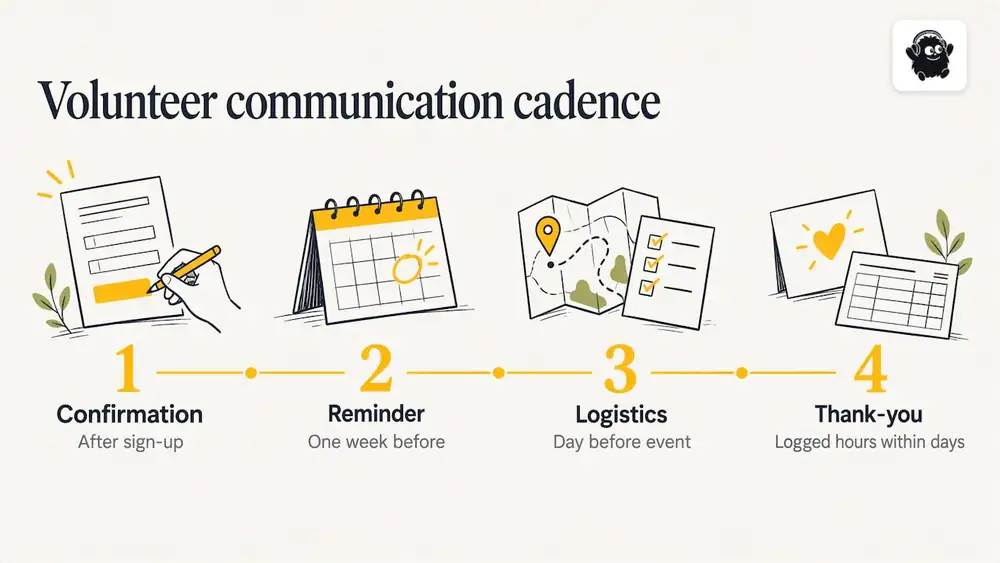
A simple cadence works: a confirmation after sign-up, a reminder a week before, a final logistics message the day before, and a thank-you with their hours within a few days. If you are weighing tools to automate those messages, a review of workflow automation platforms for managers outlines what is available, though a well-organized email template and a calendar reminder work for most small teams.
Our perspective
At Eventist we spend our time with festivals, conferences, trade shows and venues, and the pattern is consistent: volunteer time is the first thing to slip when the schedule gets crowded. Teams sort out tickets, vendors and stages, then treat volunteers as a list in someone's inbox.
We think volunteers should be organized with the same rigour as staff members. That means named roles, defined shifts, a team lead for each area and a run of show that shows who is where and when. When roles are clear, the hours that get logged are accurate almost as a side effect, because nobody has to guess what a volunteer was doing at 3 p.m. on Saturday.
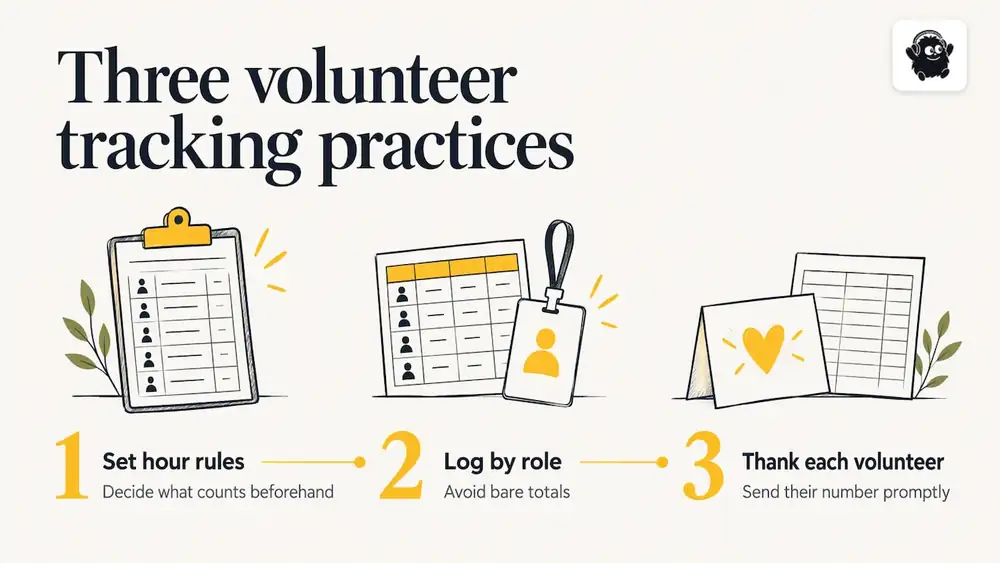
Our advice has three parts. Decide what counts as an hour before the event. Record hours against a role, not as a bare total. And send each volunteer their number promptly with a real thank-you. A spreadsheet is fine to start. Move to a system when the number of shifts, stages or sites makes manual reconciliation the slowest part of your week.
Where event software fits
If you already sell tickets and manage the schedule in one place, it makes sense to coordinate volunteers in the same place. Eventist handles staff and volunteer coordination alongside the schedule: staff roles, the run of show, and QR check-in from any phone, so the people who work your event are organized the same way as the event itself. Setup help comes from a Canadian team.
On costs, ticketing is charged per paid ticket, and free tickets and registrations run on monthly plans starting from $100 CAD per month, as of October 2026. Card processing fees go to Stripe or Square at their own rates. Full details are on the pricing page. If you want to see how volunteer scheduling tools compare, our roundup of festival scheduling software sets out the options.
Common mistakes to avoid
- Counting only the total. Hours without a role or project cannot show impact.
- Changing the rules midway. If breaks are deducted on Friday, deduct them on Sunday.
- Relying on memory. Reconciliation after two weeks turns into guesswork.
- Skipping sign-out. Missing end times are the single biggest data gap on paper systems.
- Treating volunteers as free labour. Training, supervision and recognition are part of the cost of using volunteer time, and organizations that plan for them keep more people. For safer staffing patterns, see our notes on event staff scheduling.
Privacy deserves a line too. Volunteer records contain names, contact details and, for youth, school information. Collect only what you need, keep it in one controlled place, and check the privacy rules that apply to your organization. This is general guidance, not legal advice.
Frequently Asked Questions
How do I track volunteer hours online?
Use a shared form or a volunteer management platform where volunteers log their own start and end times and a manager approves them. Record the role with every entry so you can report by activity. Export the data after the event and reconcile any missing entries within a week.
What is the easiest way to log volunteer hours as a volunteer?
Ask the organizer at the start of your shift how hours are recorded, then write your own start and end times in your notes as a backup. Request a signed confirmation listing the date, role, hours and supervisor. If you need it for school, bring the school's form to the first shift.
What are the four C's of volunteering?
One widely cited framework names them as commitment, contribution, communication and collaboration. Commitment covers showing up and sticking with the role, contribution means matching skills to needs, communication means regular two-way contact, and collaboration means working well with staff and other volunteers.
Do I need software to track volunteer hours?
Not for a small, single-day event. A clipboard or spreadsheet with a clear definition of an hour works well. Software starts to pay off when you run several shifts, stages or events and spend more time reconciling than organizing.
Sources
- Volunteer Hours for High School Students, Ottawa Catholic School Board
- Get Connected, ServeOhio
- Managing Volunteer Hours on Get Connected
- Oregon Volunteers in Disaster (ORVID)
- Volunteer Administration Manual
- Volunteer Management Practices and Retention of Volunteers, Urban Institute
- What are the four C's of volunteering
Recommended
Tags
Ready to simplify your events?
Join hundreds of organizers, studios, and festival directors who trust Eventist to run their events.