Conference Agenda Planning: Build One That Runs on Time
A good conference agenda starts with three decisions made before any session is booked: what the event is for, who is coming, and roughly how many people to expect. Everything else, from the number of tracks to the length of the coffee break, follows from those answers. This guide walks through the planning timeline, the building blocks of an agenda, a template you can copy, and how to present the finished schedule so attendees can find what they need in seconds.
TL;DR
- Define purpose, audience and expected attendance first, then fit sessions, formats and timing to them.
- Start 12 to 18 months ahead for a large conference, lock speakers about a year out and finalize the program 4 to 6 months before the event.
- Build in 10 to 30 minute breaks and real networking time, and keep the plan flexible enough to change on the day.
- Treat hybrid events as two parallel experiences, each with its own facilitator.
- Show the agenda as a clean table with consistent time formats, locations, speakers and track labels.
Start with purpose, audience and size
The U.S. Office for Victims of Crime, in its conference planning guide, says program planning begins once you have defined the conference purpose, the audience profile and an estimate of participant numbers. Only then do you interrelate those with the event types, presentation methods and scheduling that will make up the program.
In practice, answer these questions in writing before opening a spreadsheet:
1. What should attendees be able to do or decide after the event? Learn a skill, meet suppliers, vote on a policy, buy from exhibitors. Each goal pulls the agenda in a different direction.
2. Who are they? A room of first-time attendees needs introductory sessions and more guidance. A room of senior practitioners wants peer discussion and less lecturing.
3. How many will come? Headcount decides whether you need parallel tracks, how many rooms to book and how long registration and lunch queues will take.
4. What format fits? In-person, virtual or hybrid changes session length, break pattern and staffing.
The same guidance warns against programs that are too rigid. An agenda that interrelates audience, goals and scheduling still needs slack for real-time adjustments, such as a speaker running over or a room change.
Work backward from the event date
Timelines vary with event size. A university conference office suggests that large conference planning starts 16 to 18 months ahead with objectives, a venue search and decisions on agenda format. The same checklist places speaker commitments about 12 to 14 months out, program finalization 4 to 6 months before the event, and final menu and headcount confirmations 2 to 3 weeks ahead.
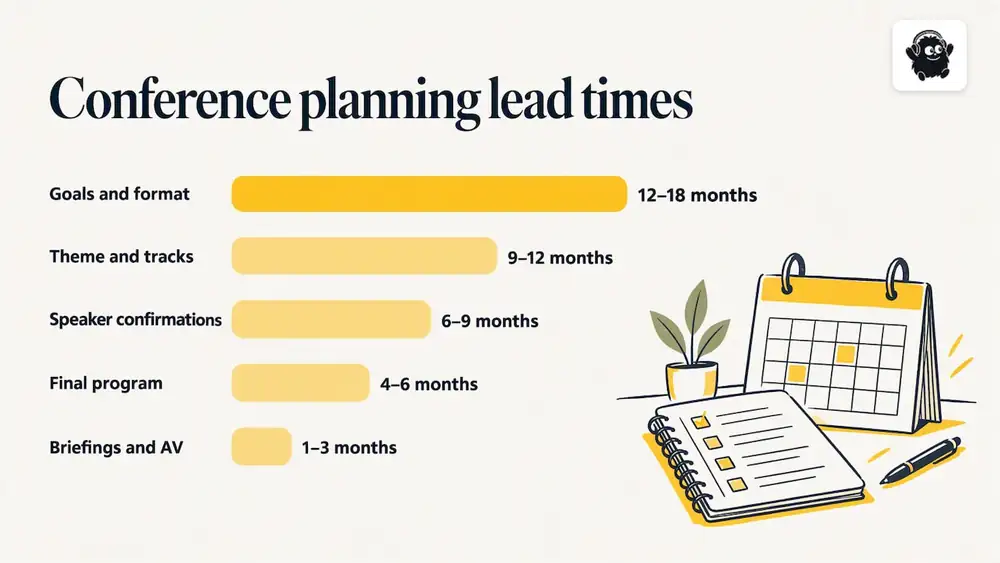
Smaller or less complex events move faster. A separate university checklist for complex events says planning typically begins 4 to 12 months ahead, with venue selection, an agenda outline and speaker confirmation happening inside that window.
A practical milestone ladder for a mid-sized, in-person conference looks like this:
| Lead time | Agenda milestone |
|---|---|
| 12 to 18 months | Goals, audience profile, budget, venue shortlist, format decision |
| 9 to 12 months | Theme and track structure, keynote and headline speaker outreach, call for proposals if you run one |
| 6 to 9 months | Speaker confirmations, session formats and lengths, draft day-by-day grid |
| 4 to 6 months | Final program, published agenda, room assignments |
| 1 to 3 months | Speaker briefings, AV needs, accessibility requests, schedule tweaks |
| Final 2 to 3 weeks | Final headcounts, printed or in-app agenda, run of show for staff |
The exact numbers depend on your venue's booking lead time and how many external speakers you need. If you are planning a festival rather than a conference, our festival planning timeline uses the same backward-planning logic with festival-specific milestones.
What a conference agenda should include
A workable agenda lists, for every session: the title and a short description, the speaker names and bios, the start time and duration, the room or venue location, and the breaks, networking opportunities and special events around it. Atlassian's conference agenda guide lists these same elements and recommends choosing a template that adapts to the session and scheduling needs of your event rather than forcing the event into a template.
Beyond that checklist, add what attendees actually ask on the day:
- Registration and badge pickup hours
- Meal times and dietary information
- Where the quiet room, coat check and accessible entrances are
- Which sessions are recorded or streamed
- A contact for questions during the event
For accessibility, build requirements into the agenda from the start rather than adding them after publication. Our accessible event planning checklist covers 25 items to review.
Sequence sessions so energy holds
Session order matters as much as session content. Three principles come up repeatedly in conference planning guidance.
Open with a keynote that sets the tone. The OVC planning guide notes that keynotes can energize the opening of a conference, and a peer-reviewed guide to organizing scientific symposia says an opening keynote should energize the audience and set the tone for the conference or the day.
Spread out the heavy material. The same symposium guide advises spreading intense sessions across the day and following them with free time or a lighter session. A dense technical workshop belongs before a panel or a social break, not before another workshop.
Vary the format. Mix keynotes, panels, workshops, demonstrations and discussion groups. The OVC guide recommends varied presentation methods because the same format for six hours straight wears people down.
Plan breaks as part of the program
Breaks are not dead time. The OVC guide says breaks of 10 to 30 minutes between sessions give people time for restroom visits, travel between rooms, stretching and other needs. A good rule is to use the short end for single-room events and the long end when attendees must change floors or buildings.
A few ways to size them:
- Same room, same track: 10 to 15 minutes.
- Moving between rooms on one floor: 15 to 20 minutes.
- Moving between buildings, or when queues for coffee are likely: 20 to 30 minutes.
- Lunch: long enough for the whole venue to be served. Budget for the queue, not only for eating.
Give networking real room
Omitting networking time is one of the most common agenda mistakes. People often travel to a conference mainly to meet others, so schedule it as a program item, not a leftover. Options include a longer mid-morning break, a reception at the end of day one, topic tables at lunch and a short open-floor slot after each keynote. For more ways to build informal interaction into the schedule, see these audience engagement strategies.
Build multi-track and multi-day agendas
Once a conference passes a few hundred people, a single room often cannot serve every interest, and parallel tracks appear. Columbia Business School's documentation for its conference pages describes a useful way to think about this: an agenda made of agenda areas (days or tracks), agenda items (sessions) and sub-items (sub-sessions or speakers). The same hierarchy works for a one-day, one-room event and for a multi-day, multi-track program, which makes it a good planning model as well as a web design model.
A few rules keep parallel tracks from becoming a headache:
1. Align start and end times across tracks. Attendees who change tracks should move together, and breaks should not stagger.
2. Avoid scheduling your two most popular topics at once. Use registration data or past attendance to guess demand, then put the likely favourites in the largest rooms.
3. Label tracks by audience or theme, not by room number. Rooms change, themes do not.
4. Put a keynote or plenary at the start and end of each day. It brings everyone together and gives you a fixed point for announcements.
5. Leave one slot per day with fewer sessions. That gives you recovery time when something runs long.
With parallel tracks, the schedule becomes a moving puzzle of speakers, rooms and times. Planning in a drag-and-drop calendar rather than a static spreadsheet makes it easier to try several arrangements before you publish. Do not rely on software to spot clashes for you; check speaker availability and room capacity by hand before you finalize.
Planning a hybrid or virtual conference agenda
Hybrid does not mean in-person plus a camera. The International Science Council's planning tool says to plan a hybrid conference as two parallel experiences with equivalent opportunities for online and in-person participants, and to assign an online facilitator to surface questions, monitor the chat and support interaction. The scientific symposium guide makes the same point: online events tend to succeed when a dedicated facilitator or co-host manages chat and technical issues for remote participants.
This changes the agenda in concrete ways:
- Shorter blocks for virtual attendees. Screen fatigue sets in faster than room fatigue, so add more frequent breaks to the remote schedule.
- Time zones. Show the time zone on every agenda view, and consider repeating key sessions or posting recordings.
- Questions from both audiences. Give the online facilitator a defined moment to relay remote questions, rather than hoping the moderator remembers.
- Interaction tools. Live polls and voting let remote attendees take part in a session. A tool such as live audience polls and voting can give people watching online a way to respond in real time alongside the room.
If you are repurposing sessions after the event, plan the recording and editing approach during agenda design, not afterward. Our guide to event content management shows how to turn sessions into 90 days of follow-up content.
A conference agenda template you can copy
The following one-day, two-track template suits a conference of roughly 150 to 500 people. Adjust the times to your venue, and treat the break lengths as starting points.
| Time | Main room | Second room |
|---|---|---|
| 8:00 to 9:00 | Registration and coffee | Registration and coffee |
| 9:00 to 9:15 | Welcome and housekeeping | Welcome and housekeeping |
| 9:15 to 10:00 | Opening keynote | Opening keynote |
| 10:00 to 10:30 | Break and networking | Break and networking |
| 10:30 to 11:30 | Session 1: practical talk | Session 1: workshop |
| 11:30 to 11:45 | Break | Break |
| 11:45 to 12:45 | Session 2: panel | Session 2: case study |
| 12:45 to 14:00 | Lunch and topic tables | Lunch and topic tables |
| 14:00 to 15:00 | Session 3: workshop | Session 3: talk |
| 15:00 to 15:30 | Break | Break |
| 15:30 to 16:30 | Session 4: lighter discussion | Session 4: demonstrations |
| 16:30 to 17:00 | Closing plenary | Closing plenary |
| 17:00 to 18:30 | Reception | Reception |
Notice what the template does. The heaviest workshops sit before a break or a lighter session. Lunch is generous. Both tracks start and end together, so attendees can switch. The reception is a scheduled item rather than an afterthought.
To customize it:
- Single track: drop the second column and lengthen each session to 45 or 60 minutes with a question period.
- Multi-day: repeat a morning keynote and a closing slot each day, and make day two lighter at the start if day one ends with a reception.
- Virtual: shorten sessions to 30 to 45 minutes, add a 10 minute buffer between them and show time zones.
- Trade show: add exhibit floor hours as their own agenda items, separate from sessions, so visitors see when they can browse booths without missing a talk.
Design the agenda page so attendees can scan it
A plan is only as good as its presentation. The Harvard design system's guidance on event pages recommends showing an at-a-glance schedule as a table because it helps visitors scan the day and clarifies timing and location. It also warns against cramming cells, mixing time formats and using too many columns for mobile screens.
A developer-oriented guide to conference websites adds further pointers: put dates, location, time zone and track labels above the fold, show session times, formats and locations clearly, support search by session title, speaker and keyword, link to speaker profiles and label speaker changes visibly.
Turn that into a checklist:
- One time format throughout (for example 9:30 a.m., or 09:30, never both).
- Maximum of three or four columns on mobile.
- Track names as colour-coded labels, with the colour also explained in text so it is not the only cue.
- A location for every item, even if it is "Main Hall".
- Speaker names linked to bios.
- A "last updated" note, so attendees know whether they are seeing the latest version.
- A downloadable or printable version for people with poor signal in the venue.
And keep the agenda live. Room changes and late cancellations happen at every conference, so decide who updates the page and how attendees are notified, whether by email, SMS or app message.
Common conference agenda mistakes
The OVC planning guide names two: making the program too rigid, and leaving out breaks or adequate networking time. Others show up often enough to be worth checking for:
1. Planning sessions before the audience. A strong topic for the wrong crowd falls flat.
2. Packing every minute. Back-to-back sessions with no buffer turn one late speaker into an hour-long delay.
3. Ignoring travel time between rooms. Check distances and stairs on a venue walk-through.
4. Treating remote attendees as spectators. See the hybrid section above.
5. Publishing late. Attendees decide whether to register, and which days to attend, based on the agenda. Publishing it 4 to 6 months out, as university planning checklists suggest, gives them the information when they need it.
6. Forgetting the operational layer. The public agenda is only part of the plan. Staff need a run of show with load-in, AV checks, speaker green-room times and room resets. For logistics, see our event logistics planning guide. Permits, insurance, AV contracts and similar items are covered there as general guidance, not legal advice, so confirm specifics with your venue and advisers.
Our perspective: the agenda is the operating plan
Most organizers treat the agenda as a document attendees read. We think of it as the operating plan the whole event runs on. The same schedule decides when staff members open doors, when check-in lines peak, when speakers arrive and when a room needs a reset.
That is why we build scheduling next to ticketing and registration instead of in a separate tool. Multi-track and multi-stage schedules, speaker and artist dashboards, live maps, staff roles and the run of show all draw from one set of session data, so a change made once is reflected everywhere it matters. Our approach is designed to cut the number of spreadsheets organizers have to keep in sync.
Our advice is the same whether the event has one room or twenty: settle the purpose and audience, leave room for the unexpected and give every attendee a schedule they can read in ten seconds.
— Ciara
What running the agenda costs on Eventist
Once the agenda is set, the same system can sell the tickets and run the doors. Eventist's pricing page lists, as of October 2026, a flat $4.99 CAD per paid ticket for festivals and conferences for Canadian organizers. Tickets and registrations for events that are not paid run on monthly plans starting from $100 CAD. Card processing fees are paid separately to Stripe or Square at their own rates.

Here is the arithmetic. At 600 paid tickets, the flat fee is 600 × $4.99 = $2,994 CAD. Compare that with a hypothetical 3% platform fee on a $200 ticket, which is $6 per ticket, or 600 × $6 = $3,600. The flat fee comes to $606 less in this example, and the gap widens as ticket prices rise, which is why Eventist is usually cheaper than percentage pricing for higher-priced conference tickets. The 3% figure is an illustration, not a quote from any specific competitor, so run the numbers with your own ticket price. For a closer look at tools for running the day itself, including QR check-in from any phone and door sales, see Eventist's conference solution or the services page for setup help.
Frequently Asked Questions
How far in advance should I plan a conference agenda?
For a large conference, university planning checklists start 16 to 18 months ahead and finalize the program 4 to 6 months before the event. Smaller or less complex events can start 4 to 12 months out. Work backward from your event date and your venue's booking lead time.
How long should breaks be between sessions?
Planning guidance suggests 10 to 30 minutes. Use about 10 to 15 minutes when attendees stay in one room, and longer when they need to change floors or buildings, or when coffee lines are likely.
What is the best way to plan a hybrid conference agenda?
Plan it as two parallel experiences rather than an in-person event with a stream attached. Give online participants their own facilitator, relay their questions at set moments and show every time in a clearly labelled time zone.
What should an agenda page show?
Show dates, location, time zone and track labels at the top, then a scannable table with session times, formats, locations and speakers. Keep time formats consistent and limit columns on mobile, and link each speaker to a bio.
Sources
- Planning the Program, U.S. Office for Victims of Crime
- Checklist for Conferences, University of Michigan Conference & Event Services
- Recommended Event Planning Checklist for Complex Events, CU Anschutz
- Free conference agenda template, Atlassian Confluence
- Ten Steps to Organize a Virtual Scientific Symposium
- Conference Agenda, Columbia Business School
- Planning your online conference, International Science Council
- Building an event one-pager, HarvardSites Design System
- Conference Website Essentials: Agenda, Speakers, and Ticketing, Koder.ai
Recommended
Tags
Ready to simplify your events?
Join hundreds of organizers, studios, and festival directors who trust Eventist to run their events.