Event Volunteer Management: A Practical Guide for Organizers
Event volunteer management is the work of deciding which jobs volunteers will do, recruiting enough people, scheduling them into shifts, briefing them, keeping them in contact on the day and thanking them afterward. The organizers who do it well start with the work to be done, not the calendar, and plan for people who cancel. This guide walks through each step, with a worked headcount example, a roster template and the safety points Canadian organizers should check.
TL;DR
- List every role and location first, then estimate headcount and turn it into short shifts. Do not start from a blank calendar.
- Recruit roughly 10% to 20% more volunteers than your headcount to cover drop-outs, and keep a standby pool for the day itself.
- Give each volunteer one confirmed schedule through one channel, with reminders before the shift.
- Brief everyone on their role, safety and conduct, and keep volunteers away from work normally done by paid staff.
- Debrief and thank volunteers afterward. Recognition is how you keep them for next year.
What event volunteer management involves
Volunteer management is a professional process, not a sign-up sheet. The UN Volunteers programme for events describes it as a systematic approach with tailored recruitment and communication so that large events can be delivered successfully. A small fundraiser does not need that scale of machinery, but the same sequence applies:
1. Plan: define roles, headcount and who coordinates.
2. Recruit: find people and collect their availability.
3. Prepare: orient and train them for the specific role.
4. Schedule: build shifts and confirm them.
5. Run: check people in, communicate and handle changes.
6. Close: debrief, collect feedback and recognize the work.
Good orientation and training are worth the time. An academic review of volunteer management theory identifies them as key components that can reduce stress, help volunteers feel welcome and support retention.
Define roles and headcount before you recruit
Start by listing the tasks and the places where help is needed: gates and ticket scanning, info desks, stage and artist support, wayfinding, accessibility assistance, vendor liaison, first-aid support (alongside qualified responders), cleanup. Then estimate how many people each one needs. Volunteer Now's events toolkit advises identifying tasks and locations, estimating numbers and avoiding work that is normally done by paid staff.
Write a short role description for each job. A sound volunteer plan includes responsibilities, qualifications and the expected time commitment, so people know what they are saying yes to.
A worked headcount example
The method below follows the approach of AgentCalc's staffing guidance: total the role-hours, divide by shift length, then add a buffer for attendance risk. The numbers are illustrative.
- Six gate posts open for 10 hours: 6 × 10 = 60 role-hours.
- Four-hour shifts: 60 ÷ 4 = 15 volunteer slots.
- Add a 15% buffer: 15 × 1.15 = 17.25, so recruit 18 people for the gates.
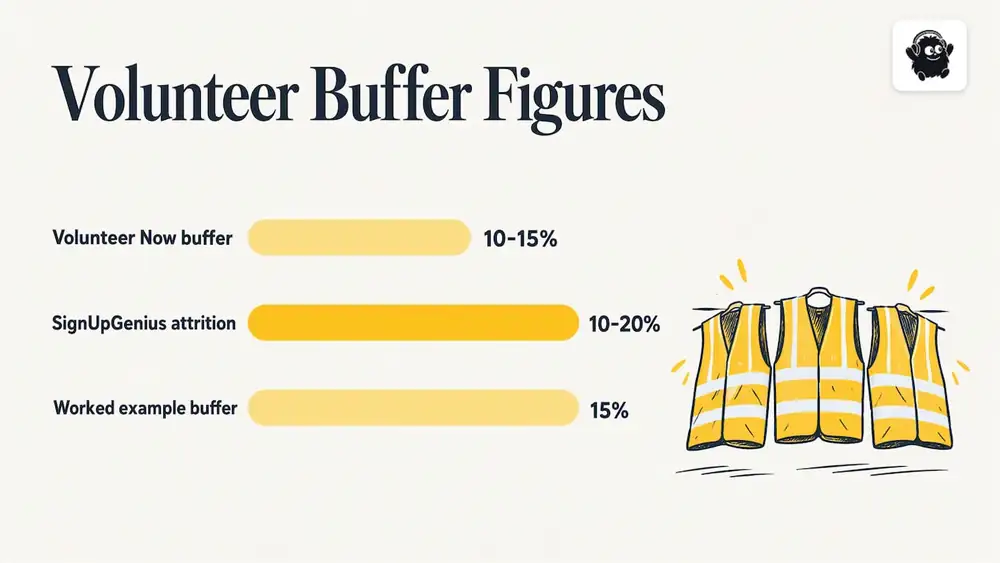
That buffer sits inside the range most guidance suggests. Volunteer Now recommends recruiting around 10% to 15% more volunteers than needed, while SignUpGenius plans for roughly 10% to 20% attrition. Use the higher figure for early-morning shifts, bad-weather outdoor events and roles where an empty post is a safety issue.
AgentCalc also suggests keeping a few floaters or runners for high-risk moments instead of fixing every volunteer to one post for the whole day. Floaters are your fastest answer to a late arrival at the gate or a sudden surge at the info desk.
Recruit and communicate from one list
Keep every applicant in one place: name, contact method, availability, preferred roles, relevant skills or clearances and emergency contact. A sign-up form that feeds a contact list saves hours of copying between spreadsheets and inboxes, and a CRM integration for web forms is one way to make submissions land where your team already works.
Be inclusive in how you recruit. Post the opportunity in more than one place, state the time commitment plainly and say what support is available. The UN Volunteers' accessibility checklist for IVY 2026 events recommends providing screen-reader-compatible digital materials and accessible venues, and working with local organizations of persons with disabilities on outreach and advice.
For a deeper look at the first week after someone signs up, see our volunteer onboarding templates.
Build shifts that cover the event without wearing people out
Start from the work, not the calendar
VolunteerFlow's October 2026 guidance recommends listing each role and its minimum headcount first, then turning those needs into shifts with visible capacity limits. SignUpGenius adds that shifts should match demand: heavier coverage for setup, lighter coverage mid-event, rather than identical shifts all day.
Shift length, overlap and breaks
VolunteerFlow suggests that two to four hours suits most roles, that full-day requests can be split into morning and afternoon shifts, and that about 15 minutes of overlap helps handoffs. For multi-day events, SignUpReady's tournament guidance treats each day as its own staffing problem, with three-to-four-hour shifts and a standby pool for day-of cancellations.
Also account for the parts of the event the public never sees. EventRota's step-by-step guide says to include setup and pack-down, handover overlap and breaks, and to gather availability before you assign anyone.
Cap slots, use a waitlist
Set each slot limit to the number you actually need and let overflow sign-ups join a waitlist. A waitlist turns a cancellation into a phone call instead of a hole in your coverage.
Share the load fairly
If the same five reliable people take every shift, they burn out. FairTurns' roster guidance suggests assigning qualified, available people with the fewest previous turns first, while checking they are not away or double-booked. Counting turns protects dependable volunteers and gives newer ones a chance to take part.
Self-sign-up versus assigned shifts
Open sign-up is popular, but it can leave some time slots over-covered and others empty. A 2024 study on dual-mode scheduling found that self-scheduling can create imbalanced coverage, and that combining volunteer choice with staff assignments reduced both over-covered and under-covered slots. In practice: let volunteers choose from open shifts, then have a coordinator fill the gaps by direct request.
What a volunteer roster should contain
Whether you call it a rota, a roster or a shift schedule, the columns matter more than the software. SignMeUp's volunteer rota template lists date, start and end times, role, location, volunteer name, status and break or handover arrangements, and says to include setup and pack-down as well as public opening hours. Loopyah's shift planning guide adds supervisor, contact method and training or authorization status.
| Column | Why it is there |
|---|---|
| Date | Multi-day events need each day planned separately |
| Start and end time | Include setup and pack-down, not just public hours |
| Role | Matches the written role description |
| Location | Gate, stage, info desk, parking, loading dock |
| Volunteer name and contact | One confirmed contact method per person |
| Status | Invited, confirmed, checked in, no-show, standby |
| Supervisor | The person the volunteer reports to on site |
| Break or handover | Planned relief and the 15-minute overlap |
| Training or clearance | Orientation done, safety briefing done, screening where required |
If your event also runs paid staff, keep a separate roster section for them. Volunteers supplement the team and do not replace it, and a clear split makes that visible. Our guide to event staff scheduling covers the paid-staff side in more detail.
Brief, communicate and check people in
Volunteer Now's toolkit frames management as inclusive recruitment, briefings on roles and safety and communication with volunteers during the event. A good briefing covers:
- Where to arrive, where to park, where to get food and water.
- Who their supervisor is and how to reach them.
- The code of conduct, what to do in an emergency and where first aid is.
- Three or four questions attendees ask most, with the answers.
- What they should not do, such as handling cash or making safety decisions.
Training material travels well when it is on a phone. Posting a QR code on the briefing sheet that opens a map or the role guide is simple, and a QR code generator makes one in minutes.
One schedule, one channel, three reminders
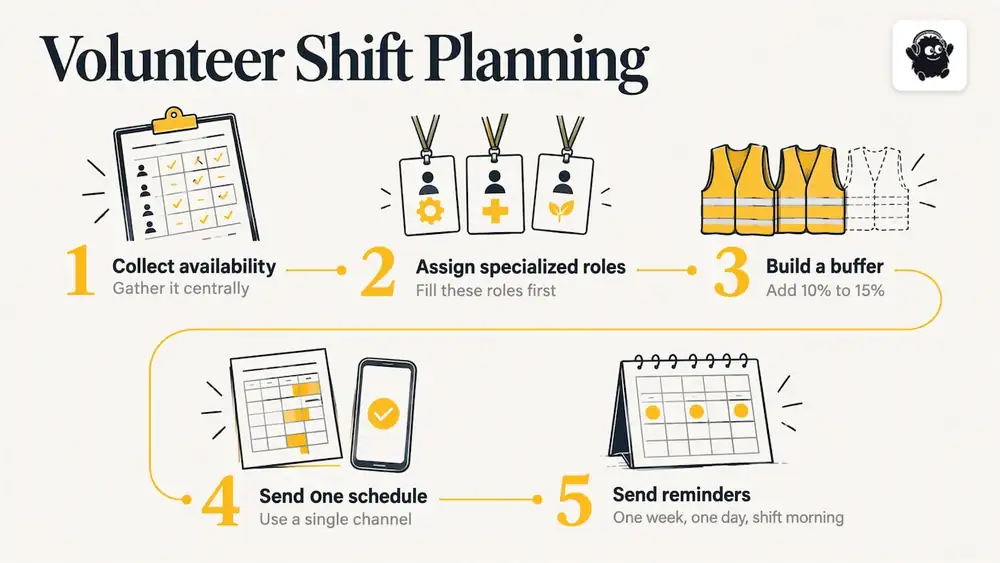
Qomon's volunteer scheduling guidance recommends collecting availability centrally, assigning specialized roles first, building a 10% to 15% buffer, sending one confirmed schedule through a single channel and reminding people one week, one day and the morning before the shift. Several versions of the schedule in several chat groups is how people turn up at the wrong gate.
Who is in charge on the day
Larger events name a single coordinator. The FIRST tournament guide says an Event Director or Volunteer Coordinator provides overall coordination while planning committee members manage their own areas and raise issues early. That structure scales down well: one coordinator, one lead per zone, and a clear rule that problems go up the chain quickly.
Check-in and tracking hours
Check volunteers in when they arrive, the same way you do for ticket holders. It tells you who is missing before a post goes empty, and it gives you accurate hours for thank-you letters, references and funder reports. See our volunteer hours tracking guide for practical methods.
Handle no-shows and last-minute changes
Plan for them rather than hoping. A workable routine:
1. Keep a standby pool of people who have said they can be called on the day.
2. Ask volunteers to report a cancellation to one named person, by one method.
3. Fill the gap from the waitlist or standby pool first, then from floaters.
4. Update the single confirmed schedule and send the change to everyone it affects.
5. Note who cancelled and why. Patterns, such as a poorly timed early shift, are fixable.
Large programs formalize this. FIRST uses a Volunteer Management System to centralize data, verify safety certifications and make official role assignments. You do not need that scale, but the principle holds: one record of who is cleared for which role.
Safety, accessibility and legal checks
This is general guidance, not legal advice. Rules on screening, insurance, permits and privacy differ by province and municipality, so confirm them with your city, your insurer and, where needed, a lawyer.
What to put in writing:
- A volunteer handbook. The City of Richmond Hill's festival and events planning guide says handbooks should cover codes of conduct, drug and alcohol rules, attendance procedures and legal requirements including safeguarding and data privacy.
- Screening for sensitive roles. If volunteers work with children or vulnerable people, ask the relevant authority or your insurer what checks apply.
- Accessibility. Discuss reasonable accommodation with volunteers who need it, and make training materials usable with a screen reader.
- Privacy. You are collecting names, phone numbers and sometimes emergency contacts. Store them in one place, limit who sees them and delete them when you no longer need them.
Thank them and learn from them
Debrief volunteers after the event and collect feedback for next year. Recognition does not need to be elaborate: Volunteer Now lists a coffee morning, lunch, informal gathering or thank-you letter as practices that help retain volunteers. Send the thanks within days, name specific contributions and share one result, such as the number of people who came through your gates.
Festival organizers can find a longer workflow in our guide to streamlining volunteer management at festivals.
Our perspective
Volunteers are part of the run of show, so they should be managed where the rest of the event is managed. When tickets, check-in, schedules and staff roles live in separate tools, the coordinator becomes the integration layer, copying names between sheets at midnight.
That is why we build Eventist as one system for the whole event. Staff roles, multi-stage and multi-track schedules, live maps and QR check-in from any phone sit beside ticketing, so the people working a gate and the people passing through it are planned together.
Our advice stays simple: write the roles down, schedule in short shifts, keep one source of truth, and spend the time you save on thanking your volunteers properly.
— Ciara
Run volunteers and tickets in one place
If you sell tickets and coordinate volunteers for the same event, Eventist covers staff roles, scheduling and QR check-in alongside ticketing, with setup help from a Canadian team. As of October 2026, the pricing page lists a flat fee per paid ticket for Canadian organizers: $0.85 CAD for event ticketing and $4.99 CAD for festivals and conferences. Events with free tickets or registrations run on monthly plans starting from $100 CAD. Card processing fees are paid to Stripe or Square at their own rate.

Venues are priced differently, at 0.5% to 1.9% of what they charge on everything they sell, and the venues page explains how that works.
Frequently Asked Questions
How many volunteers do I need for an event?
Add up the hours each role must be covered, divide by your shift length, then add a buffer. Guidance from Volunteer Now suggests recruiting 10% to 15% more than you need. Raise it toward 20% for early shifts or outdoor events.
How long should a volunteer shift be?
Two to four hours suits most roles, according to VolunteerFlow. Split full-day requests into morning and afternoon shifts and build in about 15 minutes of overlap so the outgoing volunteer can brief the next one.
What should a volunteer schedule template include?
At minimum: date, start and end times, role, location, volunteer name, status and break or handover arrangements, as in SignMeUp's template. Add a supervisor, a contact method and training status if you have more than a handful of volunteers.
How do I handle volunteers who cancel at the last minute?
Keep a waitlist and a standby pool, and ask volunteers to report cancellations to one named person. SignUpReady recommends a standby pool for day-of cancellations on multi-day events. Then send the updated schedule to everyone affected.
Can volunteers replace paid staff?
No. Volunteer Now advises organizers to avoid assigning volunteers work normally done by paid staff. Use volunteers to add capacity and community, and keep safety-critical or specialist jobs with trained staff members.
Sources
- UN Volunteers: Volunteers for Events (V4E) Blueprint
- An Empirical Exploration of Volunteer Management Theory
- Volunteer Now: Events Volunteering Toolkit
- Community Tool Box: Developing a Plan for Involving Volunteers
- AgentCalc: Volunteer Event Staffing Calculator
- UN Volunteers: IVY 2026 Inclusive Event Accessibility Checklist
- VolunteerFlow: How to Schedule Volunteers
- SignUpGenius: How to Schedule Volunteers
- SignUpReady: Tournament Volunteer Signup Guide
- EventRota: How to Create a Rota for an Event
- FairTurns: How to Make a Volunteer Roster
- Dual mode scheduling in volunteer management
- SignMeUp: Volunteer Rota Template
- Loopyah: Event Volunteer Shift Schedule
- Openscreen QR Code Generators
- Qomon: Volunteer Scheduling
- FIRST Tech Challenge Tournament Guide
- City of Richmond Hill: Community Festivals and Events Planning Guide
Recommended
Tags
Ready to simplify your events?
Join hundreds of organizers, studios, and festival directors who trust Eventist to run their events.