Guest List Management: A Practical Guide for Organizers
Good guest list management means keeping one accurate record of who is invited, who has confirmed, who is waitlisted and who actually walked through the door, then using that record to make decisions about food, seating, staffing and communication. A spreadsheet of names is a start. A list with clear statuses, a deadline and a fast way to check people in is what keeps a gala, conference, festival or ticketed night running smoothly.
This guide covers how to structure the list, what to collect, how to set deadlines, how to handle check-in at the door and how to choose software, with examples for festivals, conferences, trade shows, venues and everyday ticketed events.
TL;DR
- Treat the guest list as an operating dataset, not an invitation list. Every field you collect should feed a decision: catering, seating, accessibility, staffing or communication.
- Track separate statuses (invited, confirmed, waitlisted, cancelled, attended, did not attend). The final headcount is rarely the same as the RSVP count.
- Set your RSVP deadline backwards from your caterer's or venue's final-count deadline, and review numbers one to two weeks out.
- Collect as little personal data as the event needs, and decide who can edit and export the list.
- Make arrival fast: pre-register wherever possible, and keep door data entry to what is needed for admission.
What a guest list is actually for
Most people think of a guest list as a head count. In practice it is a coordination tool. A U.S. Department of Education privacy assessment of an event registration system describes data collected from attendees, speakers, exhibitors, officials and guests being used for invitations, confirmations, agendas, attendance counts, meals, sessions and accommodations. The same document lists RSVP and decline status, guest additions, breakout-session selection, name badges and real-time reporting among the functions of such a system.
That tells you how to design yours. Start from the decisions you will have to make, then work back to the information you need:
| Decision | Information the list must provide |
|---|---|
| How much food to order | Confirmed count, dietary needs |
| Room layout and seating | Confirmed count, group or table requests, accessibility needs |
| Staffing at the door | Expected arrivals, ticket types, VIP or press categories |
| Session capacity | Breakout or track selection |
| Day-of communication | Email and mobile contact, status |
| Post-event reporting | Who attended versus who registered |
If a field does not feed one of those decisions, leave it off the form.
Who is on the list: types of guest lists
The right structure depends on the event, and many events run more than one list at once.
- Ticketed general admission. Every paid ticket is effectively a list entry. The list matters mostly at the door, for scanning and for capacity.
- Reserved seating. Each entry is tied to a seat, so the list and the seat map must agree. Late changes need to update both.
- Invitation-only events. Galas, launches and fundraisers need RSVP tracking, plus-ones and seating by table.
- Conferences and trade shows. Attendees, speakers, exhibitors, sponsors and staff members all need different badges and access, and attendees may choose sessions or tracks.
- Comp and industry lists. Artists, press, sponsors, vendors and partners. These are the entries most likely to cause door confusion because they sit outside the ticket system.
Keep each category labelled. A single undifferentiated list makes it impossible to see, for instance, how many of 400 expected people are staff members and vendors rather than paying guests.
Build the list around statuses
The most useful habit in guest list management is separating statuses. Indiana University's RSVP documentation shows a workable model: totals for confirmed, waitlisted and attended registrants, registration time and contact information retained, and the ability to cancel, restore, delete, mark attended, mark did not attend, export to CSV and email registrants.
Translate that into a status set for your own list:
1. Invited. Contacted, no reply yet.
2. Confirmed. Will attend, with any guests and requirements recorded.
3. Waitlisted. Interested, but capacity is full.
4. Declined or cancelled. Keep the record rather than deleting it, so you can see why numbers moved.
5. Attended. Checked in on the day.
6. Did not attend. Confirmed but absent, which is useful for next year's no-show rate.
Two practical effects follow. First, a waitlist lets you refill cancelled spots rather than running under capacity. Second, comparing confirmed with attended after the event gives you a realistic no-show allowance for the next one, so you are not guessing.
What to collect, and what not to
Every extra field lowers completion and raises your responsibility for storing it. Aim for a short form with a few optional questions.
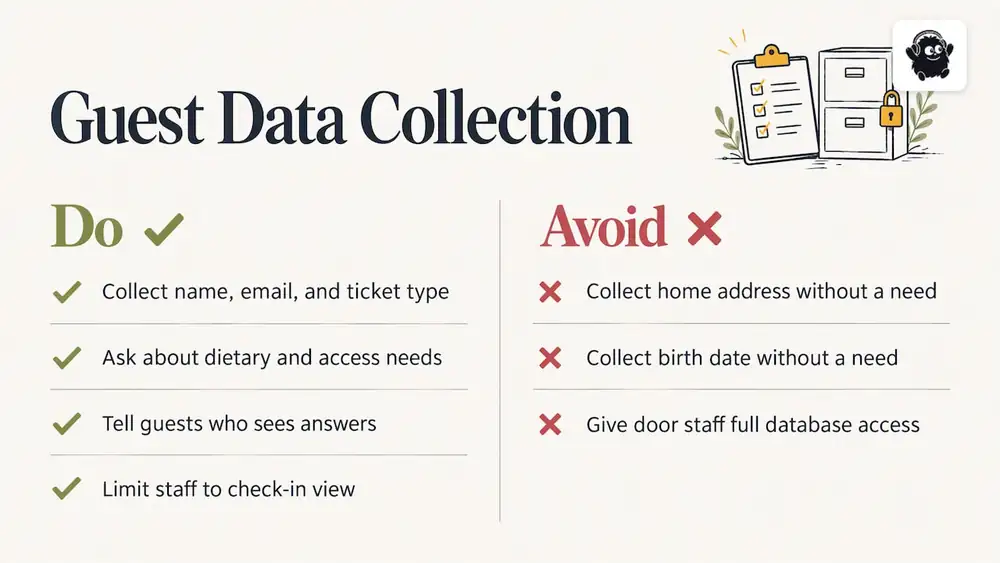
Almost always needed: full name, email address, ticket or guest type.
Needed for some events: mobile number (for SMS reminders), dietary requirements, accessibility needs, session or track selection, company name for badges, plus-one names.
Usually unnecessary: home address, birth date, anything you cannot link to a decision.
The Department of Education document notes that registration systems can contain personally identifiable information and attendance history. That is a good reason to limit what you collect to what you need for admission, communication, safety, catering, seating or programming, and to decide in advance who can edit or export the list. Give door staff access to the check-in view, not the full database. Privacy law varies by province and by country, so confirm your obligations for storing and sharing attendee data. This is general guidance, not legal advice.
Georgia Tech's event-planning checklist also recommends recording ADA accommodations and dietary needs as part of RSVP tracking. In Canada the relevant framework differs, but the practice is the same: ask clearly, make it optional where you can, and tell guests who will see the answer.
Set deadlines backwards from your suppliers
An RSVP deadline is a supply-chain date. The same checklist advises setting it according to the caterer's final-count deadline, then checking RSVP numbers and preparing seating plans and room diagrams one to two weeks before the event.
A simple way to do this:
1. Ask your caterer and venue for their final-count and final-change dates in writing.
2. Set your RSVP deadline several days before the earliest of those dates.
3. Send reminders at the halfway point and 48 hours before the deadline.
4. Follow up personally with key guests who have not replied (sponsors, speakers, VIPs).
5. Send final numbers and dietary requirements to the caterer, then freeze the main list.
After the freeze, handle changes as exceptions with one person responsible. That prevents three people editing three copies of the list the night before.
A single number is not enough for complex events. Catering, room layout, seating, accessibility, security and supplies each have their own constraints, so report the count by category: seated dinner guests, reception-only guests, accessibility seating, staff members and vendors.
Choosing tools: spreadsheet, app or event platform
For a 30-person dinner, a shared spreadsheet is fine. Once you have ticket sales, multiple guest types or more than a few hundred people, the weaknesses show up: duplicate rows, no live attendance count, no way to scan, and no clean way to message only the people who need to hear something.
Compare options on these criteria:
| Criterion | Why it matters |
|---|---|
| Status tracking | Separates confirmed, waitlisted, cancelled and attended |
| Export | A CSV copy for caterers, venues and backups |
| Messaging | Targeted emails or SMS to a segment, not everyone |
| Check-in method | Phone scanning, name search and a way to handle walk-ups |
| Offline behaviour | What happens when venue Wi-Fi or mobile data is weak |
| Access control | Different permissions for door staff and organizers |
| Cost model | Percentage of ticket price, flat fee per ticket or subscription |
If you are comparing software more widely, including project and task tools that sit alongside your guest list, this comparison of project management tools for event planners is a helpful starting point for the planning side. Keep in mind that a task tracker does not replace a registration and check-in system. You still need one place that holds the attendee record.
Check-in: where the list meets reality
A list that is perfect on Friday can fail on Saturday if the door is slow. The U.S. Department of Justice's conference planning guidance says registration should be fast, simple and painless for both advance and onsite registration. The practical reading: pre-register wherever possible, and limit onsite data entry to what is needed for admission or operational changes.
Before doors open
- Export or sync the final list to every check-in device, and test one scan on each.
- Brief door staff on the categories: general, VIP, comp, vendor, press, staff.
- Decide how you will handle a name that is not on the list (a supervisor, a quick lookup and a note, never a free-for-all).
- Prepare a separate lane or table for problems so they do not block the main queue.
At the door
- Scan QR codes for pre-registered guests. Use name search as the fallback for guests who forgot their code.
- Mark attendance as it happens, so the live count is accurate. That count matters for capacity limits and for deciding when to open overflow areas.
- Keep walk-up sales and payments in a separate lane from scanning if you can.
We cover the mechanics in more depth in our guides on how QR code check-in works at events and running check-in for large crowds. For outdoor and multi-gate events, see our comparison of festival check-in apps.
After the event
Mark no-shows, export the final attended list and compare it with confirmed. Email attendees a thank you, and use the attendance record to plan capacity, catering and staffing for the next event. Keep or delete personal data according to a retention rule you set in advance.
Guest list management by event type
Festivals
Festivals have the largest mix of list types: ticket holders, artists and their guests, vendors, volunteers, crew and media. Separate access levels per gate and per day, and give vendors and artists their own lists with a named owner for each. Because staff members and vendors often arrive earliest, their check-in has to be working before the general gates open.
Conferences and trade shows
Registration data does more work here: badges, session selection, exhibitor staff and meal counts. Capture the session choice at registration so you can see which rooms are likely to be full, and give exhibitors a way to register their own booth staff within an allocation. Our conference registration page outlines how we handle attendee registration and management.
Venues and concerts
Venues deal with a recurring flow: on-sale, reserved seats, will-call lists, artist guest lists and last-minute door sales. Seat-level data keeps the list and the seat map aligned. Our guide to season ticket management covers what venues need when the same people return all year.
Fundraisers, galas and community events
Seating by table, plus-ones and dietary needs dominate. Collect guest names for each ticket if the event is seated, and give a named contact for table hosts who are bringing groups.
Our perspective
We see guest list problems in the same places again and again. Organizers treat registration, ticket sales, seating, check-in and communication as separate jobs with separate tools, and then spend the week before the event reconciling them by hand. A name changes in one place and not the others. A comp list lives in someone's inbox. The door team works from a printout that was out of date on Tuesday.
Our view is that the guest list should be one record that everything else reads from. When tickets, seat maps, registration, QR check-in and door sales share the same attendee data, a cancellation frees a seat, a late sale appears on the door list and the live count is correct. That is why we build event management and ticketing as one system rather than a ticketing tool with extras attached.
The second point is restraint. A form that asks for twelve fields produces abandoned registrations and a pile of data you then have to protect. Ask for what you will act on.
The third is the door. Most guests judge your event by the first five minutes. A fast, calm entry with staff who know the categories does more for the experience than most of the money spent inside.
Handling the awkward cases
Plus-ones and guest additions. Decide the rule up front: each guest registers individually, or the primary guest adds names later. Individual registration gives you cleaner data and lets you send each person their own code.
Duplicates. Use email as the key and merge entries that share it. Duplicates inflate the headcount and cost money in catering.
Transfers. Allow a name change until a cut-off date, and log who made it. For reserved seating, make sure the new name replaces the old one rather than creating a second entry.
Overbooking. If you deliberately confirm slightly more than capacity because you expect cancellations, base the ratio on your own attended-versus-confirmed history, and have a plan for the case where everyone arrives. Fire code and venue capacity limits are set by local authorities and your venue, so check with them. This is general guidance, not legal advice.
Late arrivals and re-entry. Decide whether a scanned code can be reused. Most events allow re-entry for festivals and not for ticketed seated performances.
What this costs on an event platform
If you sell tickets, the cost model affects how you manage the list, because every paid entry carries a fee. Our event ticketing in Canada is priced per paid ticket at $0.85 CAD, as listed on our pricing page in October 2026. Festivals and conferences are $4.99 CAD per paid ticket. Card processing fees are paid to Stripe or Square at their own rate. Free tickets and registrations run on monthly plans starting from $100 CAD. Venues pay 0.5% to 1.9% of what they charge on everything they sell, single tickets included.
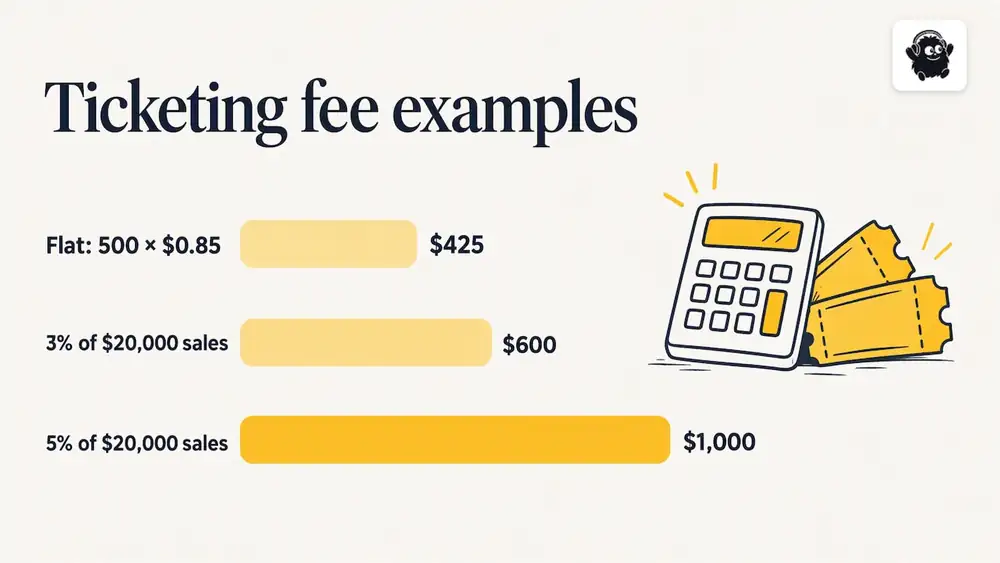
Here is the arithmetic for a standard ticketed event. Suppose you sell 500 paid tickets at $40 each, which is $20,000 in sales. A flat fee of $0.85 per ticket comes to $425. A platform charging a percentage of 3% on the same sales would take $600 before processing fees, and 5% would take $1,000. The percentage figures here are illustrative, not any particular competitor's rates, so check the current rates of any platform you are comparing. With a flat fee, the cost does not rise when you raise the ticket price, which is why Eventist is usually cheaper for events with higher-priced tickets. On a $5 ticket the gap narrows, and a percentage fee at 3% would be $0.15, so run your own numbers.
If you want help setting up the guest list structure, categories and check-in for a larger event, our services page lists setup and training options, and our ticketing software page outlines the features that tie tickets to check-in.
A one-page guest list checklist
1. List the decisions the guest list must support.
2. Define your categories and statuses.
3. Keep the form short, and mark optional fields.
4. Set the RSVP deadline from your caterer's and venue's dates.
5. Review numbers one to two weeks out and prepare seating and layout.
6. Freeze the list, with a named owner for changes.
7. Test check-in devices and brief door staff.
8. Mark attendance live and review the final count.
9. Export, reconcile and set a data retention date.
Frequently Asked Questions
How do you organize a guest list?
Start with categories (for example guests, speakers, vendors, staff members and VIPs), then add a status for each person: invited, confirmed, waitlisted, cancelled, attended. Record only the details you need for decisions such as dietary needs or seating. Keep one master copy with a named owner.
How do you get an accurate headcount for an event?
Set an RSVP deadline tied to your caterer's final-count date, then check numbers one to two weeks ahead. Count by category rather than as a single total, since catering, seating and staffing each need their own number. Compare confirmed with attended after the event to calibrate the next one.
What is the best way to do guest list check-in?
Pre-register guests so that arrival means a quick scan or name lookup. Keep any onsite data entry to what is needed for admission, and mark attendance as people arrive so your live count stays correct. Have a separate point for problems so the main queue keeps moving.
Is a spreadsheet enough to manage a guest list?
For a small private event, yes. Once you sell tickets, run several guest categories or need live check-in, a spreadsheet makes duplicates and out-of-date copies likely. A system that holds registration, ticketing and check-in in one record removes most of that reconciliation work.
Sources
- Privacy Impact Assessment, Office of Communications and Outreach On-Line Registration System (U.S. Department of Education)
- Event Planning Checklist (Georgia Tech Special Events)
- Manage RSVPs (Indiana University Events Documentation)
- Executing the Conference Plan (U.S. Department of Justice, Office for Victims of Crime)
Recommended
Tags
Ready to simplify your events?
Join hundreds of organizers, studios, and festival directors who trust Eventist to run their events.