How to Track Event Attendance: Methods, Metrics and Reconciliation
To track event attendance, scan every person at the point of entry, tie each scan to a ticket or registration record, and compare the two lists after the event. Registrations tell you who intended to come. Scans tell you who arrived. The gap between them, and the people who show up with no record at all, is where most reporting errors start. This guide covers what to count, the main tracking methods for in-person, session-level, hybrid and virtual events, how to reconcile the numbers, and which metrics are worth putting in a report.
TL;DR
- Attendance is the count of people who actually came, not tickets sold or registrations received. Count them at entry and, where it matters, at each session.
- QR scanning from a phone is the practical default for most events. Keep a manual lookup list and a door-sales process for walk-ins.
- Reconcile after the event: match scans to registrations, label each person as attended, no-show, duplicate or walk-in, and keep a short note on every adjustment.
- Report a small set of metrics: show rate, peak arrival window, walk-in share, session attendance and ticket sales over time.
- Pick software that shows live counts during the event and exports clean records afterward.
What attendance actually measures
Four numbers get confused constantly:
- Registrations or tickets sold: people who committed to attend, possibly including free and complimentary tickets.
- Attendance: people who physically entered, or logged in for a virtual event.
- Show rate: attendance divided by registrations, expressed as a percentage.
- Engagement: what attendees did once inside, such as which sessions they joined, which booths they visited and what they bought.
Who counts as an attendee is a decision to make before the event, not after. Event Impacts advises that attendance figures should include spectators, participants, venue staff, officials, media, VIP guests and volunteers, and that these groups should be segmented where possible for deeper analysis. In practice, that means giving each group its own ticket type or registration category, so a sponsor's staff members or a volunteer crew do not disappear into the general admission total, and so you can still report "paying guests" separately.
The same source notes that accurate attendance data is needed to scale sample-based survey results to the whole event population. If 200 people answer a satisfaction survey and you have no reliable headcount, you cannot say what those answers represent. Attendance is the denominator behind nearly every other number you report.
Decide what you need to know before choosing a method
The right method depends on the question you are answering. Three levels of detail cover most events.
Entry-level counts
One number per person per day: did they come in? This suits concerts, community events, parties, comedy nights, fundraisers and single-room workshops. It answers capacity, show rate and revenue questions.
Session-level counts
Conferences, festivals with several stages and trade shows with a seminar programme need to know who attended which session. This informs room sizing, speaker scheduling and the next year's programme. It requires a second scanning point, or a lighter method such as a room count, at each session.
Journey-level data
Some organizers want to know the path an attendee took: entry, sessions, booths, food. This is richer but costs more to collect and raises privacy considerations. Collect it only if you have a decision it will change, and tell attendees what you are recording.
Methods for tracking attendance in person
QR code scanning
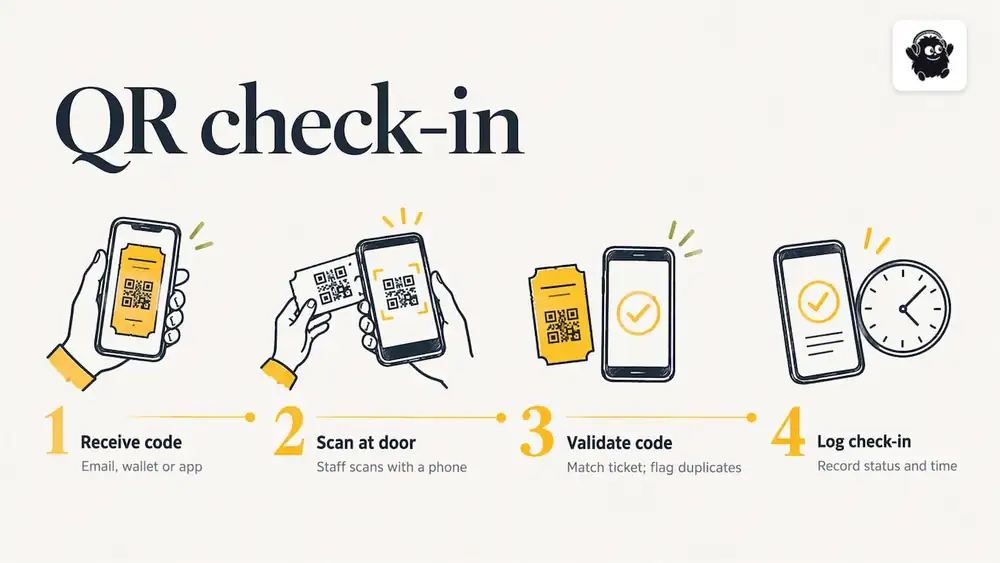
Each ticket or registration carries a unique QR code, delivered by email, in a wallet or in an app. Staff members scan it with a phone at the door. The scan checks the code against the ticket list, marks the person as checked in and logs the time. Because each code is unique, a second scan of the same code can be flagged as a duplicate, which also helps catch screenshots passed between friends. For a closer look at the mechanics, see how QR code check-in works at events, and for a field comparison of tools, the 2026 check-in app roundup.
Strengths: fast, cheap, works with the phones your staff already carry, and produces a timestamped record. Weak points: poor venue connectivity, damaged screens and attendees who cannot find their email. Plan for each of these (see the entry-point section below).
Name-list check-in
Staff search an attendee list by name or email and tick people off. It is slower than scanning, and typos in spelling cause misses, but it is the essential fallback for anyone without their code. Keep it available on at least one device at every entrance.
Paper lists
A printed list still works for a small room, a board meeting or a workshop of 20 people. It fails as soon as there are multiple entrances, because nobody can see the total. If you use paper, enter the results into a spreadsheet the same day, while memory is fresh.
Wristbands, badges and NFC or RFID
Badges and wristbands make re-entry and zone access easy to check visually. RFID and NFC readers can log movement between rooms without anyone pointing a phone, which suits large B2B shows tracking session traffic. The trade-off is hardware cost, setup time and the need for reliable readers at each doorway. For most events under a few thousand people, QR scanning plus a visual wristband check does the job.
Headcounters and turnstiles
Manual clickers and turnstile counters give a raw entry number with no identity attached. They are a useful cross-check against scan totals, particularly at open-air or multi-gate events, but they cannot tell you who came.
Tracking attendance in real time
Live counts matter for safety, staffing and decisions made on the day: how full is the venue, is the queue at gate B growing, should another scanner open? Real-time tracking comes down to three conditions:
1. Every entry point writes to one shared record. If gate A and gate B each keep their own list, nobody has the total until someone merges them. Use software where all scanners feed one live count.
2. Scanners tolerate poor connectivity. Test your signal at the actual entrances during setup, not in the office. Have a backup plan: a mobile hotspot, or a downloaded list for name lookup.
3. Someone owns the dashboard. A live number is only useful if a named person watches it, knows the thresholds, and can call the gate leads.
For entry flow, the Eventist team has written an event check-in operations playbook covering scanner numbers, lane design and queue management for large crowds.
Permits, venue capacity limits, fire code and insurance conditions may set a maximum occupancy for your event. Treat what follows as general guidance, not legal advice: confirm your limits with the venue, your municipality and your insurer, and make sure your live count is accurate enough to support them.
Door sales and walk-ins
Many events sell tickets at the door. If those sales run through a separate cash box or a different system, they will not appear in your scan data and your count will be wrong. Sell door tickets through the same platform that issues and scans online tickets, so each walk-in gets a record the moment they pay.
Tracking session attendance
Session-level data tells you which topics drew a crowd and which rooms were wrong-sized. Options, from lightest to most precise:
- Room scanning: a volunteer or staff member scans badges or tickets at each session door. Accurate, but it needs staffing in every room.
- Self-scan stations: a QR code posted at the door that attendees scan with their own phone. Cheaper, less reliable, since people skip it.
- Headcounts: a staff member counts at the midpoint of the session. No identity data, but good enough for room-size decisions.
- Post-session surveys or app check-in: useful as a supplement, but expect a response rate well below total attendance.
Whichever you choose, use the same method in every room, otherwise you cannot compare sessions. Record whether a session had capacity limits or required pre-registration, since a session that filled up tells you something different from one that was half empty.
Hybrid and virtual events
Virtual attendance is easier to log and harder to interpret. Platforms record logins, join and leave times and minutes watched automatically, but a login is not attention. Decide in advance what counts: for instance, joining for a minimum number of minutes. Hybrid events need two tracks with one definition. Keep in-person and online attendees as separate categories in your report, then show a combined total only if both counts use compatible rules. Do not add "logged in" to "walked through the door" and call it attendance without saying so.
How to reconcile attendance with registrations
Reconciliation is the step that turns raw scan data into a number you can defend. The goal is to account for every record on both lists.
1. Export both datasets. You need the full registration or ticket list and the full scan log, with timestamps and ticket types.
2. Match on a unique identifier. Email is common, though a ticket ID is more reliable because people share email addresses or register colleagues under one. AnaliStable's reconciliation template follows this approach: it matches registration and check-in records by email, counts scans per registrant and labels each person as Attended, No-show or Duplicate scan.
3. Flag walk-ins. Scans with no matching registration are walk-ins. The same template flags them as such. If you sold door tickets through your platform, they should appear in the ticket list and match cleanly. If they do not, you have a process gap to fix.
4. Handle duplicates. Multiple scans of one code might mean re-entry, a scanner retry or a shared screenshot. Check timestamps and gates before deciding. Count the person once.
5. Deal with cancellations and transfers. A cancelled or refunded ticket should not count as a no-show. A transferred ticket should be matched to the new holder if the system records it, and otherwise to the original buyer, with a note.
6. Record the final figures and your rules. Write down attendance, no-shows, walk-ins and duplicates, along with how you treated edge cases. Next year's team will thank you.
A worked example
Suppose a 600-capacity evening event sells 540 tickets and has 12 refunds before the date, leaving 528 valid tickets. The scan log shows 471 unique valid codes scanned, 9 additional scans that were duplicates, and 14 people who paid at the door.
- Attendance: 471 pre-sold + 14 door sales = 485 people
- No-shows: 528 valid tickets minus 471 scanned = 57
- Show rate for pre-sold tickets: 471 divided by 528 = 89.2%
- Walk-in share: 14 divided by 485 = 2.9%
- Duplicate scans: 9, not added to attendance
The refunds are reported separately and never counted as no-shows. Those figures are illustrative arithmetic, not benchmarks.
Common causes of mismatches
| Symptom | Likely cause | What to do |
|---|---|---|
| Scans exceed tickets | Door sales outside the system, or shared codes | Sell all door tickets in the same platform; review duplicate timestamps |
| Many scans, few unique people | Re-entry or scanner retries | Count unique tickets, not scan events |
| High no-show rate on free tickets | No commitment cost | Send reminders; compare against paid show rates separately |
| Attendees you cannot match | Typos in email, registered under a colleague | Match on ticket ID; check names manually |
| Session totals above entry total | Counting people in several sessions | Report sessions as visits, not unique people |
Metrics worth reporting
A report that lists 40 numbers gets read by nobody. These are the ones that change decisions:
- Show rate, split by ticket type. Free and paid tickets behave differently, and so do early and late buyers.
- Peak arrival window. When did the line build? That decides how many scanners and staff you need next time.
- Walk-in share. A high share suggests under-promotion in advance or a strong door audience worth targeting.
- Session attendance versus capacity. Which rooms were overfull or empty?
- Ticket sales over time. The sales curve shows when promotions worked and when you should have started marketing earlier.
- Sales by channel or referral link. This tells you where buyers came from.
- Attendance by segment. Spectators, participants, VIP guests, media, volunteers and staff members, as Event Impacts recommends.
- Revenue per attendee, including on-site spend, if you collect it.
For more on why this data matters beyond a post-event summary, see the article on data analytics for event organizers.
What to look for in event reporting software
Whether you call it an analytics platform, a reporting tool or a ticket sales dashboard, check these things before you commit:
- Live dashboard: attendance and ticket sales update during the event without a manual refresh or export.
- One source of truth: tickets, registrations, door sales and check-in sit in the same system, so reconciliation is a filter and not a spreadsheet project.
- Segmentation: ticket types, groups and sales channels can be filtered.
- Clean exports: CSV or similar with timestamps and unique IDs, so you can reconcile in your own tools.
- Offline resilience: a clear answer on what happens when the signal drops at the door.
- Pricing you can model: flat fees are easier to forecast than percentages. Ask what is charged on free registrations, refunds and door sales.
- Support before the event: someone who will help configure ticket types and check-in the week before.
If your reporting work also involves assigning tasks to staff, such as who exports data, who cleans the list and who sends the post-event survey, a general project management tool for event planners can keep those follow-ups organized alongside your attendance records. For a wider view of platforms that combine ticketing and operations, our event management software guide compares the options.
Our perspective
Most attendance problems we see are not technology problems. They are definition problems. Nobody decided in advance whether volunteers count, whether a refunded ticket is a no-show or whether a door sale belongs in the same record as an online one. When those rules are fuzzy, no software can produce a trustworthy number.
The second pattern is fragmentation. Tickets in one tool, registration forms in another, a spreadsheet at the door and a separate payment device for walk-ins: each hand-off creates a place for records to go missing. We built Eventist around the idea that the same system that sells the ticket should also check the person in, take the door sale and report on all of it. QR check-in works from any phone, a built-in point of sale handles door sales, and real-time analytics sit on the same records. That makes the reconciliation steps above shorter, because there is only one list to reconcile.
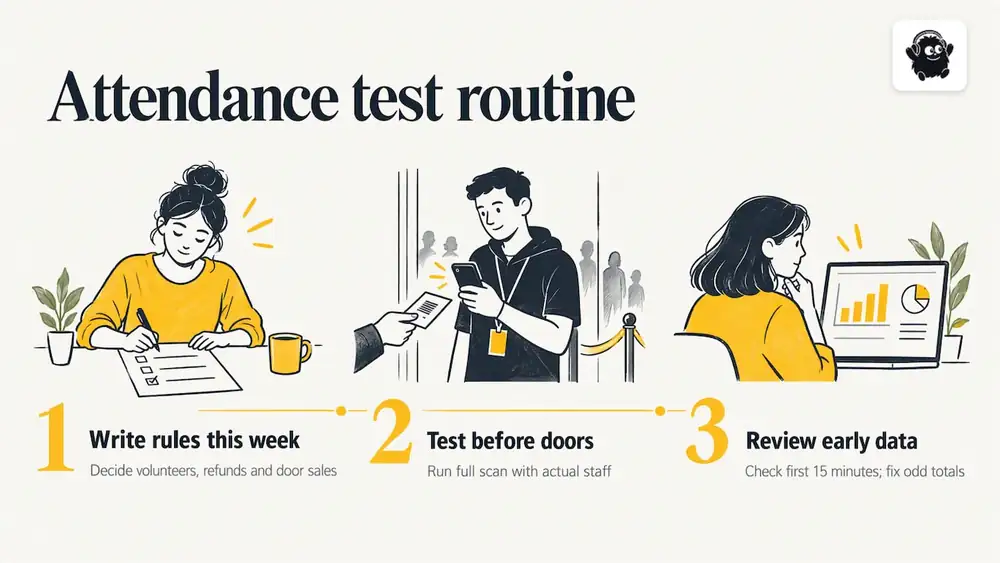
Our advice for any organizer: write down your counting rules this week, run a full test scan with your actual staff before doors open, and look at the first 15 minutes of data as they come in. If the totals look odd then, you can still fix it.
What it costs to run ticketing and tracking together
If you sell tickets through Eventist, you pay a flat fee per paid ticket rather than a percentage of the price. As of October 2026, the published pricing for Canadian organizers is $0.85 CAD per paid ticket for event ticketing, $4.99 CAD per paid ticket for festivals and conferences and $9.99 CAD per paid ticket for competitions. Card processing fees are paid to Stripe or Square at their own rate, and are separate from these amounts. Free tickets and registrations run on monthly plans starting from $100 CAD.
Here is the arithmetic for why a flat fee is usually cheaper. Take an event selling 1,000 paid tickets at $40 each. At $0.85 per ticket, the platform fee is $850 CAD. A hypothetical percentage-based fee of 3% of the ticket price would be $1.20 per ticket, or $1,200 on the same sales. The flat fee is $350 lower in that example. At a $15 ticket, though, 3% is only $0.45 per ticket, so a flat fee would cost more. The higher the ticket price, the more the flat model favours you, so run your own numbers with your real prices and any percentage you are quoted.

If you want help configuring ticket types, check-in and reporting before doors open, the services page lists done-for-you setup and team training. Organizers of everyday ticketed events can also see how flat-fee ticketing works for workshops, parties and community nights.
A simple tracking plan you can copy
Two weeks before
- Define who counts as an attendee and create ticket types for each group.
- Decide whether you need entry-only or session-level counts.
- Choose your scanning devices, and assign one shared list.
One week before
- Test scanning at the actual entrances, including a poor-signal scenario.
- Prepare a name-lookup fallback and a door-sales process through the same system.
- Brief gate staff on duplicate scans and what to do with a code that will not scan.
On the day
- Watch the live count and the arrival curve in the first 15 minutes.
- Log any manual overrides with a reason.
- Keep a headcount at an independent point if capacity is tight.
Within a week after
- Export tickets and scans, reconcile, and write down your final numbers and rules.
- Report the metrics above to your team and sponsors.
- Archive the data in line with your privacy obligations. For personal information, confirm your obligations under applicable privacy law; this is general guidance, not legal advice.
Frequently Asked Questions
What is the difference between attendance and registrations?
Registrations count people who signed up or bought a ticket. Attendance counts those who actually arrived. The ratio between them is your show rate, which varies by event type and by whether the ticket was paid or complimentary.
How do I track attendance at an event with several entrances?
Use scanners that all write to one shared record, so the total updates live across gates. Staff each gate with a name-lookup fallback, and compare the scan total against an independent headcount at one point if capacity is a concern.
How do I count walk-ins and no-shows accurately?
Sell door tickets through the same platform so each walk-in has a record. After the event, match scans to the ticket list: valid tickets with no scan are no-shows, scans with no prior registration are walk-ins, and refunded tickets are excluded from both.
Can I track attendance for virtual or hybrid events?
Yes. Virtual platforms log join and leave times automatically, so define a minimum viewing time as your rule for counting someone as attended. Report in-person and online attendance separately, then combine them only with a clear note on each definition.
Which attendance metrics should I report to sponsors?
Lead with total unique attendance, show rate, attendance by segment and session or booth traffic where you have it. Add the peak arrival window and ticket sales over time if the sponsor cares about audience timing and promotion.
Sources
Recommended
Tags
Ready to simplify your events?
Join hundreds of organizers, studios, and festival directors who trust Eventist to run their events.