QR Code Ticketing: How It Works and How to Set It Up

QR code ticketing means every attendee receives a digital ticket with a unique scannable code, and staff members at the entrance scan it with a phone or dedicated scanner to confirm the ticket is real and has not been used. The system behind it does the checking: it looks up the code, confirms it belongs to your event, and marks it as used. This guide covers how that works, how to issue tickets, how to scan them, how to limit fraud and what to prepare before doors open.
TL;DR
- A QR ticket is a code tied to a record in your ticketing system. The code itself is only a pointer, so the real protection comes from the system marking each ticket as used.
- Choose one code per ticket when you need to track each person, and one code per order only when a group will enter together.
- Screenshots are the main fraud risk. First-scan-wins validation, rotating codes and a clear plan for the second person at the gate handle most of it.
- Plan for devices, battery, connectivity and a manual lookup list before you plan anything else. Most queues come from these, not from the codes.
- Scanning also gives you attendance data: you know who came, when, and through which entrance.
What a QR code ticket is
A QR ticket is a digitized admission ticket. According to a glossary entry on QR tickets, the data behind it can carry unique identifiers, expiration dates and seat information in a form the service can verify. In practice, most ticketing platforms store only a unique reference in the code and keep everything else (name, ticket type, seat, status) on their servers.
That design explains most of what follows. A QR code is a type of two-dimensional matrix barcode, invented in 1994 by Masahiro Hara at Denso Wave to label automobile parts. It uses error correction so it stays readable when partly damaged, which is why a slightly scuffed paper ticket or a cracked phone screen can still scan. But readable does not mean trustworthy. Anyone can copy a QR image. What decides whether the copy gets in is the system on the other end.
How QR code ticketing works, step by step
The flow is the same on almost every platform:
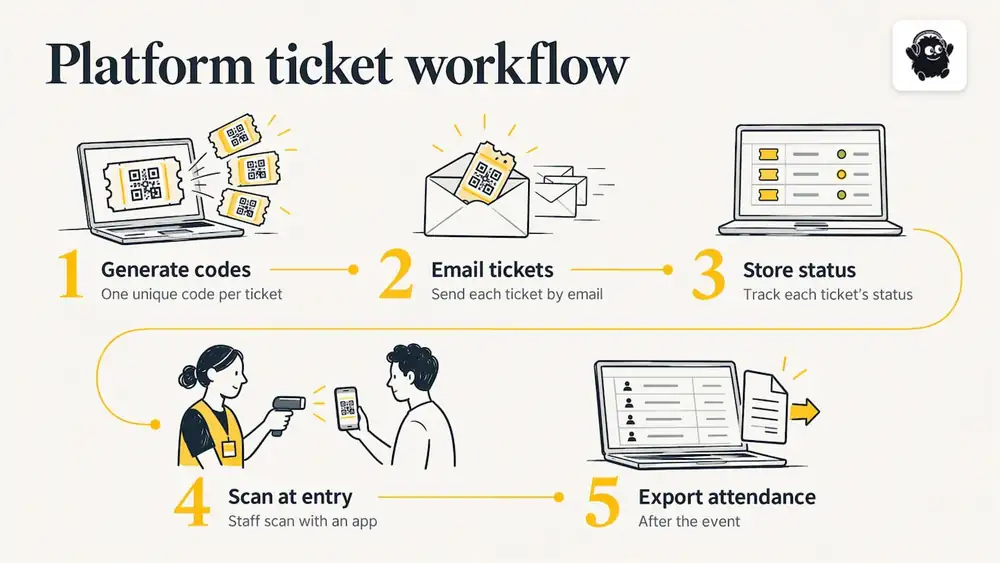
1. Purchase or registration. The attendee buys a ticket or registers for a free session. The system creates a ticket record with a unique code.
2. Delivery. The ticket arrives by email, in an attendee account, as a PDF, or in a mobile wallet, depending on the platform.
3. Presentation. At the entrance, the attendee shows the code on a phone or on paper.
4. Scan and lookup. A scanner reads the code and sends the reference to the system, or checks it against a list stored on the device.
5. Decision. The system answers within a moment: valid and unused, already scanned, wrong event, wrong day, or wrong entrance.
6. Record. A valid ticket is marked as used, with a time stamp, and the attendance count updates.
The step that stops reuse is number 6. If the first scan does not mark the ticket as used, a screenshot works as many times as someone sends it.
Static codes, dynamic codes and one code per order
Two distinctions confuse organizers when they compare platforms.
Static versus rotating codes
A static ticket code never changes. It is simple, works in any email or PDF, and is safe enough for most events as long as the system enforces single use. Some services go further and regenerate a one-time code each time the ticket is displayed, or use short-lived rotating tokens, as the Qraft glossary notes. That makes a screenshot useless within seconds. The same source points out a trade-off: whether a ticket can be shown offline depends on whether the service stores it on the phone or fetches a fresh code each time. A rotating code that needs a network connection can fail in a basement venue or a crowded field.
A third term, "dynamic QR code", often means something different again: a code whose destination can be changed after printing. That is useful for marketing posters, not for admission control. When a vendor says "dynamic", ask which of the two they mean.
One code per ticket or one per order
With one code per ticket, each attendee holds their own code. You see exactly who entered, and a group can arrive in any order. With one code per order, the buyer holds a single code and the scan admits the whole group. That is fast for families or table bookings, but you lose individual attendance data, and one person can enter on behalf of a party that never arrives.
| Setup | Best for | Watch out for |
|---|---|---|
| One code per ticket, static | Most concerts, workshops, comedy nights | Screenshots shared before doors; needs single-use enforcement |
| One code per ticket, rotating | High-demand or resale-prone events | Needs reliable connectivity or on-device storage |
| One code per order | Family days, tables, group bookings | No individual attendance, partial arrivals |
| Paper QR printed at box office | Walk-up sales, older audiences | Reprints and lost tickets need a lookup process |
How to create QR code tickets for an event
There are two routes.
Use a ticketing platform. This is what most organizers should do. The platform generates a code for every ticket sold, emails it, stores the status and gives you a scanning app. You do not manage the codes at all. The checks that matter when you compare platforms: does it support one code per ticket, can staff scan from ordinary phones, is there a manual search for people whose code will not scan, and can you export attendance after the event.
Build it yourself. A spreadsheet plus a QR generator can produce unique codes for a small private event. It works for a few dozen guests, but you take on every risk: duplicates, no live record of who has entered, and no way to see two scans of the same code at different doors in real time. For a ticketed public event with money changing hands, a platform is safer.
Whichever route you take, a ticket should include the event name, date, ticket type, the attendee's name where relevant and the code itself, large enough to scan from a phone screen at low brightness. Put the entrance instructions and any bag or ID policy in the delivery email, not on the ticket.
Scanning and validating tickets at the entrance
On the day, the working unit is a lane: one or two staff members, one scanning device, a visible sign for ticket holders, and a separate lane for problems. Our guide to how QR code check-in works at events goes through the screens in more detail, and the check-in playbook covers lane layout and throughput for large crowds.
A workable sequence:
1. Ask attendees to open their ticket before they reach the front, with screen brightness up.
2. The staff member scans and waits for a clear result. Green means admit.
3. If the result is "already used", do not argue at the lane. Check the time and entrance of the first scan and send the person to the problem desk.
4. If the code will not scan after two tries, move the person to the problem desk, where staff search by name or email.
5. Keep the line moving: the problem desk exists so one bad scan never holds ten people.
Phones or dedicated scanners
Phones are inexpensive, familiar and good enough for most events. Dedicated handheld scanners read faster in bright sun and survive rough handling, which matters at a large festival gate. Our comparison of event check-in apps and the festival-specific phone, scanner and RFID options set out the trade-offs. A reasonable rule: use phones for events up to a few hundred people and add dedicated hardware when you expect sustained queues.
Can you scan a QR code to track attendance?
Yes, and this is one of the real benefits. Every successful scan creates a time-stamped record, so you get a live count of people inside, arrival curves by hour, and a list of no-shows. Organizers use this to decide when to open a second entrance, to check capacity against the venue's limit, and to report to sponsors or funders.
Two limits are worth knowing. First, a scan records entry, not presence: unless you also scan at session doors or exits, you do not know who stayed. Conferences and multi-track events often add session-level scanning for this reason. Second, per-order codes record one scan for many people, so your headcount will be an estimate unless you count the group manually.
If you collect names, emails or other personal details at registration, the privacy rules that apply depend on where your attendees are. In Canada, that means checking federal and provincial privacy law. This is general guidance, not legal advice, so speak to a lawyer or privacy professional about your own event.
Preventing fraud, duplicate entry and check-in problems
QR tickets are harder to fake than paper stubs, but they bring their own failure modes. These are the common ones and how to handle each.
- Screenshots and forwarded tickets. A buyer sends the same code to several people. With first-scan-wins validation, only the first person gets in, and the system shows the time and entrance of the original scan. Rotating codes remove the problem at source but need connectivity.
- Resale of the same ticket twice. The honest second buyer loses out. Say clearly in your ticket terms how resale works, and tell attendees to buy only from your official link. A short note on your event page helps.
- Wrong day or wrong entrance. If your event has multiple days, zones or ticket tiers, make sure the scanner checks the ticket against the right session. A day-one ticket should not admit someone on day two.
- Staff scanning without checking the result. Train staff to read the screen, not just hear the beep. A green result and a red result must look unmistakably different.
- Name-matching disputes. Decide beforehand whether ID is checked. If it is, say so in the ticket email.
- Lost or cracked phones. A manual lookup by name or email lets you admit legitimate buyers without reissuing codes.
For reserved seating, the ticket should carry the seat or section so ushers can direct people and a seat cannot be sold twice. Our festival ticketing feature checklist lists the capabilities worth testing before you commit to a platform.
What to prepare before doors open
Most QR check-in problems are logistical. This checklist covers them.
Devices and power
- One scanning device per lane, plus spares at roughly one for every four lanes.
- Chargers and power banks at every station. Scanning drains batteries quickly with the camera and screen on.
- Protective cases and, outdoors, a shade or hood so screens remain readable.
Connectivity
- Test the network at the actual gate, not in the office. Crowds degrade cellular and venue Wi-Fi.
- Ask your platform how scanning behaves when the connection drops. If scanning relies on a live lookup, bring a mobile hotspot on a different carrier as backup.
- Keep a printed or downloaded guest list at the problem desk as a last resort, and treat it as sensitive: collect it at the end of the night.
Staff
- Run a ten-minute practice with real test tickets before doors: valid, used, wrong day, and a blurred code.
- Give each staff member one job: scanner, greeter or problem desk. Mixed roles slow lines.
- Brief them on what to say to someone whose ticket was already used. A calm script prevents scenes.
Attendees
- Send a reminder the day before with the entrance, the time doors open and what to have ready. Tell them to open the ticket from the email or account in advance and to keep screen brightness high.
- Mention that screenshots are fine when the system allows them, and that paper copies work too, so people without smartphones are not turned away.
Door sales
If you sell at the door, make sure the sale produces a QR ticket immediately so the buyer is scanned like everyone else. Cash-only side doors create gaps in your attendance record.
Our perspective on QR ticketing
We see organizers treat QR codes as the feature, when the code is the smallest part of it. A code is a reference. What makes entry smooth is everything around it: whether each ticket has a clean status, whether staff members can scan from the phones they already own, whether a person with a dead battery can be found by name in seconds, and whether the door sale and the online sale land in the same attendance list.
That is why we build check-in as part of running the whole event rather than as a separate tool. At Eventist, organizers scan QR tickets from any phone and sell at the door with a built-in point of sale, so online and door tickets end up in one record. Ticket status, seat maps, schedules and staff roles live in the same place as the scanner, which means the person at the gate sees the same information as the person who set up the event.
Our advice is simple. Pick a setup that your least technical staff member can run after five minutes of training, rehearse the failure cases, and keep a manual option within arm's reach. Fancy security matters less than a calm lane.
Camps, classes and recurring groups
QR tickets are not only for one-off shows. Organizers who run recurring sessions, such as camps or activity programs, use the same scan-at-entry logic to track who is present each day. If that is your situation, this overview of participant control at camps shows how attendance, registration and group records can be connected into one workflow.
Cost: what QR ticketing adds to a ticket
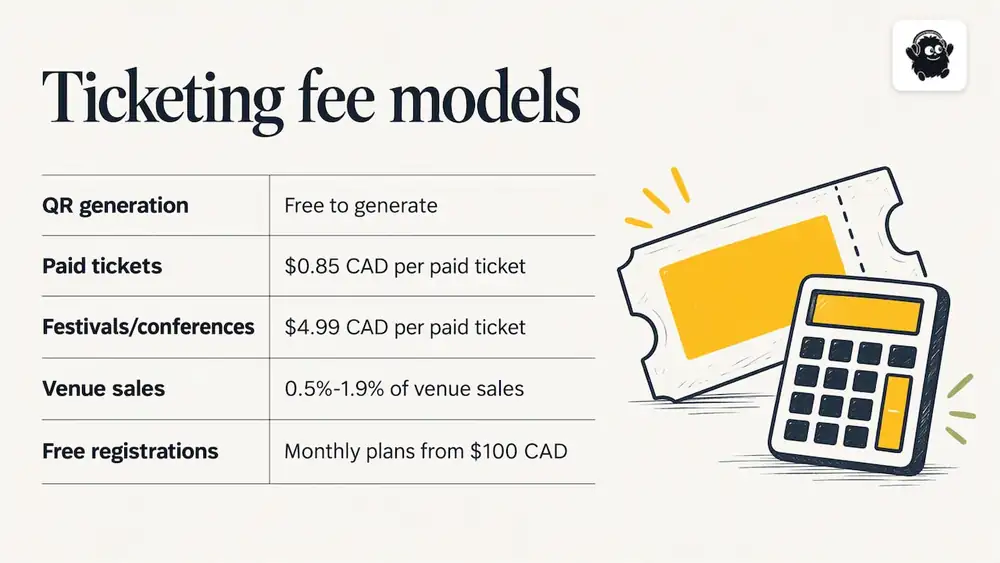
The QR code itself costs nothing to generate. What you pay for is the ticketing system that issues and validates it, and platforms charge either a percentage of the ticket price, a flat fee per ticket, or a subscription. Card processing is a separate charge paid to the processor.
As of October 2026, Eventist's published pricing for Canadian organizers is a flat $0.85 CAD per paid ticket for event ticketing and $4.99 CAD per paid ticket for festivals and conferences. Card processing fees are paid to Stripe or Square at their own rate. Venues pay 0.5% to 1.9% of what they charge on everything they sell, single tickets included. Free tickets and registrations run on monthly plans starting from $100 CAD.
To see how the flat fee works, take a workshop selling 200 paid tickets: at $0.85 CAD each, the platform fee is 200 × $0.85 = $170 CAD, whatever the ticket price. Under a percentage model the fee moves with the price, so the same 200 tickets at $60 each would cost more than at $15 each. Compare the total fee on your own expected sales, including processing, before you choose a platform. Our overview of event ticketing software with a flat fee explains how the flat fee fits different event types.
Choosing a platform: questions to ask
Use these questions whatever vendor you are considering:
1. Is there one code per ticket, and can I choose per order for groups?
2. What happens when a code is scanned twice, and how fast does the second scanner see it?
3. Can scanning continue if the connection fails, and how does the data sync afterward?
4. Can staff scan from their own phones, and can I limit what each staff member sees?
5. Does the door sale create a QR ticket in the same system?
6. Can I scan at session level for multi-track events?
7. What attendance data can I export, and how soon?
8. What does it cost per ticket once processing is included?
For multi-day festivals in particular, our comparison of platforms for Canadian festivals applies these criteria side by side.
Frequently Asked Questions
How do I make QR code tickets?
The simplest way is to use a ticketing platform that generates a unique code for each ticket sold and delivers it by email. For a very small private event, a spreadsheet and a QR generator can work, but you will not get live scan status or protection against duplicates.
Can I scan a QR code to track attendance?
Yes. Each scan records a time-stamped entry, so you can see live headcount, arrival patterns and no-shows. Scanning at session doors as well as the main entrance gives you attendance by session.
Can someone use a screenshot of a QR ticket?
Usually yes, but only once. A system that marks tickets as used on the first scan rejects every later copy. Rotating codes make screenshots useless within seconds, though they depend on the phone showing a fresh code.
Do QR tickets work without internet at the venue?
It depends on the platform. Some store ticket lists on the scanning device and sync later, while others need a live connection to check each code. Ask before you buy, and test the gate's signal, with a hotspot on a different carrier as backup.
Sources
Recommended
Tags
Ready to simplify your events?
Join hundreds of organizers, studios, and festival directors who trust Eventist to run their events.