Trade Show Management Software: How to Choose One
Trade show management software runs two businesses at once: selling booth space to exhibitors and selling admission to attendees. Most organizers start with a floor plan in a design tool, a spreadsheet of exhibitors, a form builder for contracts and a separate ticketing page, then spend the last month before the show copying between them. The software question is whether one system can hold the floor plan, the booth sale, the exhibitor's paperwork and the attendee door in the same place.
This guide covers what the category has to do, how booth sales and floor plans actually work, what belongs in an exhibitor portal, how lead retrieval fits, and the pricing models you will be quoted. It is written for organizers of trade shows, expos, consumer shows and vendor fairs who sell both booths and tickets.
Key takeaways
- Trade show software has two customers. Exhibitors buy space and need paperwork; attendees buy admission and need a fast door. A tool that only does one leaves you running the other on a spreadsheet.
- The floor plan should be the inventory, not a picture of it. If selling booth 14 does not mark booth 14 as sold, you will double-sell it eventually.
- An exhibitor portal is the single biggest reduction in your own email volume. Booth number, map position, contracts, deadlines and badge allocations in one place the exhibitor can reach themselves.
- Lead retrieval is what exhibitors judge a show by. If they cannot prove the leads, they question the renewal.
- Ask every vendor whether booth sales and attendee tickets report into one revenue total, or whether you will reconcile two systems after the show.
What trade show management software actually has to do
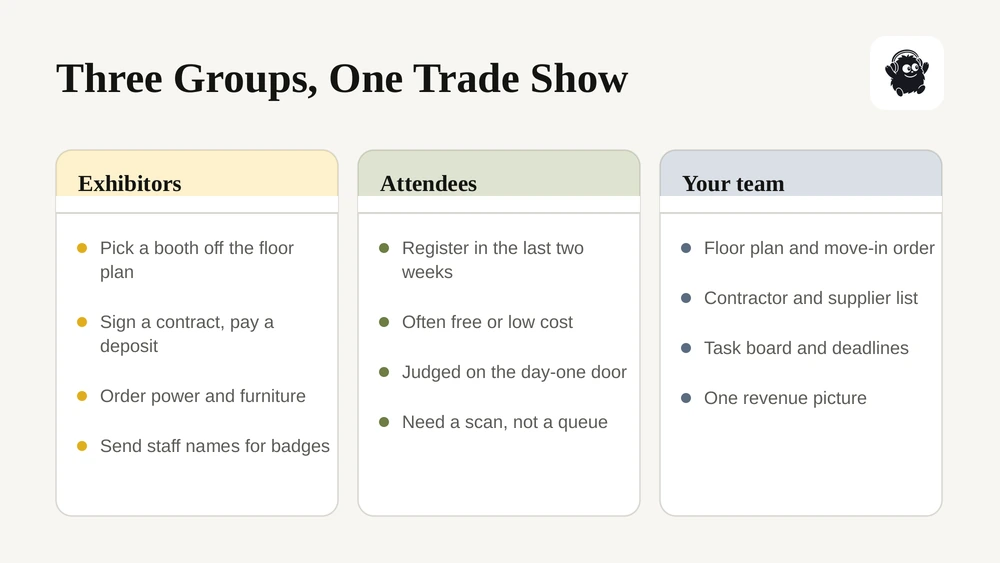
Event software is usually described for a single audience: people buy a ticket and show up. A trade show has at least three groups moving at different speeds, and the software either handles them or hands them back to you.
Exhibitors commit months out. They choose a space, sign a contract, pay a deposit and a balance, order power and furniture, submit insurance, and send staff names for badges. Each of those is a deadline you will chase.
Attendees mostly arrive in the last two weeks, often free or low-cost, and the measure of success is how fast the door moves on morning one.
Your own team needs the floor plan, the move-in schedule, the contractor list and the task board. Most of that never touches the ticketing tool at all, which is why so many shows end up with a second system.
The practical test for any platform: can one person see, on one screen, which booths are sold, which exhibitors still owe a contract or a payment, and how many attendees have registered? If that takes three tabs, the software is not managing the show.
Booth sales and the floor plan
This is where trade show software differs most from general event ticketing, and where the weakest tools give themselves away.
A floor plan should be inventory. Each booth is a sellable item with a size, a price, a status and a position on the map. When an exhibitor buys 14, booth 14 turns sold on the public plan immediately, and nobody can buy it twice. When you move a wall, the plan and the inventory move together.
What to confirm with a vendor:
| Capability | What to confirm | Why it matters |
|---|---|---|
| Plan as inventory | Selling a booth marks it sold on the live map | Prevents double-selling, which costs you the relationship, not just the money |
| Booth tiers and pricing | Corner, island, premium frontage and standard priced differently | Corners and endcaps are where the margin is |
| Self-serve selection | Exhibitors pick their own space from the plan and check out | Removes the back-and-forth email thread that eats your week |
| Holds and options | Reserve a space for a returning exhibitor with an expiry | Renewals need a window before general sale |
| Deposits and balances | Deposit now, balance on a date, with reminders | Booth prices are high enough that few pay in one go |
| Add-ons at checkout | Power, tables, chairs, extra badges, listings | Each one bought separately becomes a separate invoice |
Our guide to trade show booth sales goes further on pricing the floor, and interactive venue maps covers how the plan itself should behave.
The exhibitor portal
Once an exhibitor has paid, they have perhaps a dozen questions and you have perhaps a dozen things to collect. Email is the wrong place for both.
A portal that works gives the exhibitor their booth number and where it sits on the map, their contract to sign electronically, their invoices and payment status, the deadlines that still apply to them, their badge allocation with a place to enter staff names, and the documents they must upload such as insurance certificates.
The reason to care is simple arithmetic. A hundred exhibitors asking three questions each is three hundred emails you answer twice because the answer changed. A portal answers them once. Our writeups on vendor onboarding portals and vendor contract management cover the paperwork side in more detail.
Ask specifically whether contracts are signed inside the portal or emailed out to a separate e-signature tool. The second works, but it means the signed copy lives somewhere your floor plan cannot see.
Attendee registration and the door
Trade show admission is usually simpler than festival ticketing and has one hard constraint: the first ninety minutes of day one.
Free registration still needs a ticket. A registered attendee with a QR code scans in seconds; a walk-up who registers at the door takes minutes. The job of the software is to push as many people as possible into the first group.
Check for comped and invited tickets, because exhibitors expect guest codes for their own customers, and those codes need to be traceable to the exhibitor who gave them out. Check whether badges print on site and from what hardware. And check that the scanner works without reliable Wi-Fi, because convention centre Wi-Fi at 9am on day one is the least reliable network most organizers will ever use.
If your show runs sessions or a seminar programme alongside the floor, timed entry ticketing is worth reading before you set capacities.
Lead retrieval
Exhibitors renew on one question: did the show work. Lead retrieval is the evidence.
The basic version lets an exhibitor scan an attendee badge at the booth and collect that person's contact details, with a note or a qualifier. The useful version also lets the exhibitor export the list themselves, in a format a CRM will take, before they get home.
Two things to check. First, whether lead retrieval is included or sold as a per-exhibitor add-on, because that changes your pricing sheet. Second, what the attendee consents to, since scanning a badge hands over personal information and the attendee should know at registration that exhibitors will receive it. Canadian shows should treat that as a privacy disclosure, not a formality.
Pricing models you will be quoted
Three shapes dominate, and they suit very different shows.
| Model | How it works | Suits | Watch for |
|---|---|---|---|
| Per paid ticket | A flat amount or a percentage on each admission | Shows with paid attendance | Free-admission shows generate no fee, so booth tooling may be charged another way |
| Annual licence | A platform fee, often with modules | Large recurring expos with staff to run them | Implementation fees and multi-year terms |
| Per exhibitor or per booth | A charge for each exhibitor record or space sold | Shows whose revenue is mostly booths | Costs scale with the thing you are trying to grow |
Most enterprise expo platforms quote rather than publish. Our breakdown of how much event management software costs sets the published rates side by side, and Cvent alternatives covers the enterprise tier specifically.
How to evaluate a platform in six checks
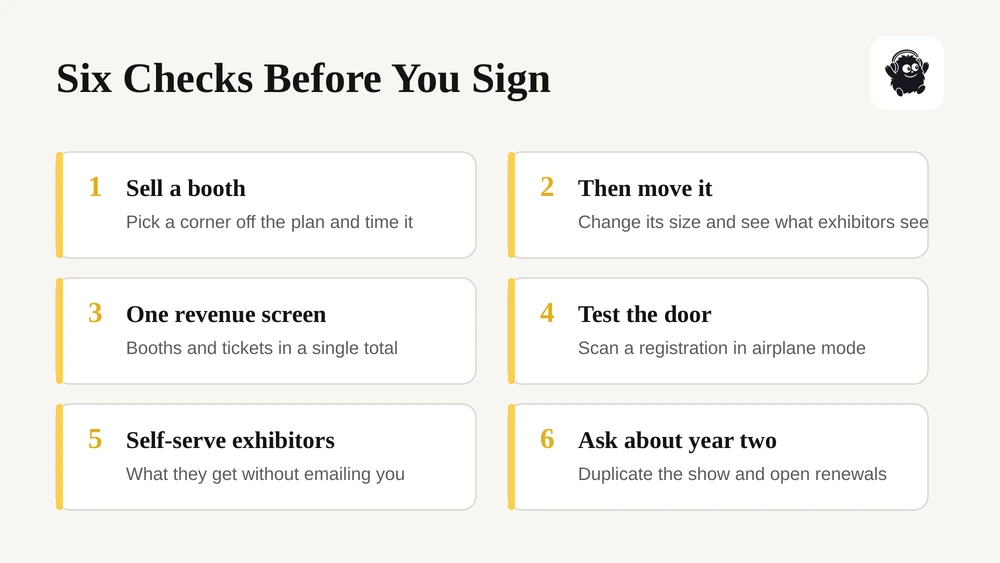
1. Sell a booth in the demo. Ask the vendor to put you in an exhibitor's seat, pick a corner booth off the plan, add power, pay a deposit and sign the contract. Time it.
2. Then move that booth. Ask them to change its size or position and show you what the exhibitor sees.
3. Ask for one revenue screen. Booth income and ticket income together, or you will reconcile two systems in January.
4. Test the door. Scan a registration with the device in airplane mode.
5. Ask what exhibitors get without emailing you. If the answer is a PDF exhibitor manual, expect the email volume you have now.
6. Ask about year two. Can you duplicate this year's show, floor plan and exhibitor list into next year's, and open renewals before general sale?
Where Eventist fits
Eventist sells booths and tickets from the same system. Exhibitors pick their space from the floor plan through their own checkout link, pay a deposit or in full, and land in a portal that shows their booth, its position on the live map, their contracts to sign electronically and the documents they still owe. Those booths appear on the same interactive site map your crew uses, with markers you can hide from the public for power, cabling and staging.
Attendee registration runs beside it rather than in a second tool, so booth revenue and ticket revenue report into one set of numbers. Every ticket carries a QR code that any phone can scan, exhibitors can capture attendee leads at their booth, and staff and volunteer roles have their own dashboards, shift schedules and task lists. Pricing for trade shows is a flat fee per paid ticket, with no subscription or setup fee for paid ticketing, and card processing goes through your own Stripe or Square account at the processor's published rate.

You can see the detail on our trade shows page, or compare the numbers on pricing.
Frequently Asked Questions
What is trade show management software?
It is software that runs both sides of an exhibition: selling and assigning booth space to exhibitors, and registering or ticketing the attendees who come to see them. The better tools also hold the floor plan as live inventory, give exhibitors a portal for contracts and deadlines, and report booth and admission revenue together rather than in two systems.
How do organizers sell trade show booths online?
Exhibitors open a public floor plan, choose an available space, and check out through a link that takes a deposit or the full amount and attaches the contract. The booth is marked sold on the plan at that moment, so nobody else can take it. Add-ons such as power, furniture and extra badges are bought in the same checkout rather than invoiced separately afterwards.
What should an exhibitor portal include?
Booth number and position on the map, the contract to sign electronically, invoices and payment status, remaining deadlines, the badge allocation with somewhere to enter staff names, and uploads for documents such as insurance certificates. The point is that an exhibitor can answer their own questions without emailing your team, which is where most of a show's admin time goes.
Does trade show software handle attendee registration too?
Some do and some do not, and it is the first thing to check. Platforms built only for exhibitor management leave admission to a separate ticketing tool, which means two systems to reconcile. Platforms built for the whole show sell booths and tickets together and report them as one revenue picture.
How much does trade show management software cost?
Pricing usually takes one of three shapes: a flat fee or percentage per paid admission, an annual licence with modules, or a charge per exhibitor or booth sold. Enterprise expo platforms generally quote rather than publish. Compare on the total for a real show, including processing, badge hardware and any per-exhibitor charges, rather than on the headline rate.
Sources
- Guidelines for obtaining meaningful consent, Office of the Privacy Commissioner of Canada
- Deceptive marketing practices: cases and outcomes, Competition Bureau Canada
Recommended
Tags
Ready to simplify your events?
Join hundreds of organizers, studios, and festival directors who trust Eventist to run their events.